tencent cloud

Tencent Kubernetes Engine

Release Notes and Announcements
Release Notes
Announcements
Release Notes
Product Introduction
Overview
Strengths
Architecture
Scenarios
Features
Concepts
Native Kubernetes Terms
Common High-Risk Operations
Regions and Availability Zones
Service Regions and Service Providers
Open Source Components
Purchase Guide
Purchase Instructions
Purchase a TKE General Cluster
Purchasing Native Nodes
Purchasing a Super Node
Getting Started
Beginner’s Guide
Quickly Creating a Standard Cluster
Examples
Container Application Deployment Check List
Cluster Configuration
General Cluster Overview
Cluster Management
Network Management
Storage Management
Node Management
GPU Resource Management
Remote Terminals
Application Configuration
Workload Management
Service and Configuration Management
Component and Application Management
Auto Scaling
Container Login Methods
Observability Configuration
Ops Observability
Cost Insights and Optimization
Scheduler Configuration
Scheduling Component Overview
Resource Utilization Optimization Scheduling
Business Priority Assurance Scheduling
QoS Awareness Scheduling
Security and Stability
TKE Security Group Settings
Identity Authentication and Authorization
Application Security
Multi-cluster Management
Planned Upgrade
Backup Center
Cloud Native Service Guide
Cloud Service for etcd
TMP
TKE Serverless Cluster Guide
TKE Registered Cluster Guide
Use Cases
Cluster
Serverless Cluster
Scheduling
Security
Service Deployment
Network
Release
Logs
Monitoring
OPS
Terraform
DevOps
Auto Scaling
Containerization
Microservice
Cost Management
Hybrid Cloud
AI
Troubleshooting
Disk Full
High Workload
Memory Fragmentation
Cluster DNS Troubleshooting
Cluster kube-proxy Troubleshooting
Cluster API Server Inaccessibility Troubleshooting
Service and Ingress Inaccessibility Troubleshooting
Common Service & Ingress Errors and Solutions
Engel Ingres appears in Connechtin Reverside
CLB Ingress Creation Error
Troubleshooting for Pod Network Inaccessibility
Pod Status Exception and Handling
Authorizing Tencent Cloud OPS Team for Troubleshooting
CLB Loopback
API Documentation
History
Introduction
API Category
Making API Requests
Elastic Cluster APIs
Resource Reserved Coupon APIs
Cluster APIs
Third-party Node APIs
Relevant APIs for Addon
Network APIs
Node APIs
Node Pool APIs
TKE Edge Cluster APIs
Cloud Native Monitoring APIs
Scaling group APIs
Super Node APIs
Other APIs
Data Types
Error Codes
TKE API 2022-05-01
FAQs
TKE General Cluster
TKE Serverless Cluster
About OPS
Hidden Danger Handling
About Services
Image Repositories
About Remote Terminals
Event FAQs
Resource Management
Service Agreement
TKE Service Level Agreement
TKE Serverless Service Level Agreement
Contact Us
Glossary

Cilium-Overlay Mode

PDF
Mode fokus
Ukuran font
Terakhir diperbarui: 2024-10-22 15:26:34

How It Works

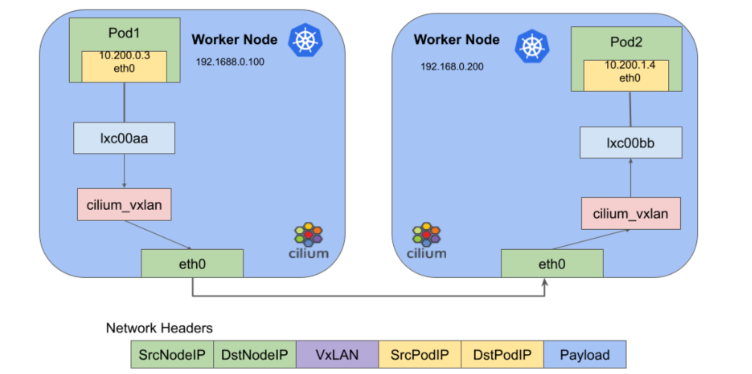
The Cilium-Overlay network mode is a container network plugin provided by TKE based on Cilium VXLan. In this mode, you can add external nodes to TKE clusters in distributed cloud scenarios. The features of this mode are as follows:
Cloud nodes and external nodes share the specified container IP range.
Container IP ranges are dynamically assigned without occupying other IP ranges in the VPC instance.
The Cilium VXLan tunnel encapsulation protocol is used to build the Overlay network.
Cross-node Pod access is supported after the VPC network in the cloud and the IDC network of the external node are interconnected through Cloud Connect Network. See the figure below to learn how it works.


Note:
Due to performance loss in the Cilium-Overlay mode, this mode only supports the scenarios where external nodes are configured in distributed cloud, and does not support the scenarios where only cloud nodes are configured. For more information, see External Node Overview.

Usage Limits

There is a performance loss of less than 10% when you use the Cilium VXLan tunnel encapsulation protocol.
The Pod IP cannot be accessed directly outside the cluster.
You must obtain two IPs from the specified subnet to create a private CLB, so that external nodes in IDC can access APIServer and the public cloud services.
The IP ranges of the cluster network and container network cannot overlap.
Static Pod IPs are not supported.

Container IP Assignment Mechanism

For container network terms and quantity calculation, see Container Network Overview.

Pod IP assignment

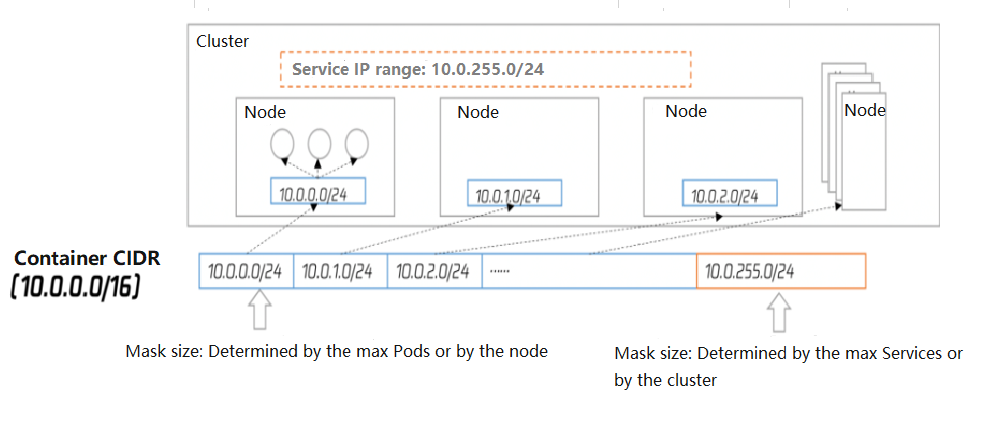
The following diagram illustrates how it works:


Nodes in a cluster include cloud nodes and external nodes.
Each node of the cluster will use the specified IP range in the container CIDR block for the node to assign IPs to Pods.
The Service IP range of the cluster will select the last segment of the specified IP range in the container CIDR block for Service IPs assignment.
After the node is released, the corresponding container IP range will be returned to the IP range pool as well.
The added nodes automatically select the available IP ranges in the container CIDR block cyclically and sequentially.

Bantuan dan Dukungan

Apakah halaman ini membantu?

masukan