tencent cloud

Tencent Kubernetes Engine

Release Notes and Announcements
Release Notes
Announcements
Release Notes
Product Introduction
Overview
Strengths
Architecture
Scenarios
Features
Concepts
Native Kubernetes Terms
Common High-Risk Operations
Regions and Availability Zones
Service Regions and Service Providers
Open Source Components
Purchase Guide
Purchase Instructions
Purchase a TKE General Cluster
Purchasing Native Nodes
Purchasing a Super Node
Getting Started
Beginner’s Guide
Quickly Creating a Standard Cluster
Examples
Container Application Deployment Check List
Cluster Configuration
General Cluster Overview
Cluster Management
Network Management
Storage Management
Node Management
GPU Resource Management
Remote Terminals
Application Configuration
Workload Management
Service and Configuration Management
Component and Application Management
Auto Scaling
Container Login Methods
Observability Configuration
Ops Observability
Cost Insights and Optimization
Scheduler Configuration
Scheduling Component Overview
Resource Utilization Optimization Scheduling
Business Priority Assurance Scheduling
QoS Awareness Scheduling
Security and Stability
TKE Security Group Settings
Identity Authentication and Authorization
Application Security
Multi-cluster Management
Planned Upgrade
Backup Center
Cloud Native Service Guide
Cloud Service for etcd
TMP
TKE Serverless Cluster Guide
TKE Registered Cluster Guide
Use Cases
Cluster
Serverless Cluster
Scheduling
Security
Service Deployment
Network
Release
Logs
Monitoring
OPS
Terraform
DevOps
Auto Scaling
Containerization
Microservice
Cost Management
Hybrid Cloud
AI
Troubleshooting
Disk Full
High Workload
Memory Fragmentation
Cluster DNS Troubleshooting
Cluster kube-proxy Troubleshooting
Cluster API Server Inaccessibility Troubleshooting
Service and Ingress Inaccessibility Troubleshooting
Common Service & Ingress Errors and Solutions
Engel Ingres appears in Connechtin Reverside
CLB Ingress Creation Error
Troubleshooting for Pod Network Inaccessibility
Pod Status Exception and Handling
Authorizing Tencent Cloud OPS Team for Troubleshooting
CLB Loopback
API Documentation
History
Introduction
API Category
Making API Requests
Elastic Cluster APIs
Resource Reserved Coupon APIs
Cluster APIs
Third-party Node APIs
Relevant APIs for Addon
Network APIs
Node APIs
Node Pool APIs
TKE Edge Cluster APIs
Cloud Native Monitoring APIs
Scaling group APIs
Super Node APIs
Other APIs
Data Types
Error Codes
TKE API 2022-05-01
FAQs
TKE General Cluster
TKE Serverless Cluster
About OPS
Hidden Danger Handling
About Services
Image Repositories
About Remote Terminals
Event FAQs
Resource Management
Service Agreement
TKE Service Level Agreement
TKE Serverless Service Level Agreement
Contact Us
Glossary

Custom Policy Authorization

PDF
포커스 모드
폰트 크기
마지막 업데이트 시간: 2024-12-11 18:50:30
This document describes how to grant specified permissions to a sub-account by customizing ClusterRoles and Roles in Kubernetes to fit your specific business requirements.

Policy Syntax Description

You can write your own policy syntax or use the Cloud Access Management (CAM) policy generator to create custom policies. An example YAML is shown below:

Role: for a namespace

apiVersion: rbac.authorization.k8s.io/v1
kind: Role
metadata:
name: testRole
namespace: default
rules:
- apiGroups:
- ""
resources:
- pods
verbs:
- create
- delete
- deletecollection
- get
- list
- patch
- update
- watch


ClusterRole: for a cluster

apiVersion: rbac.authorization.k8s.io/v1
kind: ClusterRole
metadata:
name: testClusterRole
rules:
- apiGroups:
- ""
resources:
- pods
verbs:
- create
- delete
- deletecollection
- get
- list
- patch
- update
- watch


Directions

Note:
This section describes how to bind a custom ClusterRole policy to a sub-account. This operation is basically the same as that for binding a Role policy. Following the directions below, you can bind policies to fit your specific business requirements.
1. Log in to the TKE console and click Cluster on the left sidebar.
2. On the Cluster Management page, click the ID of the target cluster.
3. On the cluster details page, select Authorization Management -> ClusterRole on the left sidebar, as shown in the following figure.


4. On the ClusterRole page, select Create using YAML in the upper-right corner.
5. On the editing page, enter the YAML content of the custom policy and then click Complete to create the ClusterRole policy. For this step, the ClusterRole: for a cluster YAML is used as an example. After the policy is created, you can view the custom permission testClusterRole on the ClusterRole page.
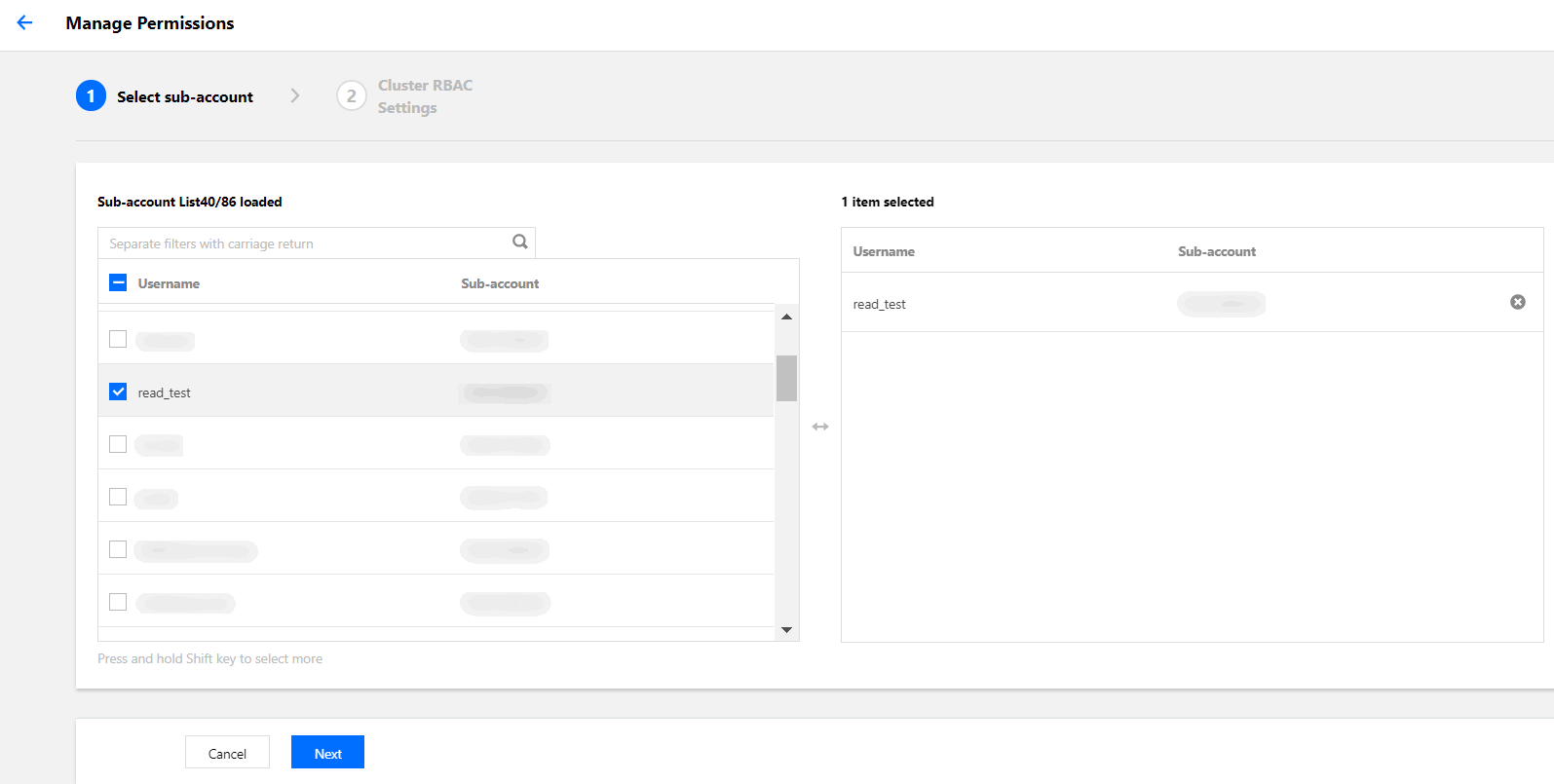
6. On the ClusterRoleBinding page, click RBAC Policy Generator.
7. When you select a sub-account on the Administration Permissions page, select the target sub-account and click Next, as shown in the following figure.


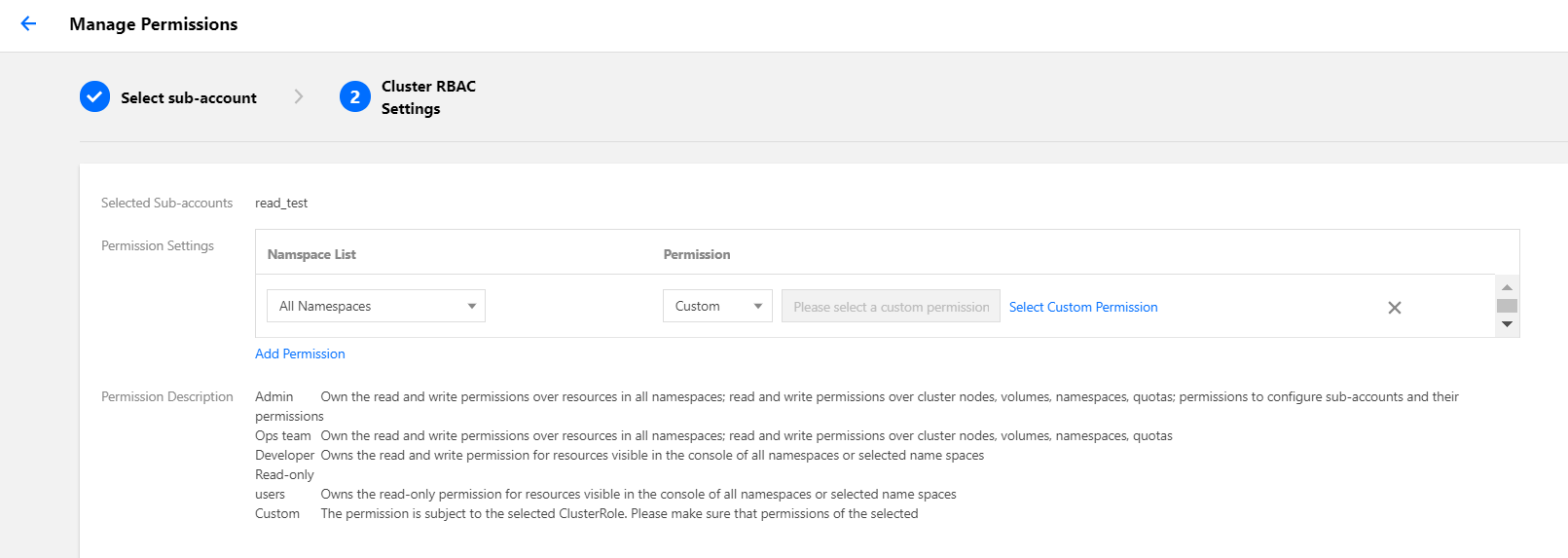
8. On the Cluster RBAC Setting page, set the permissions as instructed, as shown in the following figure.


Namespace List: specify the namespaces for which the permissions apply.
Permissions: select Custom and click Select Custom Permissions. Then, select the desired permissions from the custom permission list. Here, we select the previously created custom permission testClusterRole as an example.
Note:
You can also click Add Permission to continue customizing the permissions.
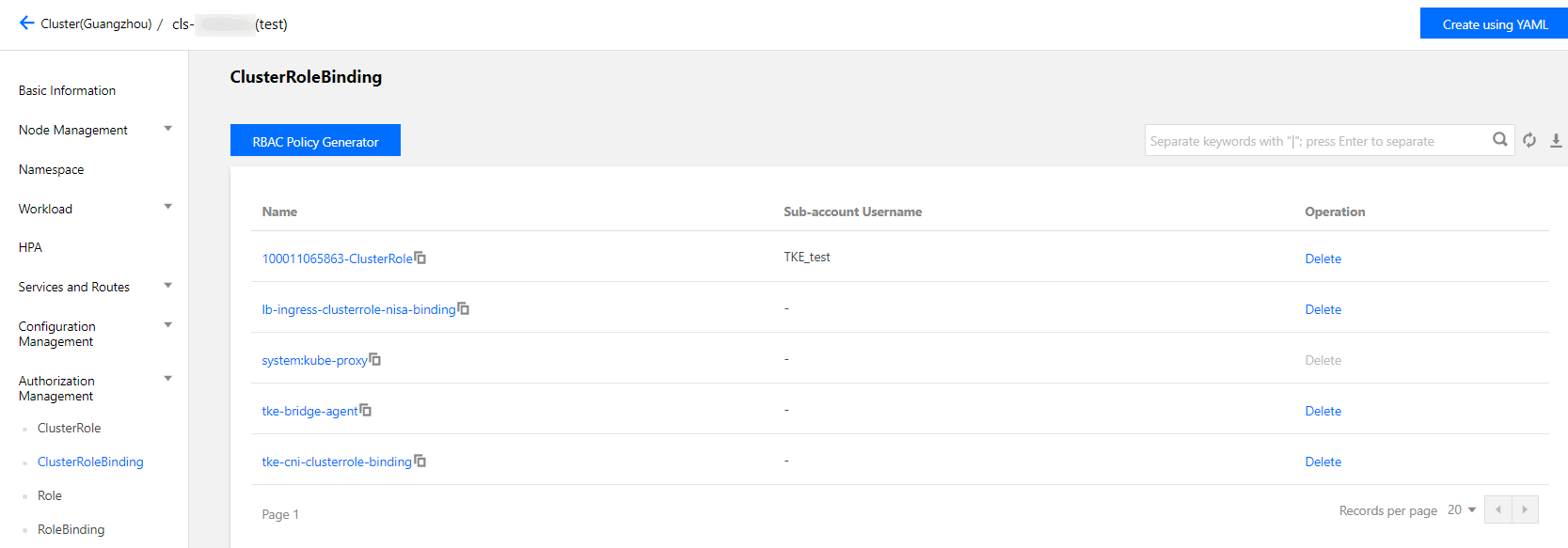
9. Click Done to complete the authorization.

For your Reference

For more information, see the Kubernetes official documentation: Using RBAC for authorization.

도움말 및 지원

문제 해결에 도움이 되었나요?

피드백