Configuring a Sub-account's Full Read/write or Read-only Permission to TKE
Unduh
Mode fokus
Ukuran font
Terakhir diperbarui: 2024-12-11 18:50:30
Overview
You can grant a user the permissions to view and use specific resources in the TKE console by using a CAM policy. This document describes how to configure certain permission policies in the console.
Directions
Configuring Full Read/write Permission
1. Log in to the CAM console and select Policies in the left sidebar.
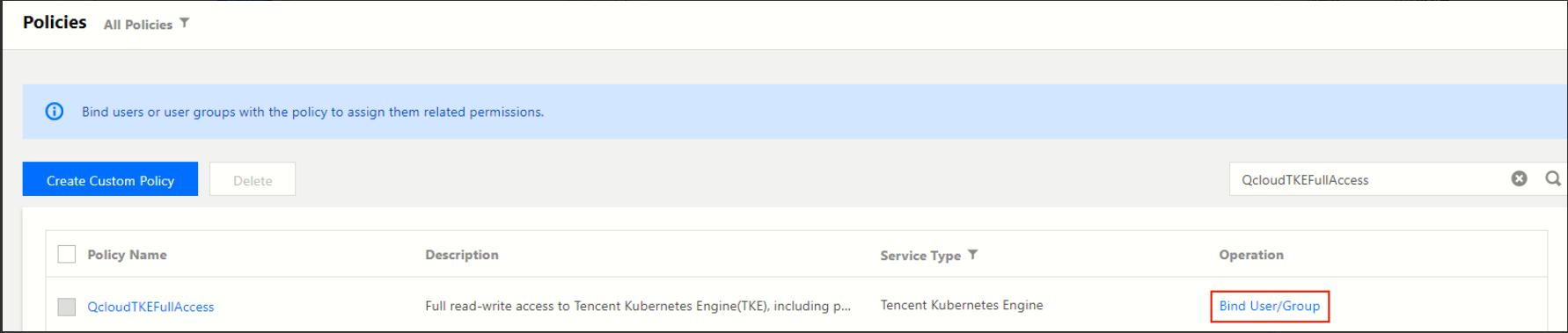
2. On the Policies page, click Bind User/Group/Role in the Operation column of the QcloudTKEFullAccess policy.
3. In the Bind User/Group/Role window that pops up, select the accounts that need full read/write permission for the TKE service, and click OK to grant full read/write permission for the TKE service to the sub-accounts.
4. On the Policies page, click Bind User/Group/Role in the Operation column of the QcloudCCRFullAccess policy.
5. In the Bind User/Group/Role window that pops up, select the accounts that need full read/write permission for Image Registry, and click OK to grant full read/write permission for Image Registry to the sub-accounts.
Note:
If you want to use the trigger and automatic building features of Image Registry, you also need to configure additional permissions for TKE - continuous integration (CCB).
Configuring Read-only Permission
1. Log in to the CAM console and select Policies in the left sidebar.
2. On the Policies page, click Bind User/Group/Role in the Operation column of the QcloudTKEReadOnlyAccess policy.
3. In the Bind User/Group/Role window that pops up, select the accounts that need the read-only permission for the TKE service, and click OK to grant the read-only permission for the TKE service to the sub-accounts.
4. On the Policies page, click Bind User/Group/Role in the Operation column of the *QcloudCCRReadOnlyAccess policy.
5. In the Bind User/Group/Role window that pops up, select the accounts that need the read-only permission for Image Registry, and click OK to grant the read-only permission for Image Registry to the sub-accounts.
Note:
If you want to use the trigger and automatic building features of Image Registry, you also need to configure additional permissions for TKE - continuous integration (CCB).