Hadoop-COS is a tool that helps integrate big-data computing frameworks including Apache Hadoop, Spark, and Tez. It allows you to read and write Tencent Cloud COS data just as you do with HDFS. It can also be used as Deep Storage for Druid and other query and analysis engines.
How do I use the Hadoop-COS jar file for self-built Hadoop?
Change the Hadoop-COS POM file to keep its version the same as that of Hadoop before compilation. Next, put the Hadoop-COS jar and COS JAVA SDK jar files in the directory hadoop/share/hadoop/common/lib. For more information, see Hadoop-COS.
Is there a recycle bin mechanism in the Hadoop-COS tool?
The recycle bin feature of HDFS is not applicable to COS. When you use Hadoop-COS to delete COS data by running the hdfs fs command, the data will be moved to the cosn://user/${user.name}/.Trash directory, but no actual deletion will occur, so the data will still remain in COS. You can use the -skipTrash parameter to skip the recycle bin feature and delete the data directly. To implement periodic data deletion like with the HDFS recycle bin, configure a lifecycle rule for objects prefixed with /user/${user.name}/.Trash/. For the configuration guide, see Setting Lifecycle.
CosFileSystem Class Not Found
Why do I receive the following message during loading, prompting me that the class CosFileSystem was not found: “Error: java.lang.RuntimeException: java.lang.ClassNotFoundException: Class org.apache.hadoop.fs.CosFileSystem not found”?
Possible cause 1
The configuration was loaded correctly, but the hadoop classpath does not include the location of Hadoop-COS jar.
Solution
Load the location of Hadoop-COS jar to hadoop classpath.
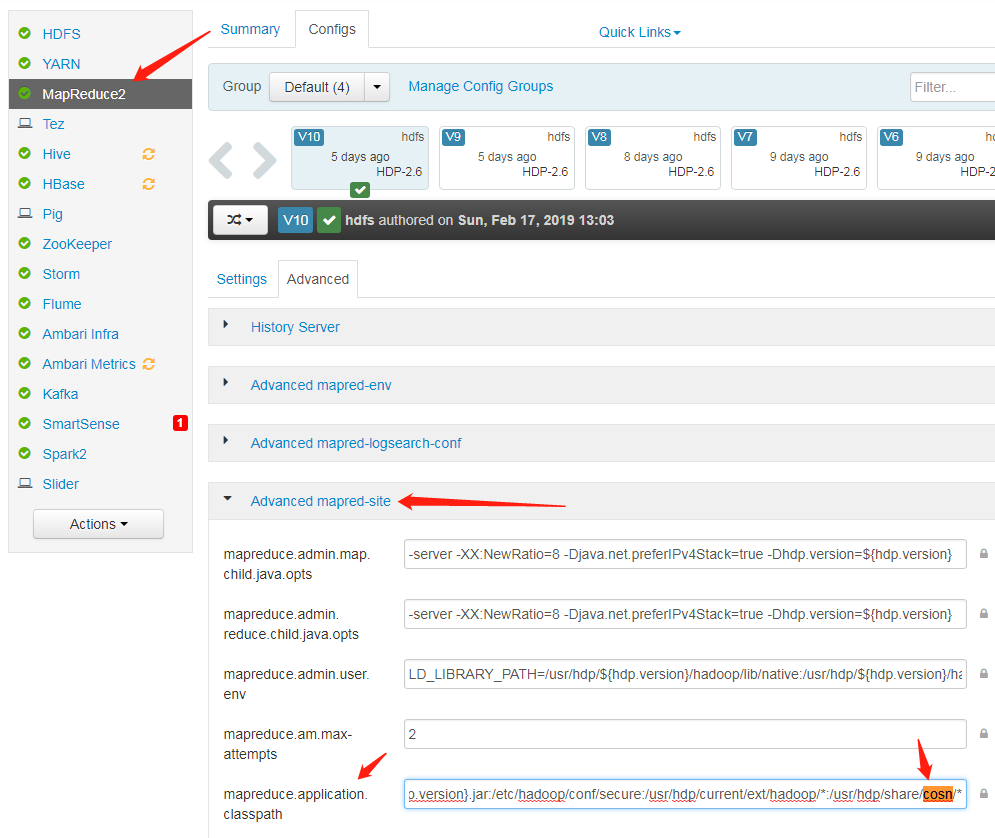
Possible cause 2mapreduce.application.classpath in the mapred-site.xml configuration file does not include the location of Hadoop-COS jar.
Solution
Add the path of cosn jar to mapreduce.application.classpath in the mapred-site.xml configuration file, and restart the service.
Why am I receiving a prompt that the class CosFileSystem was not found when I use Apache Hadoop?
COS offers two versions: Apache Hadoop and Hadoop-COS, which differ in the configuration of fs.cosn.impl and fs.AbstractFileSystem.cosn.impl.
In big data scenarios, high concurrency may trigger the COS frequency control policy, resulting in a 503 Reduce your request rate error exception. You can configure retries for your failed requests by configuring the fs.cosn.maxRetries parameter, which defaults to 200 retries.
Why hasn’t my bandwidth limit setting gone into effect?
The bandwidth limit setting fs.cosn.traffic.limit(b/s) is supported only by the latest versions of Hadoop-COS with Tag 5.8.3 or above. For more information, please see Github.
Parts
How do I set a reasonable block (part) size for multipart uploads via Hadoop-COS?
Hadoop-COS uploads large files to COS via concurrent uploads of multiple parts. You can control the size of each part by configuring fs.cosn.upload.part.size(Byte).
Because a COS multipart upload allows at most 10,000 parts for a single file, you need to estimate the largest possible file size you may need to upload to determine the value of this parameter. For example, with a part size of 8 MB, you can upload a single file of up to 78 GB in size. A maximum part size of 2 GB is supported, meaning that the largest singe file size supported is 19 TB. A 400 error will be thrown if the number of parts exceeds 10,000. If you encounter said error, please check if you have configured this parameter correctly.
Why can’t I see a large file immediately after it was uploaded to COS?
Hadoop-COS uploads all large files greater than the block size (fs.cosn.upload.part.size) through multipart upload. You can see the file on COS only after all of its parts were uploaded. Currently, Hadoop-COS does not support Append operations.
Buffers
Which buffer type should I choose for my uploads? What's the difference between them?
You can choose a butter type by setting fs.cosn.upload.buffer to one of the following three values:
mapped_disk: default. You need to put fs_cosn.tmp.dir under a directory large enough to avoid a full disk in runtime.
direct_memory: uses JVM off-heap memory (out of JVM control; not recommended)
non_direct_memory: uses JVM on-heap memory; set to 128 MB (recommended).
Why do I get the following buffer creation failure when I set the buffer type to mapped_disk: create buffer failed. buffer type: mapped_disk, buffer factory:org.apache.hadoop.fs.buffer.CosNMappedBufferFactory?
Possible cause
You do not have the read or write permission on the temporary directory used by Hadoop-COS. The directory is /tmp/hadoop_cos by default, and can be customized by configuring fs.cosn.tmp.dir.
Solution
Obtain the read and write permission on the temporary directory used by Hadoop-COS.
Runtime Exceptions
What should I do if the following exception is thrown when I perform computing tasks: java.net.ConnectException: Cannot assign requested address (connect failed) (state=42000,code=40000)?
Generally, when this exception occurs, you have established too many short TCP connections in a short period of time. After the connections are closed, local ports will enter a 60-second timeout period by default instead of being immediately repossessed. As a result, there is no available port during this period for your Client to establish a socket connection with the Server.
Solution
Modify the /etc/sysctl.conf file with changes to the following kernel parameters:
net.ipv4.tcp_timestamps = 1 #Enables support for TCP timestamp
net.ipv4.tcp_tw_reuse = 1 #Supports the use of a socket in the status of TIME_WAIT to new TCP connection
net.ipv4.tcp_tw_recycle = 1 #Enables quick repossession of a socket in the status of TIME-WAIT
net.ipv4.tcp_syncookies=1 #Enables SYN Cookies. The default value is 0. When SYN waiting queue overflows, cookies are enabled to prevent a small number of SYN attacks.
net.ipv4.tcp_fin_timeout = 10 #Waiting time after the port is released.
net.ipv4.tcp_keepalive_time = 1200 #The interval for TCP to send KeepAlive messages. The default value is 2 hours. Change it to 20 minutes.
net.ipv4.ip_local_port_range = 1024 65000 #The range of ports for external connections. The default value is 32768 to 61000. Change it to 1024 to 65000.
net.ipv4.tcp_max_tw_buckets = 10240 #The maximum number (default: 180000) of sockets in TIME_WAIT status. Exceeding this number will directly release all the new TIME_WAIT sockets. You may consider reducing this parameter for a smaller number of sockets in TIME_WAIT status.
When I upload a file, why does the exception "java.lang.Thread.State: TIME_WAITING (parking)" occur with "org.apache.hadoop.fs.BufferPoll.getBuffer" and "java.util.concurrent.locks.LinkedBlockingQueue.poll" locked in the stack?
Possible cause
You may have initialized the buffer repeatedly, but not actually triggered the write action.