Issue Description
When you try to connect to a TencentDB for MySQL instance at its public network address, the system prompts Unknown MySQL server host.
Common Causes
The public network address is incorrect.
Solutions
Check whether the public network address of the instance is enabled and correctly entered.
Troubleshooting
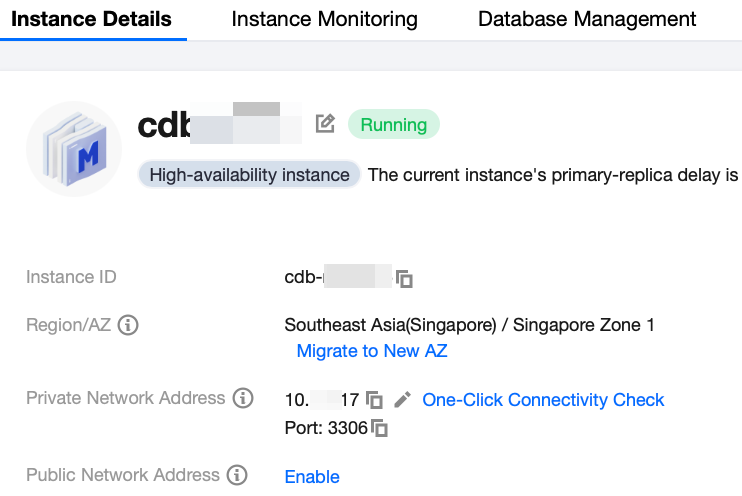
1. Log in to the TencentDB for MySQL console and click the ID of the target instance in the instance list to enter the instance details page. 2. In the Public Network Address configuration item on the instance details page, check whether the public network address is enabled.
If not, click Enable after Public Network Address and then proceed to step 3. Note:
If the Basic Info section displays the public network address and port, the public network address has been enabled.
3. Check whether the public network address entered on the client is the same as that of the instance.
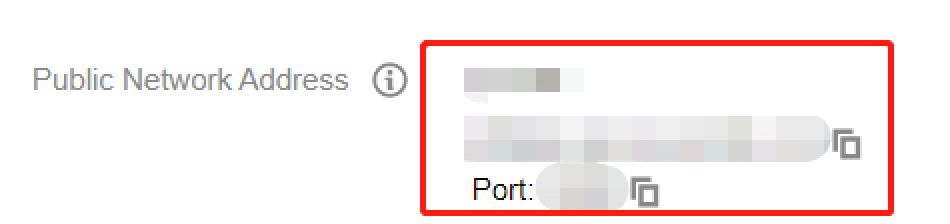
If not, copy the Public Network Address as shown in the red box in the screenshot below, paste it on the client, and then proceed to step 4. 4. Ping the public network address and check whether the DNS resolution is normal.
If so, the specific network latency will be returned, and the troubleshooting ends.
If not, the Unknown host error will be returned. In this case, submit a ticket for assistance.