Limits on Automatic Conversion from MyISAM to InnoDB
Unduh
Mode fokus
Ukuran font
Terakhir diperbarui: 2024-07-23 12:58:33
This document describes how to troubleshoot the table creation error when the MyISAM storage engine is automatically converted to InnoDB.
Background
TencentDB for MySQL supports InnoDB storage engine by default. In MySQL 5.6 and later versions, MyISAM and Memory engines are no longer supported. For more information, please see Database Storage Engines.
When the database is migrated or upgraded to TencentDB for MySQL 5.6 or above, the system will automatically convert MyISAM to InnoDB.
Contrary to MyISAM, InnoDB does not support a composite primary key that includes an AUTO_INCREMENT column. Therefore, when you create a table after MyISAM has been converted to InnoDB, an error will be reported as follows: ERROR 1075 (42000):Incorrect table definition;there can be only one auto column and it must be defined as a key.
To create a composite primary key that includes an AUTO_INCREMENT column in InnoDB, we recommend that you add an index for the AUTO_INCREMENT column.
Solution
1. The SQL statement that triggers a table creation error is as follows:
create table t_complexkey
(
id int(8) AUTO_INCREMENT,
name varchar(19),
value varchar(10),
primary key (name,id)
)ENGINE=MyISAM DEFAULT CHARSET=utf8;
The error is reported as follows:
2. Add an index and modify the SQL statement as follows:
create table t_complexkey
(
id int(8) AUTO_INCREMENT,
name varchar(19),
value varchar(10),
primary key (name,id),
key key_id (id)## Add an index for the AUTO_INCREMENT column
)ENGINE=MyISAM DEFAULT CHARSET=utf8;
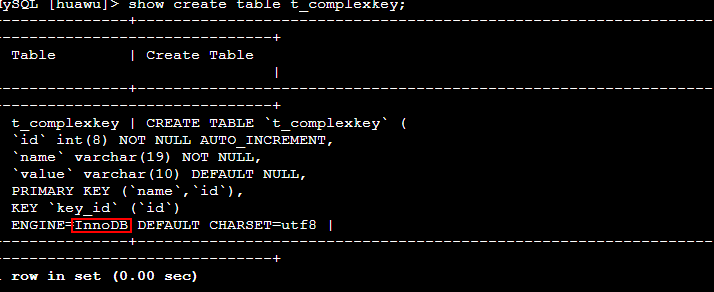
The table is created successfully as follows:
3. Run the following command to query the table structure: