tencent cloud

Tencent Cloud Agent Development Platform

Release Notes and Announcements
Release Notes
Product Announcement
Product Introduction
Product Overview
Advantages
Use Cases
Model Introduction
Purchase Guide
Package Subscription
Previous Version
Getting Started
Agent Application and Its Three Modes
Creating a "Content Summary Assistant" in Standard Mode
Creating a “Webpage Scraping Assistant” in Single Workflow Mode
Creating a “Stand-up Comedy Content Creation Assistant” in Multi-Agent Mode
Operation Guide
Application Development
Workflow
Multi-Agent
Knowledge Base
Widget
Plugin Marketplace
Model List 
Prompt Templates
Application Templates
Platform Management
Business, Workspace and Permissions
API Documentation
History
API Category
Making API Requests
Atomic Capability APIs
Operation Optimization APIs
Document Library APIs
Q&A Database APIs
Knowledge Tag APIs
Application Management APIs
Enterprise Management APIs
Billing APIs
Release Management APIs
Dialogue Endpoint APIs
Data Statistics APIs
Data Types
Error Codes
Application API Documentation
Dialogue API Overview
Dialog API Documentation (WebSocket)
Dialog API Documentation (HTTP SSE)
Image Chat or File Chat (Real-time Document Parsing + Chat)
Offline Document Upload
Tencent Cloud Agent Development Platform Operation COS Guide
ADP Document Parsing Protocol
FAQs
Product FAQs
Technical FAQs
Related Agreements
Tencent Cloud Agent Development Platform Service Level Agreement
Tencent Cloud Agent Development Platform Service Specific Terms
Tencent Cloud Agent Development Platform Privacy Policy
Tencent Cloud Agent Development Platform Data Processing and Security Agreement
Open-Source License Statement
Lighthouse OpenClaw Connector Plugin Service Agreement
Contact Us
Glossary

Knowledge Retrieval Node

PDF
Mode fokus
Ukuran font
Terakhir diperbarui: 2026-02-03 14:23:40

Node Function

The Knowledge Retrieval Node belongs to Information Processing Node. It supports users to input questions and configure the search scope to retrieve knowledge, finally outputting the retrieved knowledge fragments.


Directions

Input variables

Input variables take effect only within the same node and cannot be used cross-node. Support up to 50 input variables to meet scene requirements. Click "Add" to configure input variables as follows.
Configuration
Description
Variable Name
The variable name can only contain letters, digits, or underscores, must start with a letter or underscore. Required.
Description
Description of this variable. Optional
Data source
The data source of this variable supports two options: "refer" and "input". "Refer" allows selecting output variables from all preceding nodes, while "input" supports manually filling in a fixed value. Required.
Type
The data type of this variable cannot be selected and defaults to the variable type of "refer" or the string type of "input".

Knowledge Retrieval

User Question

Represents the question in knowledge Q&A, allowing users to input questions they want the LLM to retrieve answers for. Here supports direct import of variables, manual input of content, or a mix of variables and text content. Typical use cases include:
Scenario 1. Perform knowledge retrieval with direct reference to "user dialogue of this round"
Assume the input variable (such as Query) is configured, and refer to the system variable SYS.UserQuery.
At this point "user question" can configure as: Query, indicate usage of current user dialogue of this round for Q&A.
Scenario 2. Combine "output variable of the preceding node" to concatenate content
Assume the input variable (such as TypeId) is configured, referring to the preceding node's variable "device model".
At this point ask the device model warranty period, "user question" can configure as: How long is the warranty for TypeId?

Knowledge

Configure the search scope for knowledge, including "All Knowledge" and "By Knowledge Base".
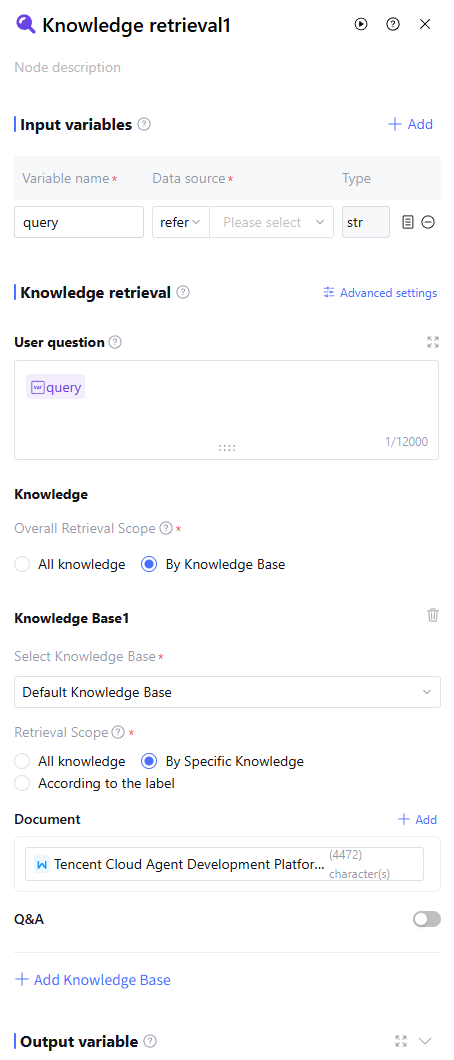
For "By Knowledge Base" search, you can select the corresponding knowledge base or add a new knowledge base. Within each knowledge base, the search scope can be set to "All knowledge", "By Specific Knowledge", or "By Tag".
Configuration
Description
All knowledge
Indicate to retrieve all configured knowledge in the knowledge base, including documents, Q&A, and database.
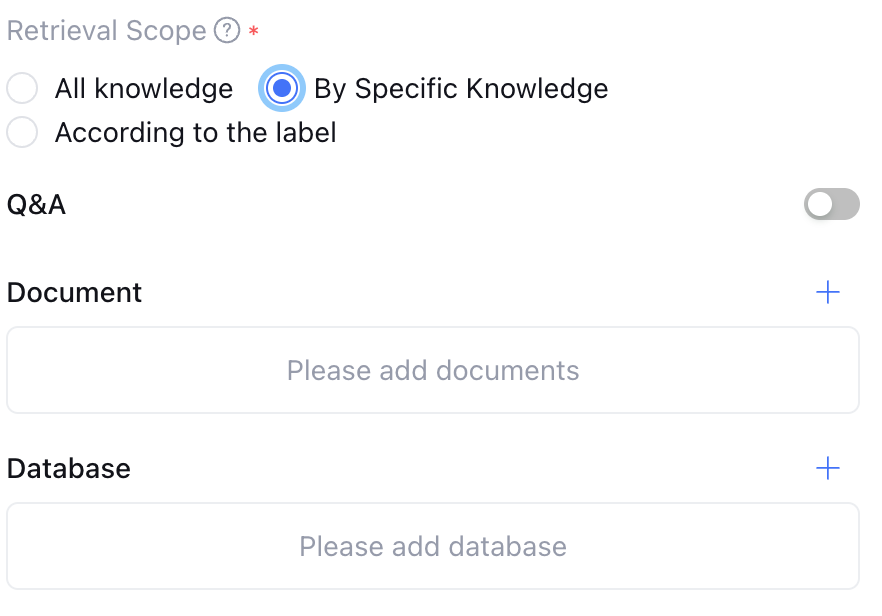
By Specific Knowledge
Specific knowledge is divided into document, Q&A, and database.
For documents, support manual selection of documents for knowledge retrieval. For Q&As, support enabling or disabling Q&As. If enabled, it will recall all Q&As. For databases, support manual selection of databases for knowledge retrieval.
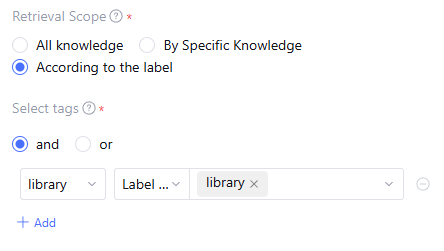
According to the label
Indicates retrieving the knowledge scope by document Tag, support input fixed tag value or refer to the variable as tag value.
Referencing variables as Tag values can more flexibly control the knowledge search scope. Typical scenario: targeting employees from different departments, case-sensitive to different knowledge scopes. At this point, the employee department can be imported into the system via API parameter method, while tagging knowledge with different department Tags. During workflow invocation, dynamically adjust the search scope based on the employee department.
Configure by Specific Knowledge as follows:

Configure by Label as follows:


Advanced Settings

Advanced Settings are used for retrieval strategy settings, document settings, and Q&A settings for knowledge-based Q&A, enabling personalized retrieval configuration.
Configuration
Configuration options
Description
Retrieval Strategy Settings
Hybrid Search
Execute keyword retrieval and vector retrieval simultaneously. Recommended for use in scenarios involving string and semantic association to achieve better comprehensive effect.
Semantic Retrieval
Scenarios with low vocabulary overlap between queries and text segments requiring semantic matching.
Excel Retrieval Enhancement
enabled
Enabled, query and compute Excel spreadsheet based on natural language is supported, but may affect reply duration.
Document Settings
Number of Recalled
Retrieve the top N document fragments with the highest matching degree, default is 5, max is 10.
Retrieval Accuracy
Based on settings, the found text segments will be returned to the LLM as a reply reference. A lower value means more segments are recalled, but it may affect accuracy. Content below the matching degree will not be recalled. Default is 0.2, max is 0.99.
Q&A Settings
Number of Recalled
Retrieve the top N Q&A fragments with the highest matching degree, default is 3, max is 5.
Retrieval Accuracy
Based on settings, the found text segments will be returned to the LLM as a reply reference. A lower value means more segments are recalled, but it may affect accuracy. Content below the matching degree will not be recalled. Default is 0.7, max is 0.99.

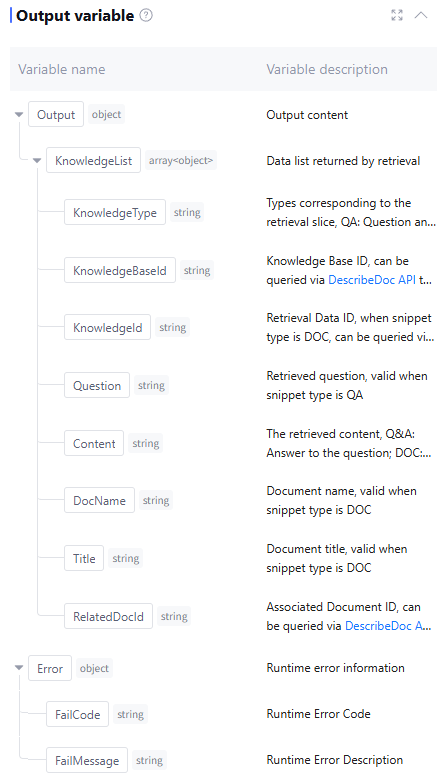
Output Variable

By default include retrieved knowledge fragments and runtime Error info (data type is object, this field is empty when running normally). Manual addition is not supported.


Application Example

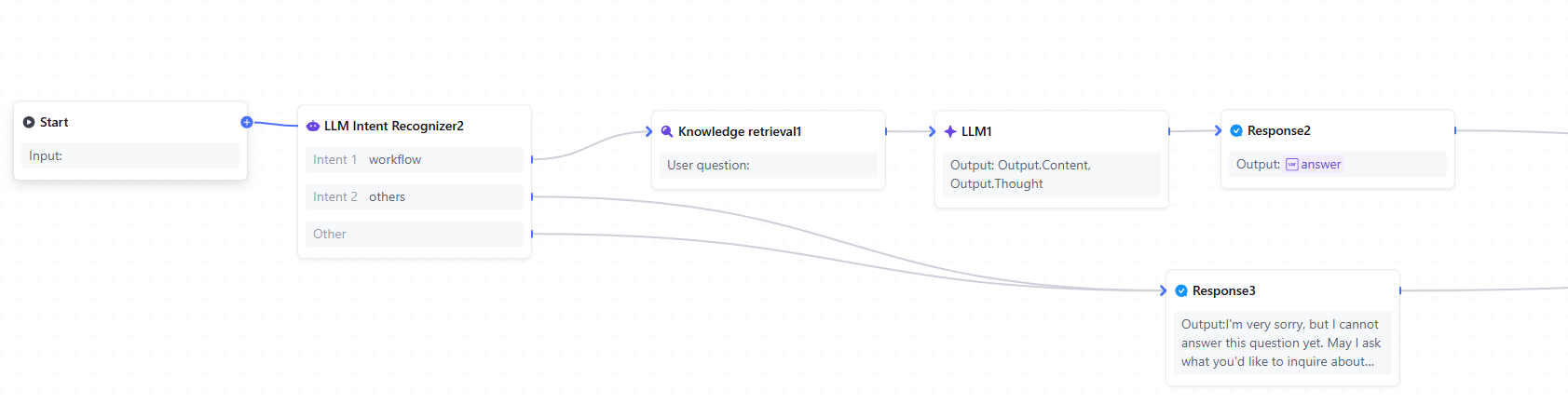
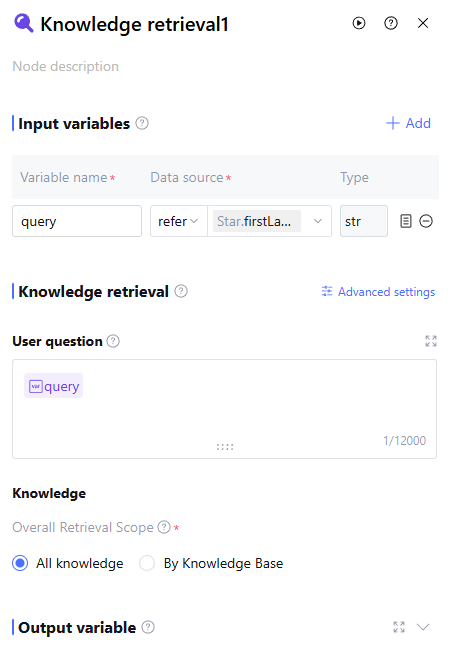
Create a Tencent Cloud Agent Development Platform (Tencent Cloud ADP) workflow Q&&A assistant to search in the knowledge base based on user questions and respond with a specific persona.


The knowledge retrieval node configuration is as follows:


FAQs

What is the difference between LLM knowledge Q&A and knowledge retrieval?
The LLM knowledge Q&A node will summarize the retrieved knowledge and generate a final reply, while the knowledge retrieval node only returns the retrieved knowledge fragments.

Bantuan dan Dukungan

Apakah halaman ini membantu?

masukan