tencent cloud

Tencent Cloud Agent Development Platform

Release Notes and Announcements
Release Notes
Product Announcement
Product Introduction
Product Overview
Advantages
Use Cases
Model Introduction
Purchase Guide
Package Subscription
Previous Version
Getting Started
Agent Application and Its Three Modes
Creating a "Content Summary Assistant" in Standard Mode
Creating a “Webpage Scraping Assistant” in Single Workflow Mode
Creating a “Stand-up Comedy Content Creation Assistant” in Multi-Agent Mode
Operation Guide
Application Development
Workflow
Multi-Agent
Knowledge Base
Widget
Plugin Marketplace
Model List 
Prompt Templates
Application Templates
Platform Management
Business, Workspace and Permissions
API Documentation
History
API Category
Making API Requests
Atomic Capability APIs
Operation Optimization APIs
Document Library APIs
Q&A Database APIs
Knowledge Tag APIs
Application Management APIs
Enterprise Management APIs
Billing APIs
Release Management APIs
Dialogue Endpoint APIs
Data Statistics APIs
Data Types
Error Codes
Application API Documentation
Dialogue API Overview
Dialog API Documentation (WebSocket)
Dialog API Documentation (HTTP SSE)
Image Chat or File Chat (Real-time Document Parsing + Chat)
Offline Document Upload
Tencent Cloud Agent Development Platform Operation COS Guide
ADP Document Parsing Protocol
FAQs
Product FAQs
Technical FAQs
Related Agreements
Tencent Cloud Agent Development Platform Service Level Agreement
Tencent Cloud Agent Development Platform Service Specific Terms
Tencent Cloud Agent Development Platform Privacy Policy
Tencent Cloud Agent Development Platform Data Processing and Security Agreement
Open-Source License Statement
Lighthouse OpenClaw Connector Plugin Service Agreement
Contact Us
Glossary

Dialogue API Overview

PDF
Mode fokus
Ukuran font
Terakhir diperbarui: 2025-08-27 14:48:18

Overview

After creating an application on Tencent Cloud Agent Development Platform (Tencent Cloud ADP), completing the application configuration, conducting a dialogue test, and publishing to obtain the AppKey, you can use the dialogue API to interact with Tencent Cloud ADP.
The platform offers two commonly used access methods: WebSocket and HTTP SSE.

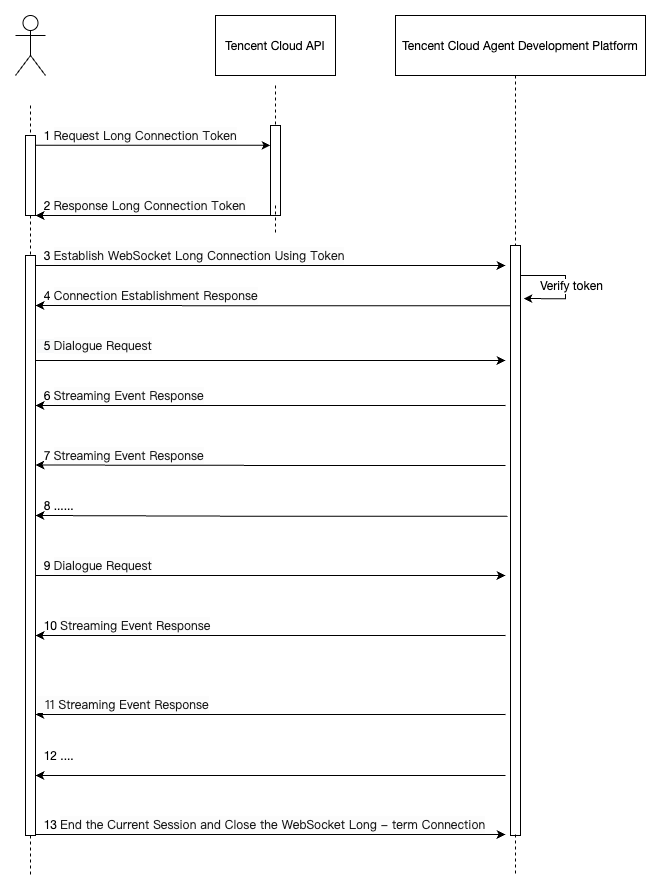
1. WebSocket Access Method Overview

WebSocket is connection-oriented and full-duplex channel. Before establishing connection, you must first get Token from the server. Only with this token can you create a WebSocket connection with the server. The token is valid only during link establishment and will be discarded upon success.
Access Process Diagram:


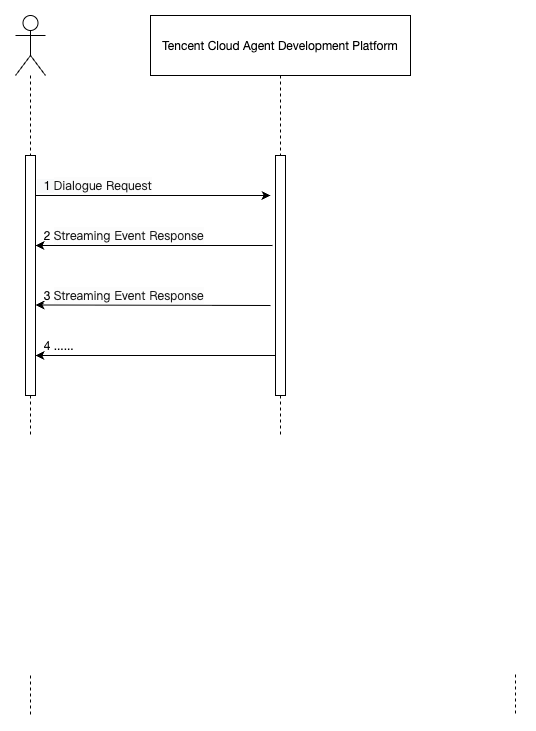
2. HTTP SSE Access Method Overview

HTTP SSE is a one-way channel. After the client initiates an HTTP request, the server continuously pushes streaming data to the client. At this point, two-way interaction is not supported.


Note:
Note: If you want to learn about APIs related to the configuration end, please visit: API document.
Bantuan dan Dukungan

Apakah halaman ini membantu?

masukan