Outbound Calling with Custom Models
Baixar
Modo Foco
Tamanho da Fonte
Description
There are two methods to initiate outbound calls using the AI Voice Agent. Select the appropriate method based on your operational model:
Method | Applicable Scenarios | Setup Cost |
Marketing campaigns, batch notifications, lead activation. Upload contact lists, configure retry and post-call actions, monitor real-time dashboards, all without code. | Low. No development required. | |
Embed outbound dialing into your CRM / ticket / business system, trigger calls based on real-time events, and achieve fully programmatic control. | Medium. Backend integration is required. |
You can use both methods simultaneously. For example, you can run batch marketing campaigns during business hours while letting your CRM continue to trigger single callbacks via API for high-priority leads.
Prerequisite
You need to purchase Premium Edition software seats.
To use the AI Outbound Calls feature, you need to integrate a self-owned phone number. You can try this feature using the test number provided after creating the application.
Initiating a Call via API
This method is best suited for scenarios where each call is triggered by an event in your business system (for example, a customer submitting a form, an order being shipped, an alarm being triggered, or a deadline being reached).
Making Calls with an AI Voice Agent Created in the Console
To initiate an outbound call, call the Create AI Agent Call API (CreateAIAgentCall) and provide the AI Agent ID, caller number, and callee number. The method to obtain the AI Agent ID is as follows:
After integrating ChatGPT, go to the Tencent Cloud Contact Center (TCCC) management panel. Click AI Agent Management in the left sidebar and open the My AI Agents module to view and manage your AI Agents. To view an AI Agent's ID, hover the mouse over its name, then click the copy button.
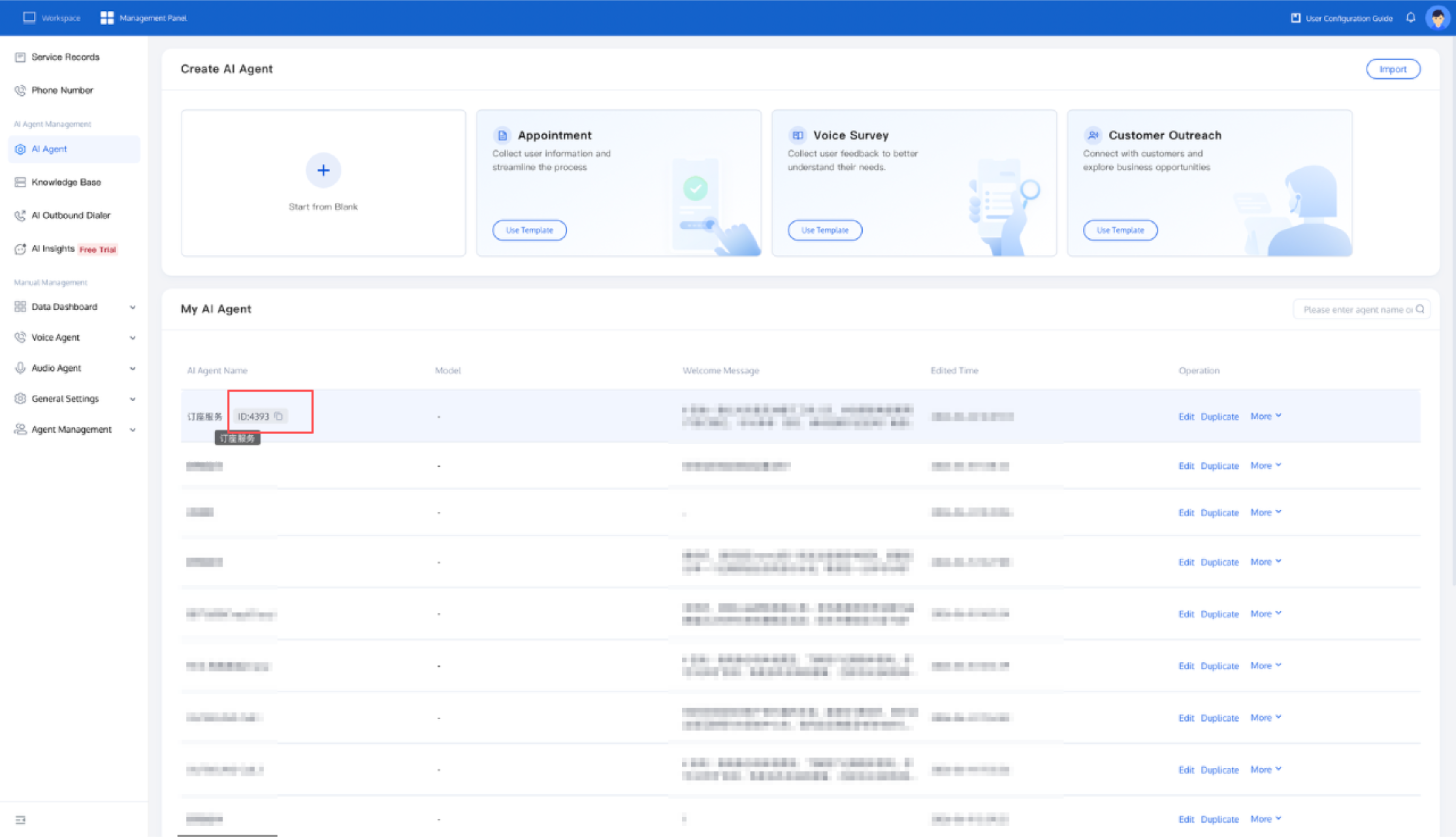
Initiating an AI Outbound Call
If you need to change AI Agent properties frequently during outbound calls, you can skip the agent creation procedure and call the Create AI Session API (CreateAICall) directly.
Before initiating the call, please confirm that your model is compatible with OpenAI, Azure, or Minimax Protocol, and visit the model service provider's website to obtain authentication information.
OpenAI Protocol
Currently, it supports general models such as GPT, Hunyuan, Deepseek, and Tongyi Qianwen.
{"LLMType": "openai","Model": "gpt-4o-mini","APIKey": "<your_api_key>","APIUrl": "https://xxx/v1/chat/completions"}
Common model parameter example:
Parameter | GPT | Deepseek |
Model | gpt-4o-mini,gpt-4o | deepseek-chat |
API Key | ||
API URL | https://api.openai.com/v1/ | https://api.deepseek.com/v1 |
Azure Protocol
{"LLMType": "azure","Model": "gpt-4o-mini","APIKey": "<your_api_key>","APIUrl": "https://{your-resource-name}.openai.azure.com?api-version={api-version}"}
Parameter | Example | Description |
LLM Type | azure | Protocol Name. |
Model | gpt-4o-mini | Model Name. |
API Key | <your_api_key> | The large model key is used to verify the identity of the requester. For the specific method to obtain it, refer to Azure OpenAI service documentation. |
API URL | https://{your-resource-name}.openai.azure.com?api-version={api-version} | Model API address. |
Minimax Protocol
{"LLMType": "minimax","Model": "abab6.5s-chat","APIKey": "<your_api_key>","APIUrl": "https://api.minimax.chat/v1"}
Parameter | Example | Description |
LLM Type | minimax | Protocol Name. |
Model | abab6.5s-chat | Model Name. |
API Key | <your_api_key> | The large model key is used to verify the identity of the requester. For the specific method to obtain it, refer to MiniMax Open Platform documentation. |
API URL | https://api.minimax.chat/v1 | Model API address. |
Related Guides
Select the corresponding path based on your deployment method.
First time using? You can deploy a usable AI Agent in just five minutes create a conversation flow or integrate an external model.
Want to learn about our conversation flow nodes? Go to Conversation Nodes.
Build a knowledge base for your conversation flow? Go to Build Your Knowledge Base.
How to test your model? Refer to Test Conversation Workflow.
Configure a voice AI Agent with your own model? Go to Integrate External Model, Edit Conversation Content, Configure Voice Interaction, and Add Call Control.
Want to view application scenarios? Try Voice Notification, Lead Mining, Feedback Collection, or Customer Support.
How to make outbound and inbound calls with an AI Agent? Refer to AI Agent Outbound Calls or AI Agent Inbound Calls.
View data logs? Refer to Call Records, Call Recordings, Latency.
How to create and view post-call tags? Refer to Post-Call Tags (Created via Conversation Flow) or Post-Call Tags (Created via External Large Model).
Ajuda e Suporte
Esta página foi útil?
Você também pode entrar em contato com a Equipe de vendas ou Enviar um tíquete em caso de ajuda.
comentários