A consumer offset represents the position of a message consumed by a consumer. In certain business scenarios, such as data processing exceptions, business logic changes, or system Ops requirements, the consumer offset may need to be reset to consume specific messages again or skip them.
Constraints and Limitations
TDMQ for RocketMQ supports resetting a consumer offset for offline groups. However, this feature is only supported for consumer groups in push consumption mode; otherwise, the resetting will fail.
2. In the left sidebar, choose Resource > Cluster, select a region, and click the ID of the target cluster to go to the cluster basic information page.
3. On the cluster basic information page, select the Group tab.
5.x clusters: Click Reset Offset in the operation column of the target group.
4.x clusters: Click Reset Offset or Reset the retry queue offset in the operation column of the target group.
The following table describes Reset Retry Queue Offset.
Feature
4.x Cluster
5.x Cluster
Retry queue granularity
Retry queues are created by group.
A group only has one retry queue, and all failed messages from all topics it subscribes to are sent to the retry queue.
Retry queues are created by group and topic.
A group has a dedicated retry queue for each topic it subscribes to.
Impact of resetting classic queues
Resetting the consumer offset of a topic does not automatically reset the retry queue.
Resetting the consumer offset of a topic will automatically reset the offset of the dedicated retry queue.
Reasons for this design
This design avoids mutual impact.
If a group subscribes to Topic A and Topic B, and the shared retry queue is reset when the offset for Topic A is reset, the failed messages of Topic B are affected.
Retry queues of different topics are isolated from each other.
Each topic has its own independent retry queue. When Topic A is reset, only the retry queue of Topic A is affected. The retry queue of Topic B is not affected. Therefore, the consumption process can be reset automatically.
Additional feature
An independent feature for resetting the retry queue offset is provided. To clear all failed messages, you can perform this operation separately.
No additional features are needed because the reset queue offset is automatically reset when a topic is reset.
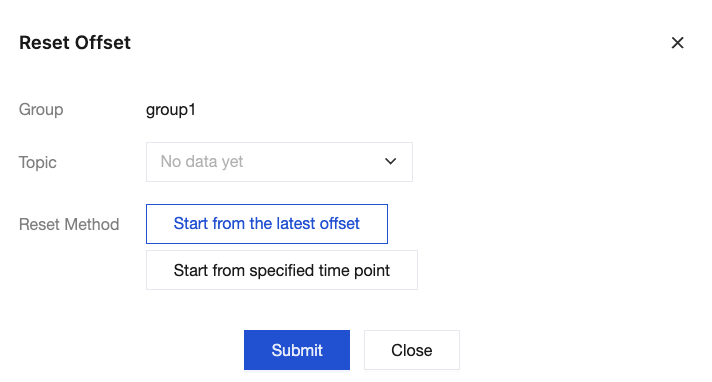
4. In the pop-up window, you can select whether to set the consumption offset of a topic Start from the latest offset or Start from specified time point (that is, specifying the position from which consumers start consuming messages under this subscription).
If you select to reset the offset from the latest offset, all backlogged messages of the group in the specified topic will be cleared. Proceed with caution.