Scheduled and Delayed Messages
Unduh
Mode fokus
Ukuran font
This document mainly introduces the concept and use of scheduled and delayed messages in TDMQ for RocketMQ.
Relevant Concepts
Scheduled messages: After a message is sent to the server, the business may want the consumer to receive it at a later time point rather than immediately. Messages of this type are called scheduled messages.
Delayed messages: After a message is sent to the server, the business may want the consumer to receive it after a period of time rather than immediately. Messages of this type are called delayed messages.
In fact, delayed messages can be seen as a special usage of scheduled messages, and their ultimate implementation effects are the same.
Usage Methods
Open-source Apache RocketMQ does not provide an API for users to freely set delay times. To ensure compatibility with the open-source RocketMQ client, TDMQ for RocketMQ implements scheduled sending by adding specific property key-value pairs to messages. You can schedule a message for delivery at any time within a certain range (40 days) by adding the
__STARTDELIVERTIME value to the property of the message. For delayed messages, you can first calculate the scheduled delivery timestamp and then send them as scheduled messages.The following code example shows how to use the scheduled and delayed messages of TDMQ for RocketMQ. View the complete sample code.
For delayed messages, first calculate the scheduled delivery timestamp using
System.currentTimeMillis() + delayTime and then send them as scheduled messages.Message msg = new Message("test-topic", ("message content").getBytes(StandardCharsets.UTF_8));// Set the message to be sent 10 seconds later.long delayTime = System.currentTimeMillis() + 10000;// Set __STARTDELIVERTIME into the property of msg.msg.putUserProperty("__STARTDELIVERTIME", String.valueOf(delayTime));SendResult result = producer.send(msg);System.out.println("Send delay message: " + result);
Duration messageDelayTime = Duration.ofSeconds(10);
final Message message = provider.newMessageBuilder()
// Set topic for the current message.
.setTopic(topic)
 // Message secondary classifier of message besides topic.
.setTag(tag)
// Key(s) of the message, another way to mark message besides message id.
.setKeys("yourMessageKey-3ee439f945d7")
// Set expected delivery timestamp of message.
.setDeliveryTimestamp(System.currentTimeMillis() + messageDelayTime.toMillis())
.setBody(body)
.build();
How It Works
Open Source Community Implementation
Initially, the community implemented delayed messages by reusing the multi-level retry delivery logic of RetryTopic and employing delay queues. However, because each queue corresponded to a single delay time, the number of queues became a bottleneck. Consequently, multi-level delayed messages were ultimately supported. The table below lists the delay times corresponding to each of the 18 currently supported delay levels.
1s 5s 10s 30s 1m 2m 3m 4m 5m 6m 7m 8m 9m 10m 20m 30m 1h 2h
The underlying implementation of multi-level delayed messages is based on one delay Topic and multiple Queues, with each Queue corresponding to a specific delay level, as shown in the following figure.
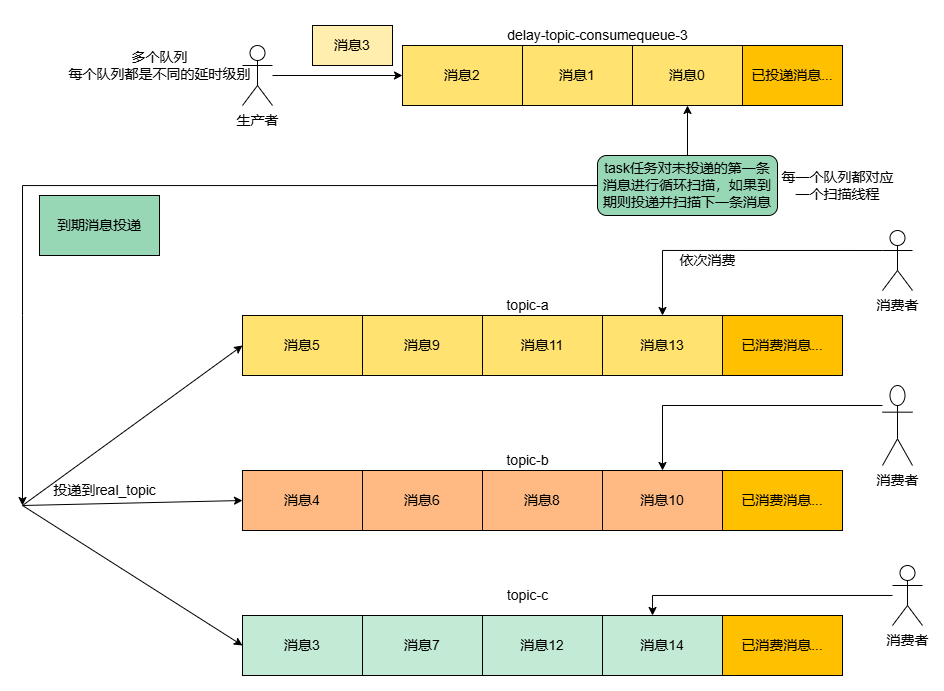
When a delayed message arrives, its delay level attribute is evaluated, and the message is placed at the tail of the corresponding queue. A thread pool then polls each queue to scan it. If the message at the head of a queue has reached its scheduled delivery time, it is delivered to the Real Topic; otherwise, the polling continues.
The usage example is as follows:
// Set the message as a delayed message on the Producer side.Message msg = new Message();msg.setTopic("TopicA");msg.setTags("Tag");msg.setBody("this is a delay message".getBytes());// Set the delay level to 5, which corresponds to a 1-minute delay.msg.setDelayTimeLevel(5);producer.send(msg);
However, the open-source community's solution also has some shortcomings:
The system only supports a predefined set of limited delay levels, which restricts the flexibility and adaptability of delay configuration.
The maximum delay time has a hard upper limit, which cannot meet the requirements of tasks with ultra-long delay cycles.
The precision control over delay times is insufficient, making it difficult to achieve fine-grained delay scheduling.
Enhancement of the Scheduled and Delayed Messages Feature in Tencent Cloud TDMQ for RocketMQ
Because multi-level delays are limited by the number of queues, TDMQ for RocketMQ has enhanced the implementation based on the community version. This enhanced implementation supports high-precision, ultra-long, and custom delays, which is the implementation of "Ultra-Long Second-Level Scheduled Messages".
Ultra-Long Second-Level Scheduled Messages allow users to set any delivery time (the default maximum is 40 days, and the 5.x platinum edition can provide customized support). The new solution introduces a file-based time wheel for implementation and also supports the cancellation of scheduled messages. In its design, the solution uses message redelivery to ensure that ultra-long delayed messages are not subject to message storage time limitations:
The implementation of scheduled messages does not interfere with the original storage logic, preventing mutual interference. Scheduled messages are written to a dedicated scheduled message topic, and the original messages are retrieved by scanning the index files of that topic.
The key to achieving arbitrary-time scheduling is knowing which messages need to be delivered at a specific moment. Therefore, an additional storage format needs to be designed while reusing the Commitlog message file storage as much as possible. By introducing a scheduled message index file, the original messages are stored in the Commitlog. To scan all scheduled messages at the current moment while maintaining message write performance, a linked list structure is used to link index units. The scheduled message index file is written directly as an Append-only Log (sequential write), which ensures message write performance.
To locate the first scheduled message index and introduce the time wheel structure, it is necessary to act as an intermediate layer for precise access to the scheduled message index file.
Finally, two storage files are introduced for scheduled messages (in rip-43): Timelog + Timewheel.
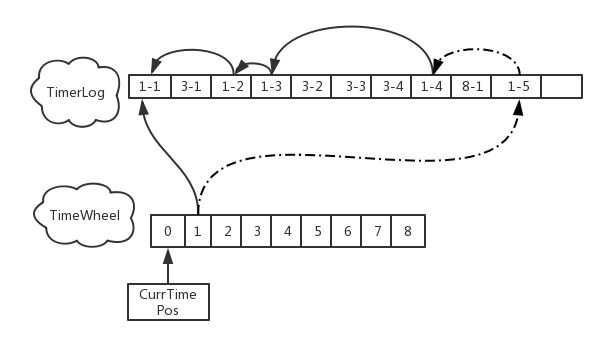
The TimerWheel is the file for the time wheel, representing the delivery time. It stores all time windows within a 2-day period (default, and it also ensures that ultra-long scheduled messages are not subject to message storage time limitations). Each slot represents a corresponding delivery time window, and the length of the time window corresponding to a slot can be adjusted to control scheduling precision. The advantage of using a time wheel is its reusability. After 2 days, there is no need to create a new time wheel file; instead, the current time wheel can simply be overwritten.
/*** Represents a slot of timing wheel. Format:* ┌────────────┬───────────┬───────────┬───────────┬───────────┐* │delayed time│ first pos │ last pos │ num │ magic │* ├────────────┼───────────┼───────────┼───────────┼───────────┤* │ 8bytes │ 8bytes │ 8bytes │ 4bytes │ 4bytes │* └────────────┴───────────┴───────────┴───────────┴───────────┘*/
The TimerLog is the index file for scheduled messages. It stores the index of scheduled messages (their storage locations within the message files) and is internally linked via a reverse linked list. The write operation to the TimerLog is implemented as an Append-only Log, which ensures message write performance.
public final static int UNIT_SIZE = 4 //size+ 8 //prev pos+ 4 //magic value+ 8 //curr write time, for trace+ 4 //delayed time, for check+ 8 //offsetPy+ 4 //sizePy+ 4 //hash code of real topic+ 8; //reserved value, just in case of
Each slot in the TimerWheel can store an index pointing to an element in the TimerLog. In turn, each element in the TimerLog stores the index of its preceding element. The TimerLog adopts a linked list structure and stores all scheduled messages that are to be delivered within the time window corresponding to each TimerWheel slot.
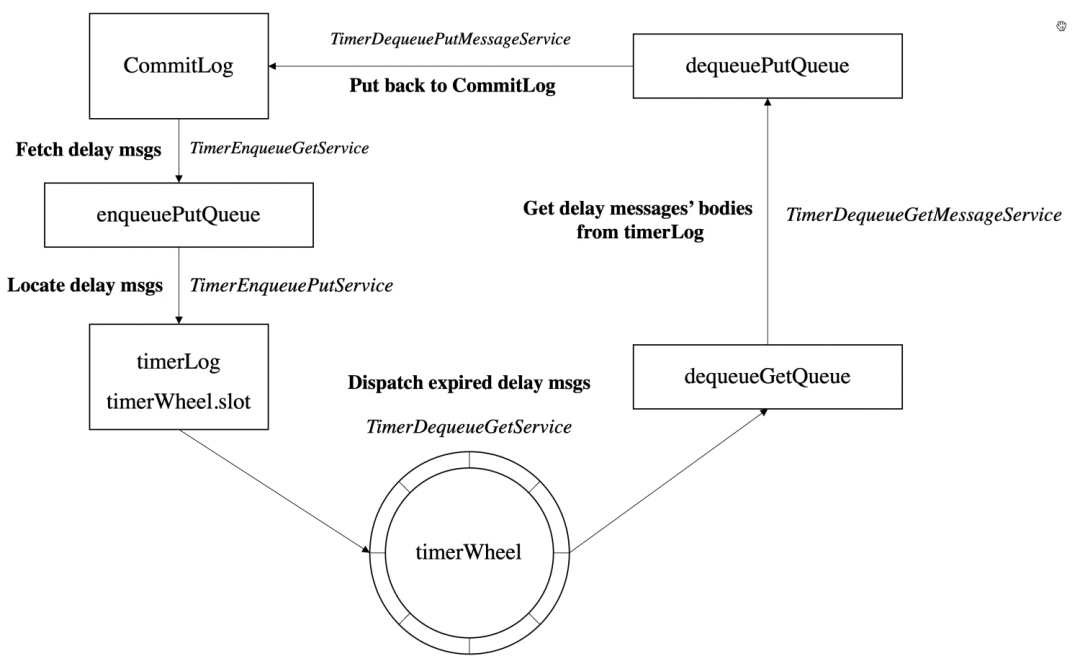
As shown in the figure above, five Services handle the placement and storage of scheduled messages respectively. The workflow is as follows:
1. For the Service responsible for placing scheduled messages, it reads scheduled messages of the specified topic (TIMER_TOPIC) from the message file every 50 ms.
1.1
TimerEnqueueGetService reads messages of the scheduled topic from the message file and first places them into the EnqueuePutQueue.1.2 Another thread,
TimerEnqueuePutService, executes the Timerlog-unit construction logic, places it into the TimerLog, and updates the storage content of the time wheel (Timewheel).2. For the Service responsible for retrieving scheduled messages, it reads the Slot for the next second every 50 ms. Three threads then place the retrieved messages back into the CommitLog.
2.1 First,
TimerDequeueGetService reads the Slot for the next second every 50 ms, retrieves the specified data from the TimerLog, and places it into the dequeueGetQueue.2.2 Then,
TimerDequeueGetMessageService retrieves data from the dequeueGetQueue, locates the corresponding msgs from the message file based on the index information, and places them into the queue (dequeuePutQueue) for writing to the message file.2.3 Finally,
TimerDequeuePutMessageService retrieves messages from this Putqueue. If a message has expired, the service modifies its Topic and places it back into the CommitLog (delivering it to the actual Topic). Otherwise, the service writes the message back to the CommitLog under the specified topic (TIMER_TOPIC) for rolling, to prevent message expiration.The usage example is as follows:
Message message = new Message(TOPIC, ("Hello" + i).getBytes(StandardCharsets.UTF_8));// Deliver after a 10-second delay.message.setDelayTimeSec(10);// Deliver after a 10-second delay. After the message is delivered to the server, the scheduled delivery time is calculated, which is the delivery time to the server plus the delayTime.message.setDelayTimeMs(10_000L);// Scheduled delivery. The scheduled delivery time is the current time + 10,000 ms.message.setDeliverTimeMs(System.currentTimeMillis() + 10_000L);// Send messages.SendResult result = producer.send(message);
Further Technical Optimization in 5.x
The file-based version of TDMQ for RocketMQ 5.x, which employs a reverse linked list indexing scheme, significantly reduces storage costs. However, the scanning efficiency of the reverse linked list is low. On SSD drives, a throughput of approximately 1,000 TPS typically becomes a bottleneck, leading to increased scheduling errors.
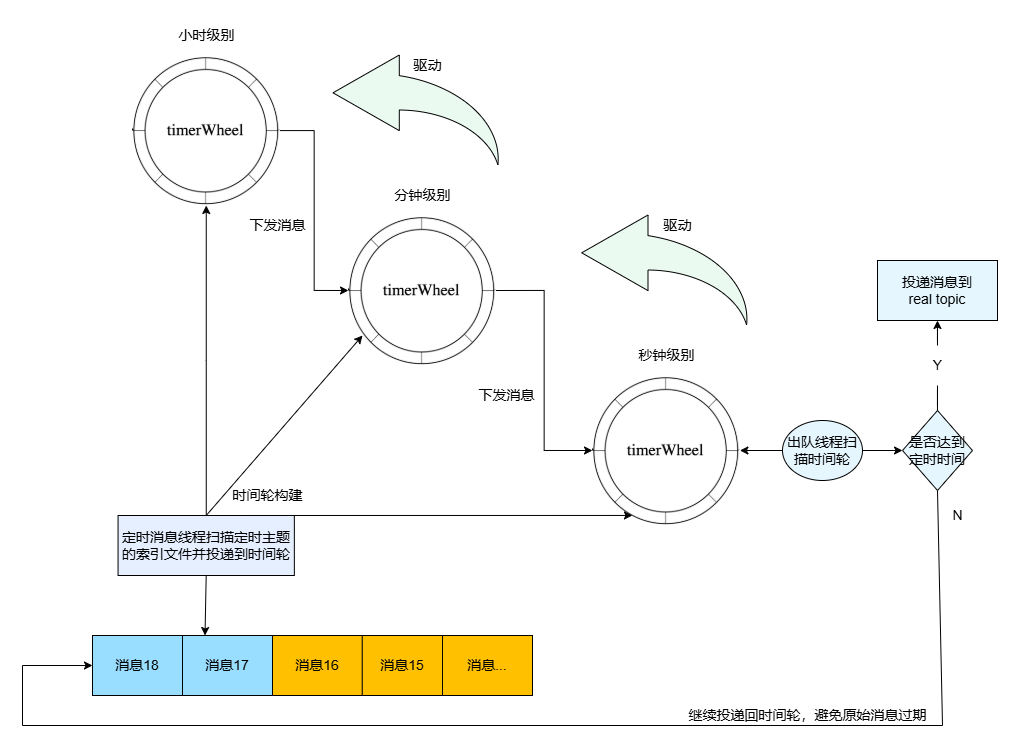
Tencent Cloud selects RocksDB to support multi-level time wheels for scheduled messages. By leveraging the KV structure, it enables rapid range scanning of scheduled messages at a specific moment, ensuring more precise scheduled delivery.
We manage hours/minutes/seconds using a single Wheel, similar to a clock mechanism where the second hand's rotation drives the minute hand, and the minute hand's rotation drives the hour hand. When a scheduled time exceeds one day, the message is still placed into the hour-level time wheel. The system subsequently redelivers the message to prevent it from expiring.
Use Limits
When you use delayed messages, make sure that the clocks on the clients and servers are the same (all regions use UTC+8) to avoid time differences.
Scheduled and delayed messages have a time deviation of approximately 1 second.
The allowable time range for scheduled and delayed messages varies depending on the cluster specifications. For more information, see Product Series.
For scheduled messages, the scheduled time should be a future time. If it is earlier than the current time, the messages are delivered to consumers immediately.
Bantuan dan Dukungan
Apakah halaman ini membantu?
Anda juga dapat Menghubungi Penjualan atau Mengirimkan Tiket untuk meminta bantuan.
masukan