Configuring Resource Tags
Unduh
Mode fokus
Ukuran font
Overview
Tags are markers provided by Tencent Cloud for identifying cloud resources, and they are key-value pairs. Tags help you conveniently classify and manage TDMQ for RocketMQ resources, such as clusters, topics, and groups, from various dimensions (such as the business, purpose, and owner). In addition, you can also use the authorization by tag method to grant sub-accounts permissions for resources under specific tags using a root account. For detailed operations, see Granting Tag-Level Permissions to Sub-accounts.
Note:
Tencent Cloud will not use the tags you set. Tags are only used for you to manage TDMQ for RocketMQ resources.
Use Limits
Quantity Limits
A resource can be bound with up to 50 tags.
Naming Limits
Tag Key | Tag Value |
Tag keys that start with qcs:, project:, or project are reserved in the system and cannot be created. | - |
In UTF-8 format, a tag key must contain 1 to 127 Unicode characters. | In UTF-8 format, a tag value must contain 1 to 255 Unicode characters. |
Tag keys and values can contain characters, spaces, digits, and special characters in UTF-8 format, but cannot start or end with a space. Supported characters in English mode: + - = . _ : / @ ( ) [ ] , ; > < Supported characters in Chinese mode: + - = / @ ( ) 【 】 : | |
Tag keys and values are case-sensitive. | |
Operation Steps and Cases
Case Description
Case: A company has 6 TDMQ for RocketMQ clusters on Tencent Cloud. The following table describes the departments, business scopes, and owners of these clusters.
Queue ID | Department | Business Scope | Owner |
rocketmq-qzga74ov5gw1 | E-commerce | Marketing campaigns | Tom |
rocketmq-qzga74ov5gw2 | E-commerce | Marketing campaigns | Harry |
rocketmq-qzga74ov5gw3 | Gaming | Game A | Jerry |
rocketmq-qzga74ov5gw4 | Gaming | Game B | Harry |
rocketmq-qzga74ov5gw5 | Entertainment | Post-production | Harry |
rocketmq-qzga74ov5gw6 | Entertainment | Post-production | Tom |
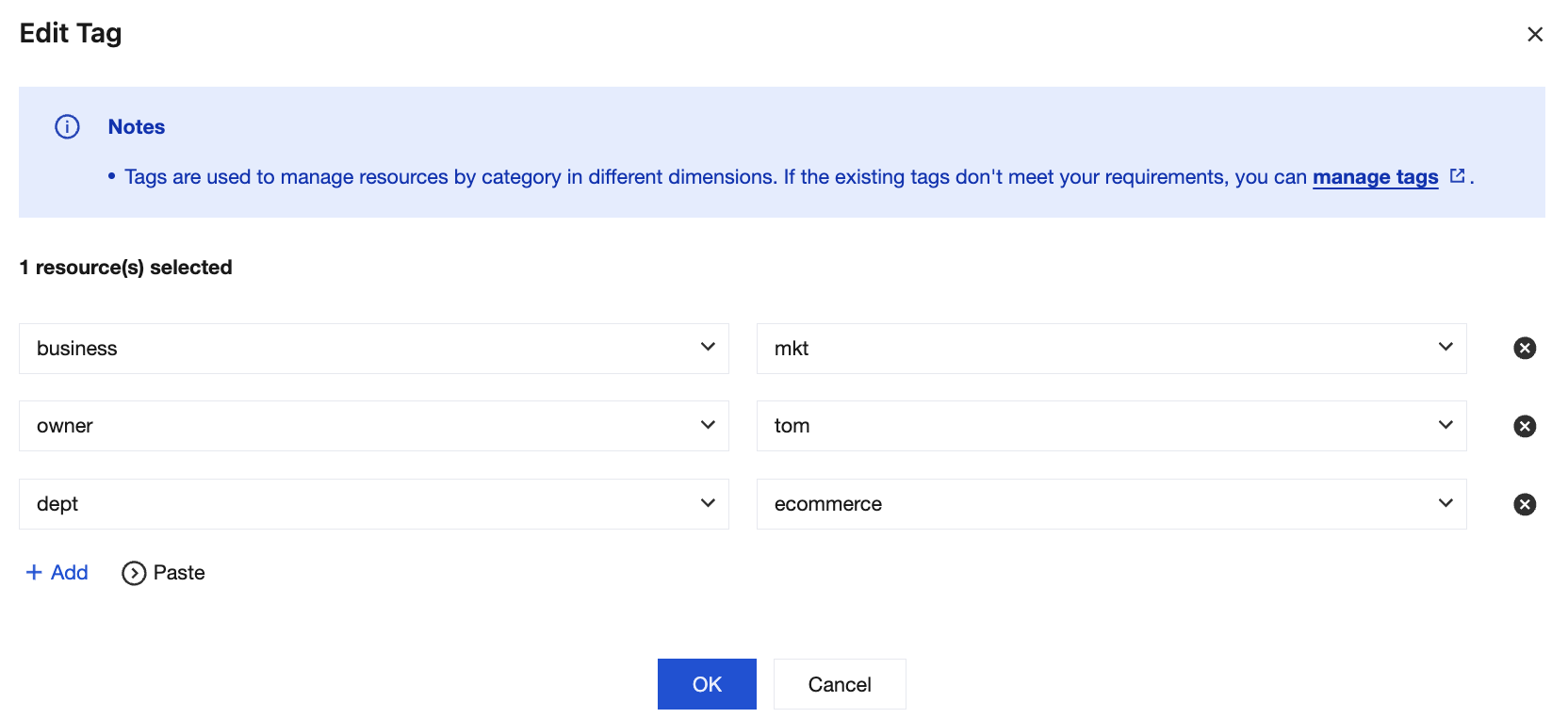
With rocketmq-qzga74ov5gw1 as an example, we can add the following three groups of tags to this instance.
Tag Key | Tag Value |
dept | ecommerce |
business | mkt |
owner | tom |
Similarly, you can also set appropriate tags for other queue resources based on their departments, business scopes, and owners.
Setting Tags in the TDMQ for RocketMQ Console
With the preceding case as an example, you can log in to the TDMQ for RocketMQ console to set tags after you design tag keys and tag values.
1. Log in to the TDMQ for RocketMQ console.
2. On the Cluster page, select a region, select the clusters for which you want to edit tags, and click Edit Resource Tag at the top of the page.

3. In the Edit Tag pop-up window, set tags.
Note:
4. Click OK. The system displays a message, indicating that the modification is successful. You can view the tags bound to the cluster in the Resource Tag column of the cluster.
Filtering Resources by Tag Key
To filter out the clusters bound to specific tags, perform the following steps:
1. Select Tag in the search box in the upper-right corner of the page.
2. In the window displayed after Tag:, select the tag you want to search for and click OK.
3. For example, if
Tag: owner:tom is selected, clusters bound to the tag key owner:tom can be filtered out.Editing Tags
1. On the Cluster page, select a region, select the clusters for which you want to edit tags, and click Edit Resource Tag at the top of the page.

Note:
You can edit tags for up to 20 resources in batches.
2. In the Edit Tag pop-up window, add, modify, or delete tags based on actual needs.
Managing Resource Tags in a Unified Manner
You can also manage resource tags in a unified manner in the Tag console. The detailed operations are as follows:
1. Log in to the Tencent Cloud Tag console.
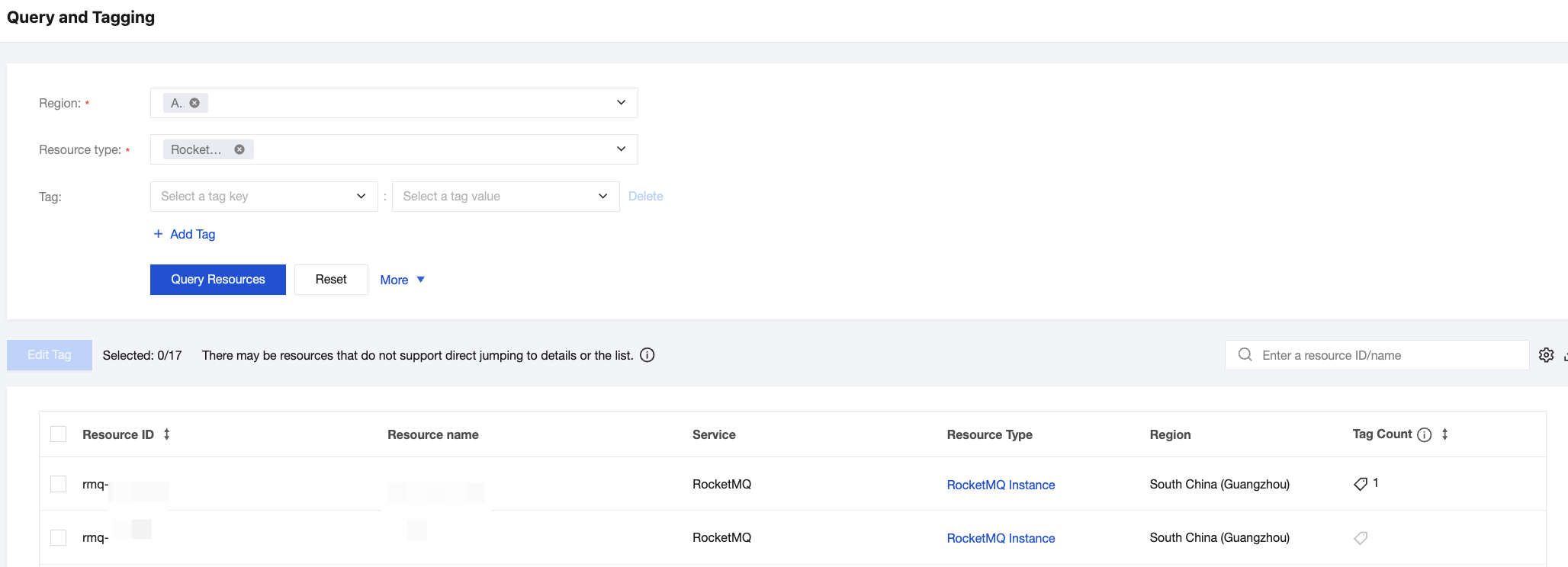
2. In the left sidebar, select Resource Tags, select the region, and select RocketMQ for Resource Type.
3. Select query tags as required and click Query Resources.
4. Select the required resources in the query result, and click Edit Tag to bind or unbind tags in batches.
Bantuan dan Dukungan
Apakah halaman ini membantu?
Anda juga dapat Menghubungi Penjualan atau Mengirimkan Tiket untuk meminta bantuan.
masukan