Configuring Quorum Queue
Unduh
Mode fokus
Ukuran font
Quorum queue is highly available queue introduced in RabbitMQ 3.8+. They achieve multi-node data replication with the Raft consensus algorithm to ensure strong message consistency and persistent storage. Unlike mirrored queue, quorum queue adopt a quorum-based write mechanism where messages must be acknowledged by a majority of cluster nodes before being considered successfully written. This approach prevents split-brain issues and enhances data security.
Core Features
Strong consistency: Messages must be acknowledged by a majority of nodes to ensure no data loss.
Automatic failover: When the primary node crashes, the Raft protocol automatically elects a new primary node to recover the service.
Persistence first: All messages are persisted to the disk by default. This feature is suitable for critical business.
Unsupported features: such as TTL, priorities, and non-persistent messages.
Scenarios
Financial transaction systems (such as payment settlement): require that messages never get lost and can tolerate high latency.
Medical data synchronization: requires strong data consistency to avoid inaccurate data due to node failures.
Long-standing core business queues (such as order status updates): have extended lifecycles and require cross-node disaster recovery capabilities.
Cross-IDC deployment: The Raft protocol reduces split-brain risks. This configuration is suitable for multi-data center scenarios.
Constraints and Limitations
Currently, only Managed Edition clusters support configuring quorum queues. The Serverless Edition features distributed high-availability clusters and does not require configuring quorum queues.
Configuring Quorum Queue
1. Log in to the TDMQ for RabbitMQ console.
2. In the left sidebar, choose Cluster > Queue, select a vhost, and then click Create to go to the queue creation page.
3. Enter the queue information according to the on-screen instructions, and click Submit to complete the queue creation.
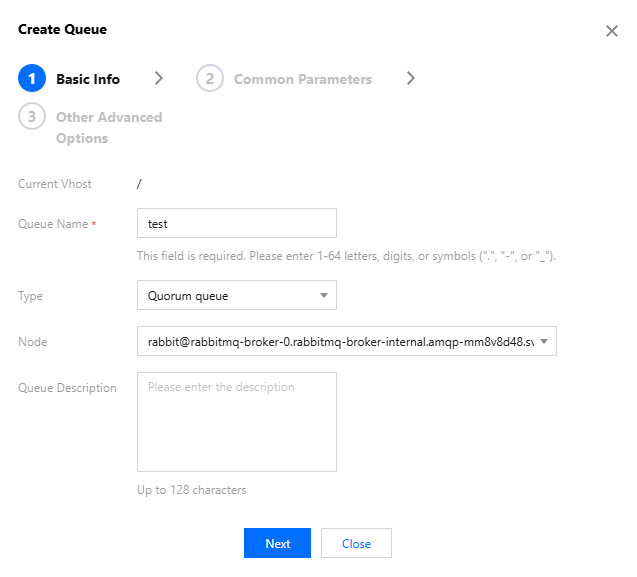
Category | Parameter | Required | Description |
Basic Info | Current Vhost | Yes | Indicates which vhost the queue is being created for. |
| Queue Name | Yes | Enter a queue name. It must be 1 to 64 characters in length and can only contain letters, digits, hyphens (-), and underscores (_). After a queue is successfully created, the name cannot be modified. |
| Type | Yes | Select Quorum Queue. |
| Node | Yes | Select the cluster node where the queue is located from the drop-down list. |
| Queue Description | No | Enter the queue description information, with a maximum of 128 characters. |
Common Parameters | Auto Expire | No | Idle time-to-live for a queue. When no consumer connections exist, and no messages are consumed or published within the specified time period, the queue will be automatically deleted. |
| Max Length | No | Maximum number of messages a queue can hold. Exceeding this set value will trigger the overflow behaviour policy. |
| Max Length Bytes | No | Maximum storage capacity for a queue. Exceeding this set value will trigger the overflow behaviour policy. |
| Delivery Limit | No | Number of retries allowed for failed message deliveries in the queue. A message will be automatically routed to the dead letter queue (if a dead letter exchange is configured) when its number of deliveries reaches the set value. If no dead letter exchange is configured, it will be discarded. |
| Overflow Behaviour | No | Message processing policy of the queue when the queue capacity reaches the upper limit: drop-head: When the queue capacity reaches the upper limit, discard messages at the head of the queue. reject-publish: When the queue capacity reaches the upper limit, reject the publishing of new messages and mark the publish operation as failed. |
| Dead Letter Policy | Yes | Policy for delivering messages that cannot be consumed normally to dead letter queues. at-most-once: delivered at most once. Messages may be lost, but are never duplicated. This configuration is suitable for non-critical businesses that can tolerate message loss. at-least-once: delivered at least once. Messages are never lost but may be duplicated. This configuration is suitable for critical businesses that cannot tolerate message loss. The at-least-once dead letter policy can only be selected when overflow behaviour is set to reject-publish. |
| Dead Letter Exchange | Yes | Messages that fail to be delivered after the maximum number of retries is reached will be delivered to a dead letter exchange, which is the AMQP default exchange by default. |
Other Advanced Options | Single Active Consumer | No | Whether to enable the single active consumer, which is disabled by default. If it is set to true, the queue allows only one consumer to process messages at a time. Other consumers remain in the standby status. When the active consumer disconnects, the system automatically selects the next consumer. This configuration is suitable for sequence-sensitive tasks, such as order status changes. |
| Max In Memory Length | No | Maximum number of messages that a quorum queue can cache in memory. Once this limit is exceeded, messages will be written to the disk. |
| Max In Memory Bytes | No | Total size (in bytes) of messages cached in memory by a quorum queue. When this limit is exceeded, messages will be written to the disk. |
| Initial cluster size | No | Defines the initial number of nodes participating in the Raft consensus for quorum queues in the cluster. |
| Leader locator | Yes | Specifies the leader node selection policy for quorum queues: client-local: Prioritize selecting the node to which the client is connected as the leader node for the current queue, which can reduce network latency. balanced: Distribute leader nodes evenly to prevent excessive load on certain nodes. |
Bantuan dan Dukungan
Apakah halaman ini membantu?
Anda juga dapat Menghubungi Penjualan atau Mengirimkan Tiket untuk meminta bantuan.
masukan