A VPN tunnel is an encrypted public network tunnel used to transmit data packets in a VPN connection. The VPN tunnel on Tencent Cloud uses the Internet Key Exchange (IKE) protocol to establish a session during IPsec implementation. IKE provides a self-protection mechanism that can securely verify identities, distribute keys, and establish IPsec sessions in insecure networks. This topic describes how to create a VPN tunnel in the console. You can also manage VPN tunnels by using APIs and SDKs. For more information, see API documentation.
The following configuration information is required to create a VPN tunnel:
Destination route
A routing policy specifies the IP ranges in the IDC that the network to which the VPN gateway belongs can communicate with. After you create a tunnel, you need to configure a routing policy in the route table of the VPN gateway. For more information, see Configuring The Routing Policies From The User To Tencent Cloud.
SPD policies
Note:
An SPD policy consists of a series of SPD rules that are used to specify the IP ranges in a VPC or CCN and the IP ranges in an IDC that can communicate with each other. Each SPD rule contains at least one CIDR block for the local IP range and at least one CIDR block for the peer IP range. A CIDR block for the local IP range and a CIDR block for the peer IP range form a mapping. An SPD rule may involve multiple mappings.
VPN Gateway will negotiate with the customer gateway according to the mappings in sequence. Make sure that your customer gateway device supports mapping-based negotiation; for example, it is supported if the also keyword is used in StrongSwan configuration.
All SPD rules under the same VPN gateway can form up to 100 mappings. If you need more, we recommend you use Route-Based VPN Connections.
The rules for all tunnels of the same VPN gateway cannot contain overlapped mappings. In other words, the local IP range and customer IP range in a mapping cannot have a duplicate address range.
We recommend you configure a matching rule in the SPD policies in Tencent Cloud and customer gateway. For example, if the local IP range 10.11.12.0/24 and peer IP range 192.168.1.0/24 are configured in the SPD policy in Tencent Cloud, set the local and peer IP ranges also to 192.168.1.0/24 and 10.11.12.0/24 respectively in the SPD policy in your customer gateway.
After an SPD policy is configured, the VPN gateway will automatically distribute the routes, eliminating your need to add routes in the VPN gateway.
Example:
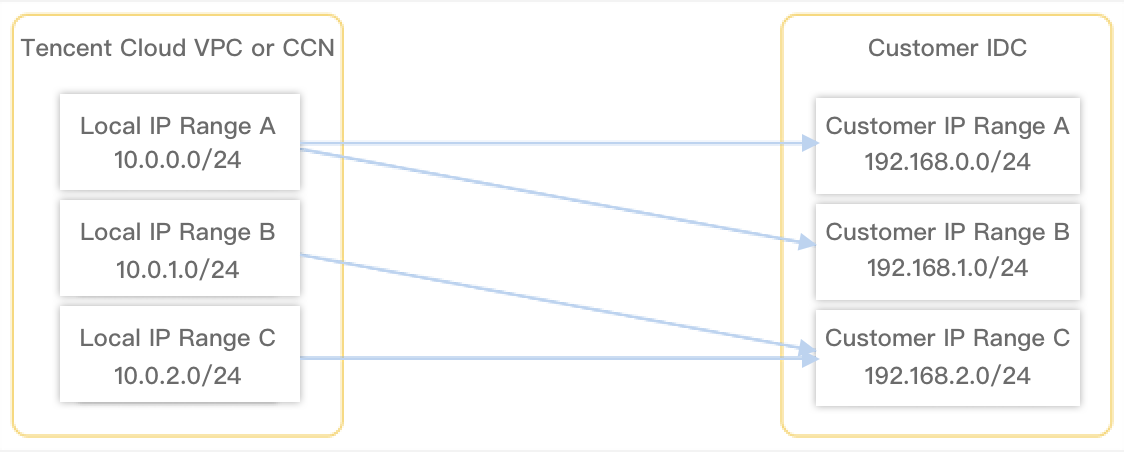
As shown in the figure below, a VPN gateway has the following SPD rules:
SPD rule 1: The local IP range is 10.0.0.0/24, and the peer IP ranges are 192.168.0.0/24 and 192.168.1.0/24. In this rule, two mappings are available.
SPD rule 2: The local IP range is 10.0.1.0/24, and the peer IP range is 192.168.2.0/24. In this rule, one mapping is available.
SPD rule 3: The local IP range is 10.0.1.0/24, and the peer IP range is 192.168.2.0/24. In this rule, one mapping is available.
The mappings are as follows:
10.0.0.0/24-----192.168.0.0/24
10.0.0.0/24-----192.168.1.0/24
10.0.1.0/24-----192.168.2.0/24
10.0.2.0/24-----192.168.2.0/24
The four mappings cannot overlap. In other words, the local IP range and peer IP range in a mapping cannot have a duplicate address range.
A new mapping 10.0.0.0/24-----192.168.1.0/24 cannot be added to SPD rules because it overlaps with an existing mapping.
A new mapping 10.0.1.0/24-----192.168.1.0/24 can be added to SPD rules because it does not overlap with existing mappings.
2. Choose VPN Connection > VPN Tunnel in the left sidebar.
3. On the VPN Connections page, click Create.
4.
Configure
the basic information of the VPN tunnel in the pop-up dialog box.
4.1
Configure basic settings
In this step, configure the basic information of the tunnel, including the name, network, associated VPN gateway, customer gateway, shared key, negotiation type, and communication mode.
Parameter
Description
Tunnel name
Custom tunnel name with 60 characters at most.
Region
The region of the VPN gateway that is associated with the VPN tunnel to be created.
VPN gateway type
Two types of VPN gateways are available: VPN gateway for VPC and VPN gateway for CCN. For more information about the two types of VPN gateways, see Overview.
VPC
Select the VPC of the VPN gateway only when the VPN gateway type is VPC. The VPN for CCN doesn't have such a parameter.
VPN gateway
Select a VPN gateway from the list.
Customer gateway
Select a customer gateway that has been created. Otherwise, create one.
Customer gateway IP
The public IP address of the customer gateway
Pre-shared key
Used to verify the identities of local and customer gateways that must use the same pre-shared key.
Negotiation type
Traffic-triggered: After the VPN tunnel is created, the negotiation will start when the traffic flows to the local end.
Active: After the tunnel is created, the local end actively initiates negotiation with the peer end.
Passive: The negotiation is launched by the peer end.
Communication mode
Supports three types: Destination Routing, SPD Policy, and Dynamic BGP Routing.
Note:
For static routing scenarios, we recommend using destination routing. Before using the SPD policy mode, you can first learn about the SPD policy principles.
To use dynamic BGP route grayscale, submit a ticket.
Customer Gateway ASN
Displays the ASN on the IDC side configured in the customer gateway. (Displayed when dynamic BGP routing is selected.)
BGP tunnel IP range
BGP tunnel IP address range for intercommunication between the cloud and the user. The IP address range must be within the range of 169.254.0.0/16. (Displayed when dynamic BGP routing is selected.)
Cloud BGP Address
BGP IP address for interconnecting the cloud and the IDC side. Do not let it conflict with the VPC CIDR block. It is recommended to use the default assigned address. (Displayed when dynamic BGP routing is selected.)
Customer BGP Address
Automatically assigned address for BGP interconnection on the user side, which cannot be modified. (Displayed when dynamic BGP routing is selected.)
Tags
Tags are identifiers for VPN gateway resources, designed to facilitate faster querying and easier management. This is an optional configuration that you can define as needed.
4.2 Configure advanced settings (optional)
DPD detection configuration
Parameter
Description
Enable DPD
DPD is enabled by default and used to check whether the peer is alive or not. If the response of the DPD request message actively sent by the local end is not received within the specified timeout period, it is considered that the peer is offline and timeout action is performed.
The local end actively sends DPD request messages to the peer. If no response message from the peer is received within the specified timeout period, the peer is considered offline, and the corresponding timeout action is performed.
DPD timeout period
The overall DPD timeout period. Valid range: 30-60s. The default value is 30s.
DPD timeout action
Disconnect: The current SA is cleared and the current VPN tunnel is disconnected
Once you enable health check and create a VPN tunnel, the system immediately performs network quality analysis (NQA) to check the health of the tunnel. If the tunnel is not linked or your configured peer address doesn't respond to NQA detection, the system will consider the tunnel as unhealthy after multiple detection failures and interrupt the business traffic until the tunnel recovers.
VPN gateway IP for health check
This parameter is required only when health check is enabled. You can use the IP address assigned by the system or specify one.
Note:
The specified address cannot conflict with the private network address or IP range of the VPC, CCN, or IDC or the peer address in health check, and it cannot be a multicast, broadcast, or local loopback address.
Customer gateway IP for health check
This parameter is required only when health check is enabled. You can use the IP address assigned by the system or specify one.
Note:
The specified address cannot conflict with the private network address or IP range of the VPC, CCN, or IDC or the local address in health check, and it cannot be a multicast, broadcast, or local loopback address.
ICMP
The NQA method is used to perform health checks.
Health check interval
Interval between two health checks of Tencent Cloud. millisecond (ms). Default value: 5000.
Value range: 1000-5000ms.
Number of health checks
Number of consecutive health check failures after which route switching is performed. Default value: 3.
Value range: 3-8.
Health check latency
Check timeout. Unit: ms. Default value: 150ms.
Value range: 10-5000ms.
IKE configuration
Configuration Item
Description
Version
IKEV1 or IKEV2
Identity verification method
Pre-shared key (default)
Encryption algorithm
IKEV1: AES-128, AES-192, AES-256, 3DES, DES, and SM4 are supported.
IKEV2: AES-128, AES-192, AES-256, 3DES, DES, SM4, AES128GCM128, AES192GCM128, and AES256GCM128 are supported.
AES-128 is recommended.
Verification algorithm
Identity verification algorithm. MD5, SHA1, SHA-256, SHA-384, SHA-512, and SM3 are supported. SHA1 is recommended.
Negotiation mode
Main (main mode) and aggressive (aggressive mode) are supported. The difference is that aggressive mode uses fewer packets to send more information, enabling faster connection establishment, but transmits the security gateway's identity in clear text. When aggressive mode is used, configuration parameters such as Diffie-Hellman and PFS cannot be negotiated, requiring both ends to have compatible configurations. (Selectable only for IKEV1)
Local ID
IP Address (default) and FQDN (full domain name) are supported.
Customer ID
IP Address (default) and FQDN are supported. Default value: IP Address.
DH group
Specify the DH group used for IKE key exchange. Ensure that the peer also supports the selected DH group.
DH group1: A DH group that uses the 768-bit Modular Exponentiation (MODP) algorithm.
DH group2: A DH group that uses the 1024-bit MODP algorithm.
DH group5: A DH group that uses the 1536-bit MODP algorithm.
DH group14: A DH group that uses the 2048-bit MODP algorithm.
DH group15: A DH group that uses the 3072-bit MODP algorithm.
DH group16: A DH group that uses the 4096-bit MODP algorithm.
DH group19: A DH group that uses the 256-bit random elliptic curve (Elliptic Curve Group modulo a Prime, ECP) algorithm.
DH group20: A DH group that uses the 384-bit ECP algorithm.
DH group21: A DH group that uses the 521-bit ECP algorithm.
DH group24: A DH group that uses the 2048-bit MODP algorithm with a 256-bit prime order subgroup.
IKE SA lifetime
Unit: s
The SA lifetime proposed for IKE security. Before a preset lifetime expires, another SA is negotiated in advance to replace the old one. The old SA is used before a new one is determined through negotiation. The new SA is used immediately after establishment, and the old one is automatically cleared after its lifetime expires.
IPsec information Configuration
Configuration Item
Description
Encryption algorithm
For IKEV1, the encryption algorithms supported are AES-128, AES-192, AES-256, 3DES, DES, and SM4.
For IKEV2, the encryption algorithms supported are AES-128, AES-192, AES-256, 3DES, DES, SM4, AES128GCM128, AES192GCM128, and AES256GCM128.
AES-128 is recommended.
Verification algorithm
Identity verification algorithm. MD5, SHA1, SHA-256, SHA-384, SHA-512, and SM3 are supported. SHA1 is recommended.
Packet encapsulation mode
Tunnel
Security protocol
ESP
PFS
Supported values are disable, DH-group1, DH-group2, DH-group5, DH-group14, DH-group15, DH-group16, DH-group19, DH-group20, DH-group21, and DH-group24.