TensorFlow Overview
Download
Mode fokus
Ukuran font
TensorFlow is an end-to-end open source platform for machine learning. It has a comprehensive, flexible ecosystem of tools, libraries, and community resources that lets researchers push the state of the art in machine learning and developers easily build and deploy machine learning-powered applications.
Easy model building
Build and train ML models easily using intuitive high-level APIs like Keras with eager execution, which makes for immediate model iteration and easy debugging.
Reliable machine learning production anywhere
Easily train and deploy models in the cloud, on-prem, in the browser, or on-device no matter what language you use.
Powerful experimentation for research
A simple and flexible architecture to take new ideas from concept to code, to state-of-the-art models, and to publication faster.
TensorFlow Architecture
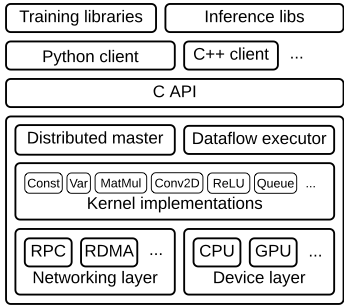
Client
It defines the computation process as a data flow graph and initializes graph execution by using
_Session_.Distributed master
It prunes specific subgraphs in a graph, i.e, parameters defined in
Session.run(), partitions a subgraph into multiple parts that run in different processes and devices, and distributes the graph parts to different worker services, which initialize subgraph computation.Worker service (one for each task)
It schedules the execution of graph operations by using kernel implementations appropriate to the available hardware (CPUs, GPUs, etc.) and sends/receives operation results to/from other worker services.
Kernel implementation
It performs the computation for individual graph operations.
EMR's Support for TensorFlow
TensorFlow version: v1.14.0
Currently, TensorFlow can only run on CPU models instead of GPU models.
TensorFlowOnSpark can be used for distributed training.
TensorFlow Development Sample
Write code:
test.pyimport tensorflow as tfhello = tf.constant('Hello, TensorFlow!')sess = tf.Session()print sess.run(hello)a = tf.constant(10)b = tf.constant(111)print sess.run(a+b)exit()
Run the following command:
python test.py
For more usage, please visit the TensorFlow official website.
Bantuan dan Dukungan
Apakah halaman ini membantu?
Anda juga dapat Menghubungi Penjualan atau Mengirimkan Tiket untuk meminta bantuan.
masukan