tencent cloud

Elastic MapReduce

  • Release Notes and Announcements
  • Product Introduction
  • Purchase Guide
    • EMR on CVM Billing Instructions
    • EMR on TKE Billing Instructions
    • EMR Serverless HBase Billing Instructions
    • EMR Serverless TCBase Billing Overview
  • Getting Started
  • EMR on CVM Operation Guide
    • Planning Cluster
    • Administrative rights
    • Configuring Cluster
    • Managing Cluster
    • Managing Service
    • Monitoring and Alarms
    • TCInsight
  • EMR on TKE Operation Guide
  • EMR Serverless HBase Operation Guide
  • EMR Serverless TCBase Operation Guide
  • EMR Development Guide
    • Hadoop Development Guide
    • Spark Development Guide
    • Hbase Development Guide
    • Phoenix on Hbase Development Guide
    • Hive Development Guide
    • Presto Development Guide
    • Sqoop Development Guide
    • Hue Development Guide
    • Oozie Development Guide
    • Flume Development Guide
    • Kerberos Development Guide
    • Knox Development Guide
    • Alluxio Development Guide
    • Kylin Development Guide
    • Livy Development Guide
    • Kyuubi Development Guide
    • Zeppelin Development Guide
    • Hudi Development Guide
    • Superset Development Guide
    • Impala Development Guide
    • Druid Development Guide
    • TensorFlow Development Guide
    • Kudu Development Guide
    • Ranger Development Guide
    • Kafka Development Guide
    • StarRocks Development Guide
    • Flink Development Guide
    • JupyterLab Development Guide
    • MLflow Development Guide
  • Practical Tutorial
    • Practice of EMR on CVM Ops
    • Data Migration
    • Practical Tutorial on Custom Scaling
  • API Documentation
    • History
    • Introduction
    • API Category
    • Making API Requests
    • Cluster Resource Management APIs
    • Cluster Services APIs
    • User Management APIs
    • Information Query APIs
    • Scaling APIs
    • Configuration APIs
    • Other APIs
    • Cluster Lifecycle APIs
    • Serverless HBase APIs
    • YARN Resource Scheduling APIs
    • Data Types
    • Error Codes
  • FAQs
    • EMR on CVM
  • Service Level Agreement
  • Contact Us

Presto Web UI

Download
Mode fokus
Ukuran font
Terakhir diperbarui: 2025-02-12 16:49:06
Presto is an open source distributed SQL query engine for running interactive analytic queries against data sources of all sizes ranging from gigabytes to petabytes. Presto was designed and written from the ground up for interactive analysis and approaches the speed of commercial data warehouses. Presto allows querying data where it lives, including Hive, Cassandra, relational databases or even proprietary data stores. A single Presto query can combine data from multiple sources, allowing for analysis across your entire organization.
EMR integrates the native web UI of Presto, which you can see in the EMR Console. Log in to the EMR Console, click a cluster instance ID to enter the instance management page. Click Cluster Service on the left sidebar to view the entry to the WebUI Address page and then click the entry to Presto. The username for login is root, and the password is the one set when the cluster was created as shown below:
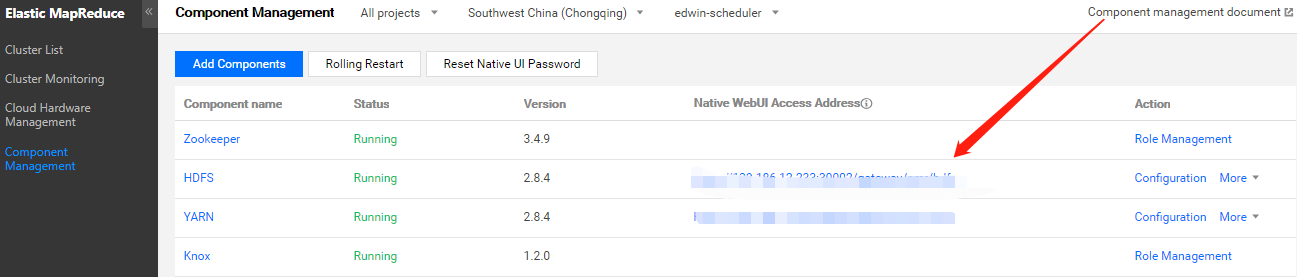
It is required to authenticate the accesses. The username is root, and the default password is the one entered when the cluster was created. To change the password, click Reset Native UI Password.

Bantuan dan Dukungan

Apakah halaman ini membantu?

masukan