tencent cloud

Elasticsearch Service

User Guide
Release Notes and Announcements
Release Notes
Product Announcements
Security Announcement
Product Introduction
Overview
Elasticsearch Version Support Notes
Features
Elastic Stack (X-Pack)
Strengths
Scenarios
Capabilities and Restrictions
Related Concepts
Purchase Guide
Billing Overview
Pricing
Elasticsearch Service Serverless Pricing
Notes on Arrears
ES Kernel Enhancement
Kernel Release Notes
Targeted Routing Optimization
Compression Algorithm Optimization
FST Off-Heap Memory Optimization
Getting Started
Evaluation of Cluster Specification and Capacity Configuration
Creating Clusters
Accessing Clusters
ES Serverless Guide
Service Overview
Basic Concepts
5-Minute Quick Experience
Quick Start
Access Control
Writing Data
Data Query
Index Management
Alarm Management
ES API References
Related Issues
Data Application Guide
Data Application Overview
Data Management
Elasticsearch Guide
Managing Clusters
Access Control
Multi-AZ Cluster Deployment
Cluster Scaling
Cluster Configuration
Plugin Configuration
Monitoring and Alarming
Log Query
Data Backup
Upgrade
Practical Tutorial
Data Migration and Sync
Use Case Construction
Index Configuration
SQL Support
Receiving Watcher Alerts via WeCom Bot
API Documentation
History
Introduction
API Category
Instance APIs
Making API Requests
Data Types
Error Codes
FAQs
Product
ES Cluster
Service Level Agreement
Glossary
New Version Introduction
Elasticsearch Service July 2020 Release
Elasticsearch Service February 2020 Release
Elasticsearch Service December 2019 Release

CAM-Based Access Control Configuration

PDF
Modo Foco
Tamanho da Fonte
Última atualização: 2025-03-20 14:22:07

ES CAM Overview

Cloud Access Management (CAM) is a web-based Tencent Cloud service that helps you securely manage and control access permissions to resources under your Tencent Cloud account. With CAM, you can create, manage, and terminate users (user groups) and use identities and policies to control user access to Tencent Cloud resources. For more information on CAM policies and usage, please see CAM Policy.

ES CAM Policies

General permission policy

ES provides two general policies by default:
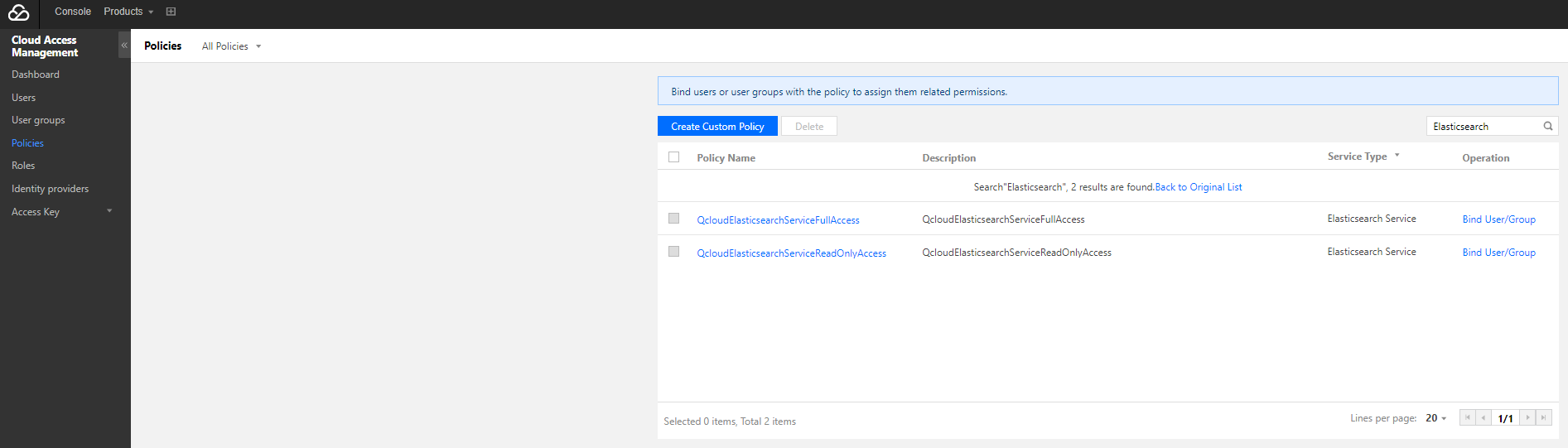
Full access policy (QcloudElasticsearchServiceFullAccess), which grants a user permission to create and manage all ES cluster instances.
Read-only access policy (QcloudElasticsearchServiceReadOnlyAccess), which grants a user permission to view ES cluster instances but not create, update, or delete them.
You can log in to the Policy Management page, select "Elasticsearch Service" in "Service Type", and bind the default policies displayed in the list to accounts as needed.

If the default policies cannot meet your requirements, you can click Create Custom Policy to customize the authorization.

Custom permission policy

Types of resources that can be authorized in ES include:
Resource Type
Resource Description
instance
qcs::es:$region:$account:instance/*
Below describes the details of resource-level access control supported by each API:
API Name
Description
Associated with Resource
Resource Description
Getting cluster list and information of individual clusters
DescribeInstances
Yes
qcs::es:${Region}:uin/${ownerUin}:instance/${instanceId}
Creating cluster
CreateInstance
No
*
Updating cluster
UpdateInstance
Yes
qcs::es:${Region}:uin/${ownerUin}:instance/${instanceId}
Restarting cluster
RestartInstance
Yes
qcs::es:${Region}:uin/${ownerUin}:instance/${instanceId}
Deleting cluster
DeleteInstance
Yes
qcs::es:${Region}:uin/${ownerUin}:instance/${instanceId}
Updating plugin
UpdatePlugins
Yes
qcs::es:${Region}:uin/${ownerUin}:instance/${instanceId}
Supported regions include:
Region
Name
Region ID
South China
Guangzhou
ap-guangzhou
East China
Shanghai
ap-shanghai
Nanjing
ap-nanjing
North China
Beijing
ap-beijing
Southwest China
Chengdu
ap-chengdu
Chongqing
ap-chongqing
Hong Kong/Macao/Taiwan
Hong Kong (China)
ap-hongkong
Southeast Asia Pacific
Singapore
ap-singapore
Northeast Asia Pacific
Seoul
ap-seoul
Tokyo
ap-tokyo
West US
Silicon Valley
na-siliconvalley
East US
Virginia
na-ashburn
Europe
Frankfurt
eu-frankfurt

The syntax of a custom policy is as follows:
{
"version": "2.0",
"statement": [
{
"action": [
"Action"
],
"resource": "Resource",
"effect": "Effect"
}
]
}
Action: replace it with the operation to be allowed or denied.
Resource: replace it with the resources that you want to authorize the user to manipulate.
Effect: replace it with "allow" or "deny".
ES currently supports access control management for all APIs except DescribeInstances. You can authorize a sub-account to perform various operations on a cluster under your account such as updating, restarting, and deleting.

Custom permission sample

To grant an account permission to update the specified cluster, use the following policy syntax:
{
"version": "2.0",
"statement": [
{
"action": [
"es:Describe*"
],
"resource": [
"qcs::es:ap-guangzhou:uin/$uin:instance/$instanceID"
],
"effect": "allow"
},
{
"action": [
"vpc:Describe*",
"vpc:Inquiry*",
"vpc:Get*"
],
"resource": "*",
"effect": "allow"
},
{
"action": [
"monitor:*",
"cam:ListUsersForGroup",
"cam:ListGroups",
"cam:GetGroup"
],
"resource": "*",
"effect": "allow"
},
{
"action": [
"es:Update*"
],
"resource": [
"qcs::es:ap-guangzhou:uin/$uin:instance/$instanceID"
],
"effect": "allow"
}
]
}


Ajuda e Suporte

Esta página foi útil?

comentários