tencent cloud

Tencent Real-Time Communication

소식 및 공지 사항
제품 업데이트
Tencent Cloud 오디오/비디오 단말 SDK 재생 업그레이드 및 권한 부여 인증 추가
TRTC 월간 구독 패키지 출시 관련 안내
제품 소개
제품 개요
기본 개념
제품 기능
제품 장점
응용 시나리오
성능 데이터
구매 가이드
Billing Overview
무료 시간 안내
Monthly subscription
Pay-as-you-go
TRTC Overdue and Suspension Policy
과금 FAQ
Refund Instructions
신규 사용자 가이드
Demo 체험
Call
개요(TUICallKit)
Activate the Service
Run Demo
빠른 통합(TUICallKit)
오프라인 푸시
Conversational Chat
온클라우드 녹화(TUICallKit)
AI Noise Reduction
UI 사용자 정의
Calls integration to Chat
Additional Features
No UI Integration
Server APIs
Client APIs
Solution
ErrorCode
릴리스 노트
FAQs
라이브 스트리밍
Billing of Video Live Component
Overview
Activating the Service (TUILiveKit)
Demo 실행
No UI Integration
UI Customization
Live Broadcast Monitoring
Video Live Streaming
Voice Chat Room
Advanced Features
Client APIs
Server APIs
Error Codes
Release Notes
FAQs
RTC Engine
Activate Service
SDK 다운로드
API 코드 예시
Usage Guidelines
API 클라이언트 API
고급 기능
RTC RESTFUL API
History
Introduction
API Category
Room Management APIs
Stream mixing and relay APIs
On-cloud recording APIs
Data Monitoring APIs
Pull stream Relay Related interface
Web Record APIs
AI Service APIs
Cloud Slicing APIs
Cloud Moderation APIs
Making API Requests
Call Quality Monitoring APIs
Usage Statistics APIs
Data Types
Appendix
Error Codes
콘솔 가이드
애플리케이션 관리
사용량 통계
모니터링 대시보드
개발 보조
Solution
Real-Time Chorus
FAQs
과금 개요
기능 관련
UserSig 관련
방화벽 제한 처리
설치 패키지 용량 축소 관련 질문
Andriod 및 iOS 관련
Web 관련
Flutter 관련
Electron 관련
TRTCCalling Web 관련
멀티미디어 품질 관련
기타 질문
Protocols and Policies
컴플라이언스 인증
보안 백서
정보 보안에 관한 참고 사항
Service Level Agreement
Apple Privacy Policy: PrivacyInfo.xcprivacy
TRTC 정책
개인 정보 보호 정책
데이터 처리 및 보안 계약
용어집
문서Tencent Real-Time Communication

Flutter

포커스 모드
폰트 크기
마지막 업데이트 시간: 2024-07-05 19:07:47
In video conferences, participants can send messages in real-time in the chat area, share opinions and ideas, and create a relaxed and pleasant communication environment by exchanging emoticons and animations. To maintain the order of the meeting, the host or administrator can set to prohibit participants from sending messages in the chat, ensuring the focus and efficiency of the conference content. By flexibly using these features, video conferences can provide efficient and convenient communication experiences for various scenarios.

Feature Introduction

Text, Multimedia Information Interaction

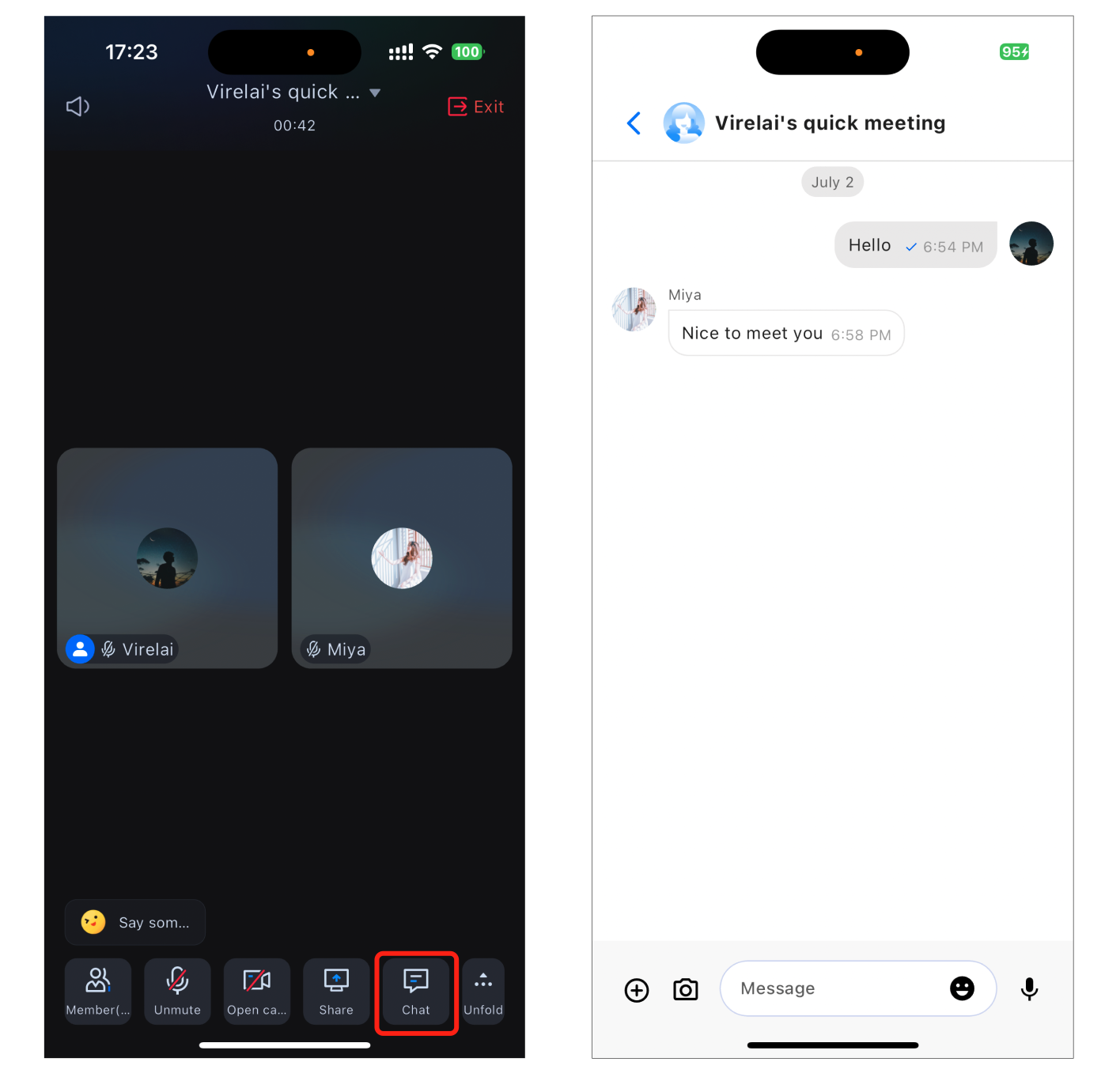
Click the Chat option at the bottom of the conference interface to access the chat interface. Participants can freely send text, pictures, videos, and voice messages, enabling real-time communication without disrupting the conference flow.


Emoji Interaction

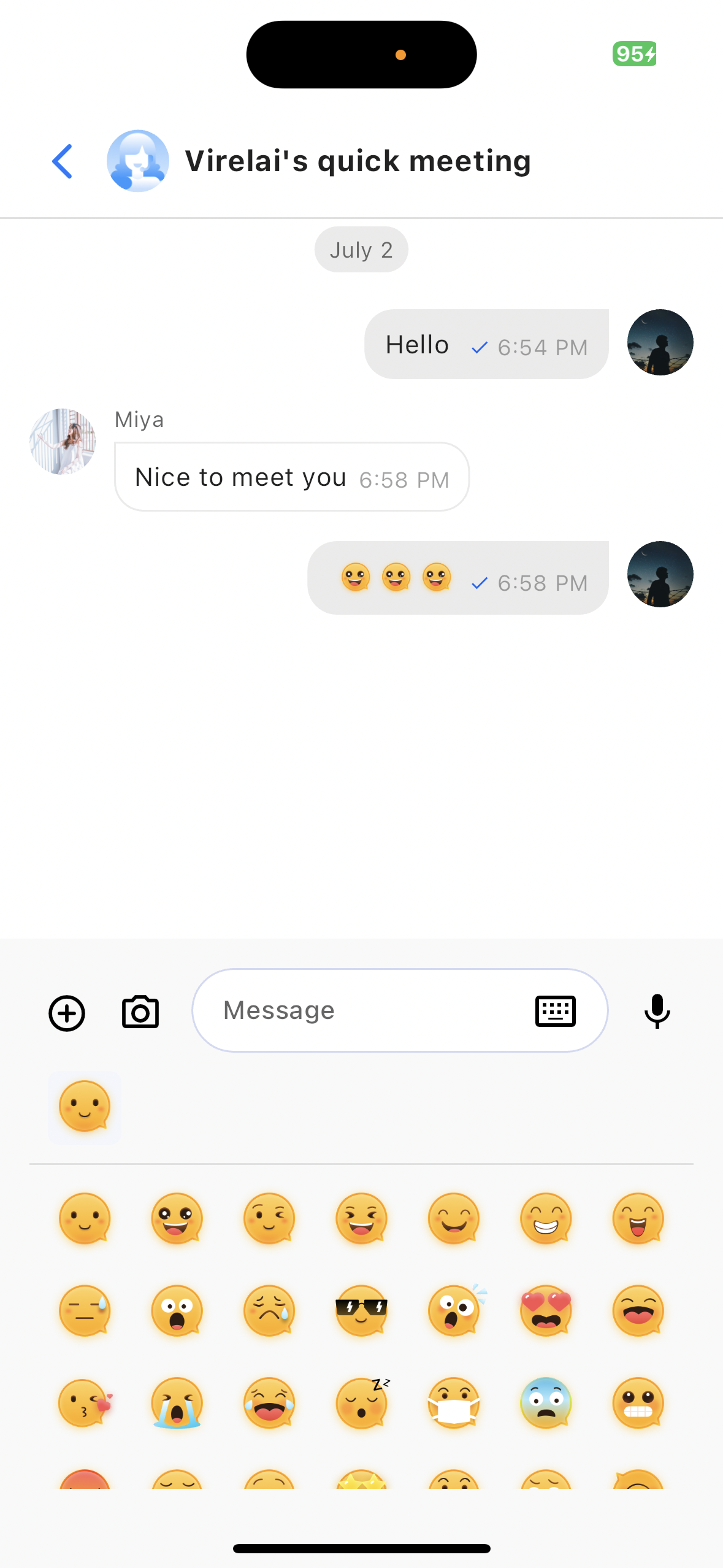
Click the Emoji Icon in the message board editor in the chat interface to bring up the emoji list. Click the corresponding emoji to display it in the message board for sending.


Chat permissions in the control panel

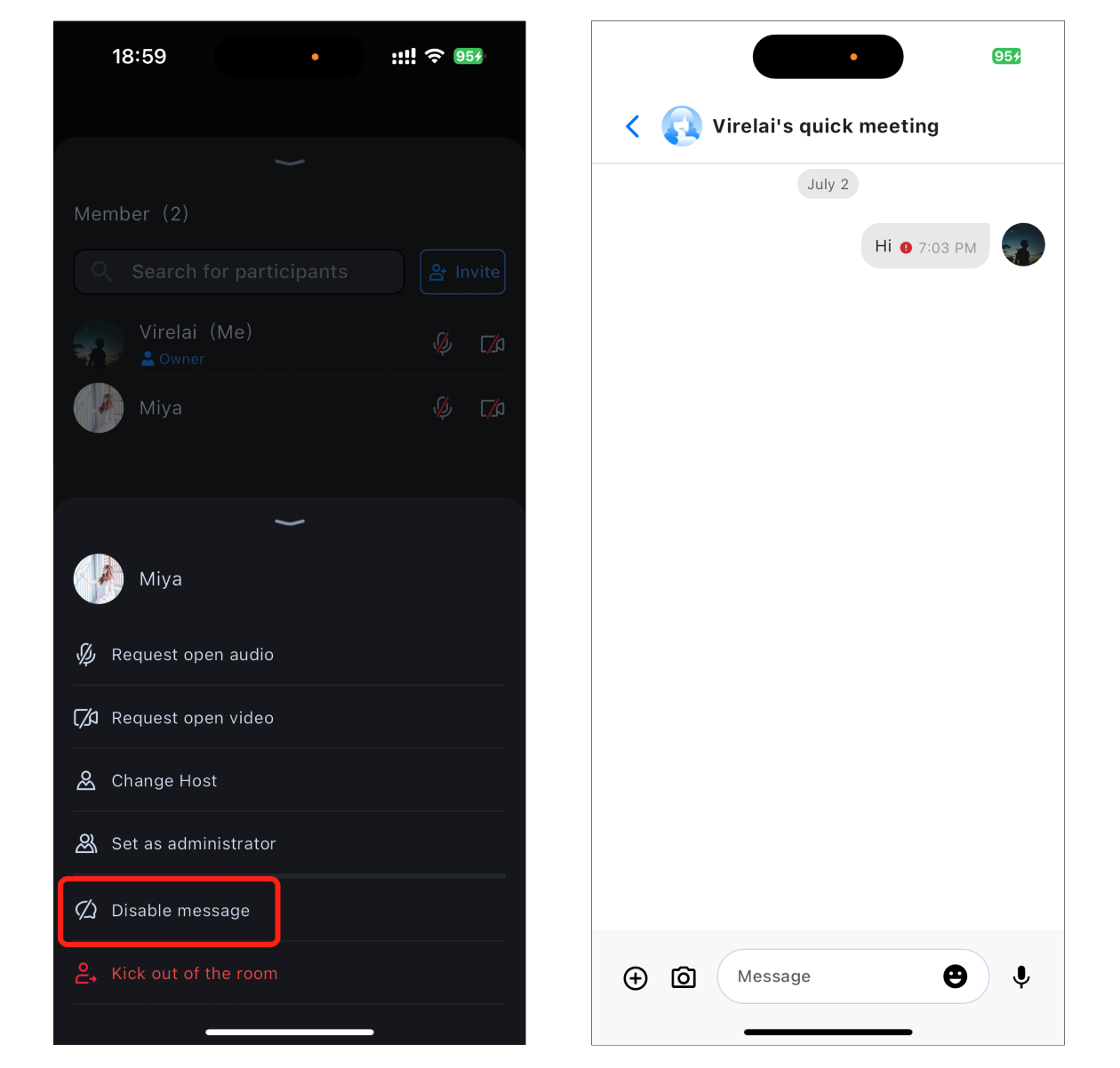
The host/administrator can set a member’s chat permissions in Member Management. If muted, regular members will not be able to send messages.


feature Integration

Integrate chat component

Add the tencent_cloud_chat_message plugin dependency to your project's pubspec.yaml file.
dependencies:
tencent_cloud_chat_message: latest version

International Language Configuration

This step is required. First, import the localization tools into the entry file of the application.
import 'package:tencent_cloud_chat_intl/localizations/tencent_cloud_chat_localizations.dart';
Next, add the localization configuration to entries provided by third-party packages such as MaterialApp or GetMaterialApp. Here, GetMaterialApp is used as an example:
GetMaterialApp(
localizationsDelegates: const [
/// Your original configuration
GlobalMaterialLocalizations.delegate,
/// Add this line
...TencentCloudChatLocalizations.localizationsDelegates,
],
supportedLocales: [
/// Your original configuration
...S.delegate.supportedLocales,

/// Add this line
...TencentCloudChatLocalizations.supportedLocales,
],
/// Other settings
)

Initialization and Login

Add the following code to your project. Its function is to complete the initialization and log in to by calling the relevant interfaces in the chat component. This step is crucial, as the chat can only be used normally after initialization. Therefore, please be patient and check whether the relevant parameters are configured correctly. Among the parameters, sdkAppId, userID, and userSig, you have already used them when logging in to TUIRoomKit.
import 'package:tencent_cloud_chat/components/component_config/tencent_cloud_chat_message_common_defines.dart';
import 'package:tencent_cloud_chat/components/component_config/tencent_cloud_chat_message_config.dart';
import 'package:tencent_cloud_chat/models/tencent_cloud_chat_models.dart';
import 'package:tencent_cloud_chat/tencent_cloud_chat.dart';
import 'package:tencent_cloud_chat_message/tencent_cloud_chat_message.dart';

await TencentCloudChat.controller.initUIKit(
options: TencentCloudChatInitOptions(
sdkAppID: 'SDKAPPID', // Your SDKAPPID
userID: 'userID', // Your userID
userSig: 'userSig', // Your userSig
),
components: TencentCloudChatInitComponentsRelated(
usedComponentsRegister: [TencentCloudChatMessageManager.register], // Register chat components
componentConfigs: TencentCloudChatComponentConfigs(
messageConfig: TencentCloudChatMessageConfig(
// The following configuration is recommended.
showMessageSenderName: ({groupID, topicID, userID}) => true,
showSelfAvatar: ({groupID, topicID, userID}) => true,
defaultMessageMenuConfig: ({groupID, topicID, userID}) =>
TencentCloudChatMessageDefaultMessageMenuConfig(
enableMessageForward: false,
enableMessageSelect: false,
),
),
),
),
plugins: [],
);

Using Emojis (Optional)

If you need to send and receive emojis, you need to configure as follows:

Add Dependencies

In your project's pubspec.yaml file, add the tencent_cloud_chat_sticker plugin dependency.

Complete configuration

In the plugins of Initialization and Login in the previous step, add the following code:
plugins: [
TencentCloudChatPluginItem(
name: "sticker",
initData: TencentCloudChatStickerInitData(
useDefaultSticker: true, // Default stickers, only this sticker pack can interoperate with TUIRoomKit from other platforms.
useDefaultCustomFace_4350: false, // If you do not need to use TUIRoomKit from other platforms, you can enable the following emoji pack.
useDefaultCustomFace_4351: false,
useDefaultCustomFace_4352: false,
userID: 'userId', // Your userId
).toJson(),
pluginInstance: TencentCloudChatStickerPlugin(
context: context,
),
),
],
Note:
To respect the copyright of emoji designs, the TUIRoomKit example project does not include large emoji cut elements. Before official commercial use, please replace them with your own designs or other emoji packs you have copyright to. The default Little Yellow Face emoji pack is copyrighted by Tencent Cloud, and can be licensed for a fee. If you wish to obtain a license, you can Submit a ticket to contact us.

Using Chat

When you create or join a conference successfully, you need to pass the chatWidget into the conference page, ConferenceMainPage . After passing it in, the chat button will display in the bottom toolbar. Clicking the chat button will automatically navigate to chatWidget.
Navigator.push(
context,
MaterialPageRoute(
builder: (context) => ConferenceMainPage( // Conference main page
chatWidget: TencentCloudChatMessage(
options: TencentCloudChatMessageOptions(groupID: 'yourConferenceId'), // Your Confere
),
),
),
);
After completing the above configuration, you can click the chat button to chat during the conference.

도움말 및 지원

문제 해결에 도움이 되었나요?

피드백