tencent cloud

Cloud Log Service

Release Notes and Announcements
Release Notes
Announcements
User Guide
Product Introduction
Overview
Features
Available Regions
Limits
Concepts
Service Regions and Service Providers
Purchase Guide
Billing Overview
Product Pricing
Pay-as-You-Go
Billing
Cleaning up CLS resources
Cost Optimization
FAQs
Getting Started
Getting Started in 1 Minute
Getting Started Guide
Quickly Trying out CLS with Demo
Operation Guide
Resource Management
Permission Management
Log Collection
Metric Collection
Log Storage
Metric Storage
Search and Analysis (Log Topic)
Search and Analysis (Metric Topic)
Dashboard
Data Processing documents
Shipping and Consumption
Monitoring Alarm
Cloud Insight
Independent DataSight console
Historical Documentation
Practical Tutorial
Log Collection
Search and Analysis
Dashboard
Monitoring Alarm
Shipping and Consumption
Cost Optimization
Developer Guide
Embedding CLS Console
CLS Connection to Grafana
API Documentation
History
Introduction
API Category
Making API Requests
Topic Management APIs
Log Set Management APIs
Index APIs
Topic Partition APIs
Machine Group APIs
Collection Configuration APIs
Log APIs
Metric APIs
Alarm Policy APIs
Data Processing APIs
Kafka Protocol Consumption APIs
CKafka Shipping Task APIs
Kafka Data Subscription APIs
COS Shipping Task APIs
SCF Delivery Task APIs
Scheduled SQL Analysis APIs
COS Data Import Task APIs
Data Types
Error Codes
FAQs
Health Check
Collection
Log Search
Others
CLS Service Level Agreement
CLS Policy
Privacy Policy
Data Processing And Security Agreement
Contact Us
Glossary

Consumption of CLS Log with Flink

PDF
Focus Mode
Font Size
Last updated: 2024-01-20 17:28:40
This document describes how to consume CLS logs with Flink in real time, analyze Nginx log data with Flink SQL, calculate web PVs/UVs, and write the result to self-built MySQL databases in real time.
Components/Applications and their versions used in this document are as described below:
Technical Component
Version
Nginx
1.22
CLS
-
Java
OpenJDK version "1.8.0_232"
Scala
2.11.12
Flink SQL
Flink 1.14.5
MySQL
5.7

Directions

Step 1. Install the Tencent Cloud Nginx gateway

1. Purchase a CVM instance as instructed in Creating Instances via CVM Purchase Page.
2. Install Nginx as instructed in the directions for installing Nginx on Linux.
3. The installation is successful if you can access Nginx in the browser and see the following page:


Step 2. Collect Nginx logs to CLS

1. Configure Nginx log collection as instructed in Collecting and Searching NGINX Access Logs.
2. Install CLS's log collector LogListener as instructed in LogListener Installation Guide. Similar to the open-source component Beats, LogListener is an agent that collects logs.
3. After index is enabled for log topics, you can query Nginx logs as shown below:
4. Enable consumption over Kafka in the CLS console to use the feature. You can consume a log topic as a Kafka topic. This document describes how to consume Nginx log data in real time with the stream computing framework Flink and then write the real-time computing result to MySQL.

Step 3. Set up a MySQL database

For detailed directions, see Creating MySQL Instance.
1. Log in to the database:
mysql -h 172.16.1.1 -uroot
2. Create the target database and table. Here, the flink_nginx database and mysql_dest table are created.
create database if not exists flink_nginx;
create table if not exists mysql_dest(
ts timestamp,
pv bigint,
uv bigint
);
1. We recommend that you use the following versions for Flink deployment; otherwise, the installation may fail.
Purchase a CVM instance as instructed in Creating Instances via CVM Purchase Page.
Install Scala 2.11.12 as instructed in Ways to Install This Release.
2. Install Flink 1.14.15 and go to the SQL UI. Download the binary code package of Flink from the Apache Flink website and start installation.
# Decompress the Flink binary package
tar -xf flink-1.14.5-bin-scala_2.11.tgz
cd flink-1.14.5

# Download Kafka dependencies
wget https://repo1.maven.org/maven2/org/apache/flink/flink-connector-kafka_2.11/1.14.5/flink-connector-kafka_2.11-1.14.5.jar
mv flink-connector-kafka_2.11-1.14.5.jar lib
wget https://repo1.maven.org/maven2/org/apache/kafka/kafka-clients/2.4.1/kafka-clients-2.4.1.jar
mv kafka-clients-2.4.1.jar lib

# Download MySQL dependencies
wget https://repo1.maven.org/maven2/org/apache/flink/flink-connector-jdbc_2.11/1.14.5/flink-connector-jdbc_2.11-1.14.5.jar
mv flink-connector-jdbc_2.11-1.14.5.jar lib
wget https://repo1.maven.org/maven2/mysql/mysql-connector-java/8.0.11/mysql-connector-java-8.0.11.jar
mv mysql-connector-java-8.0.11.jar lib
wget https://repo1.maven.org/maven2/org/apache/flink/flink-table-common/1.14.5/flink-table-common-1.14.5.jar
mv flink-table-common-1.14.5.jar lib

# Start Flink
bin/start-cluster.sh
bin/sql-client.sh
3. The installation is successful if the following information is displayed. Note that the default web port is 8081.


1. On the SQL client UI, execute the following SQL statements:
-- Create a data source table to consume Kafka data
CREATE TABLE `nginx_source`
(
`remote_user` STRING, -- Field in the log, which indicates the client name.
`time_local` STRING, -- Field in the log, which indicates the local time of the server.
`body_bytes_sent` BIGINT, -- Field in the log, which indicates the number of bytes sent to the client.
`http_x_forwarded_for` STRING, -- Field in the log, which records the actual client IP when there is a proxy server on the frontend.
`remote_addr` STRING, -- Field in the log, which indicates the client IP.
`protocol` STRING, -- Field in the log, which indicates the protocol type.
`status` INT, -- Field in the log, which indicates the HTTP request status code.
`url` STRING, -- Field in the log, which indicates the URL.
`http_referer` STRING, -- Field in the log, which indicates the URL of the referer.
`http_user_agent` STRING, -- Field in the log, which indicates the client browser information.
`method` STRING, -- Field in the log, which indicates the HTTP request method.
`partition_id` BIGINT METADATA FROM 'partition' VIRTUAL, -- Kafka partition
`ts` AS PROCTIME()
) WITH (
'connector' = 'kafka',
'topic' = 'YourTopic', -- Topic name provided in the CLS console for consumption over Kafka, such as `out-633a268c-XXXX-4a4c-XXXX-7a9a1a7baXXXX`
'properties.bootstrap.servers' = 'kafkaconsumer-ap-guangzhou.cls.tencentcs.com:9096', -- Service address provided in the CLS console for consumption over Kafka. The public network consumer address in Guangzhou region is used as an example. You need to enter the actual information.
'properties.group.id' = 'kafka_flink', -- Kafka consumer group name
'scan.startup.mode' = 'earliest-offset',
'format' = 'json',
'json.fail-on-missing-field' = 'false',
'json.ignore-parse-errors' = 'true' ,
'properties.sasl.jaas.config' = 'org.apache.kafka.common.security.plain.PlainLoginModule required username="your username" password="your password";',--Your username is the logset ID of the log topic, such as `ca5cXXXX-dd2e-4ac0-af12-92d4b677d2c6`, and the password is a string of your `secretid#secrectkey`, such as `AKIDWrwkHYYHjvqhz1mHVS8YhXXXX#XXXXuXtymIXT0Lac`. Note that `#` is required. We recommend that you use a sub-account key and follow the principle of least privilege when authorizing a sub-account, that is, configure the minimum permission for `action` and `resource` in the access policy of the sub-account.
'properties.security.protocol' = 'SASL_PLAINTEXT',
'properties.sasl.mechanism' = 'PLAIN'

);

--- Create the target table and write it to MySQL
CREATE TABLE `mysql_dest`
(
`ts` TIMESTAMP,
`pv` BIGINT,
`uv` BIGINT
) WITH (
'connector' = 'jdbc',
'url' = 'jdbc:mysql://11.150.2.1:3306/flink_nginx?&serverTimezone=Asia/Shanghai', -- Note the time zone settings here
'username'= 'username', -- MySQL account
'password'= 'password', -- MySQL password
'table-name' = 'mysql_dest' -- MySQL table name
);

--- Query the Kafka data source table and write the computing result to the MySQL target table

INSERT INTO mysql_dest (ts,uv,pv)
SELECT TUMBLE_START(ts, INTERVAL '1' MINUTE) start_ts, COUNT(DISTINCT remote_addr) uv,count(*) pv
FROM nginx_source
GROUP BY TUMBLE(ts, INTERVAL '1' MINUTE);
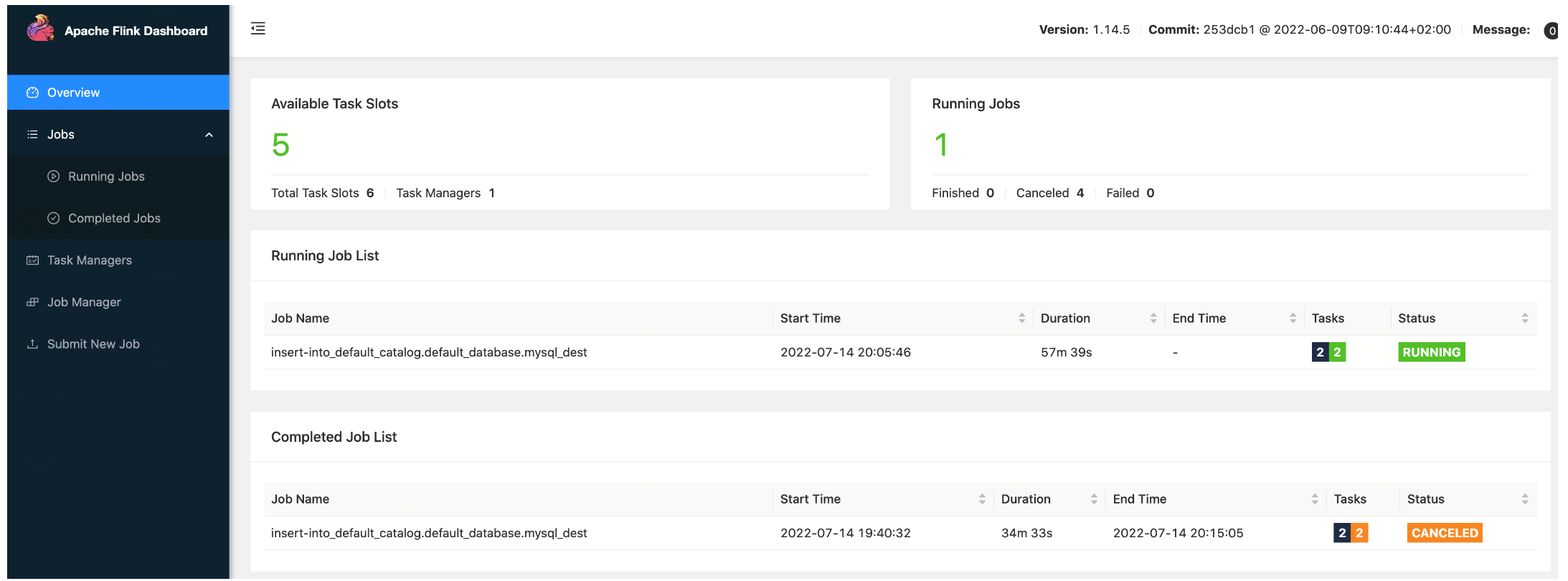
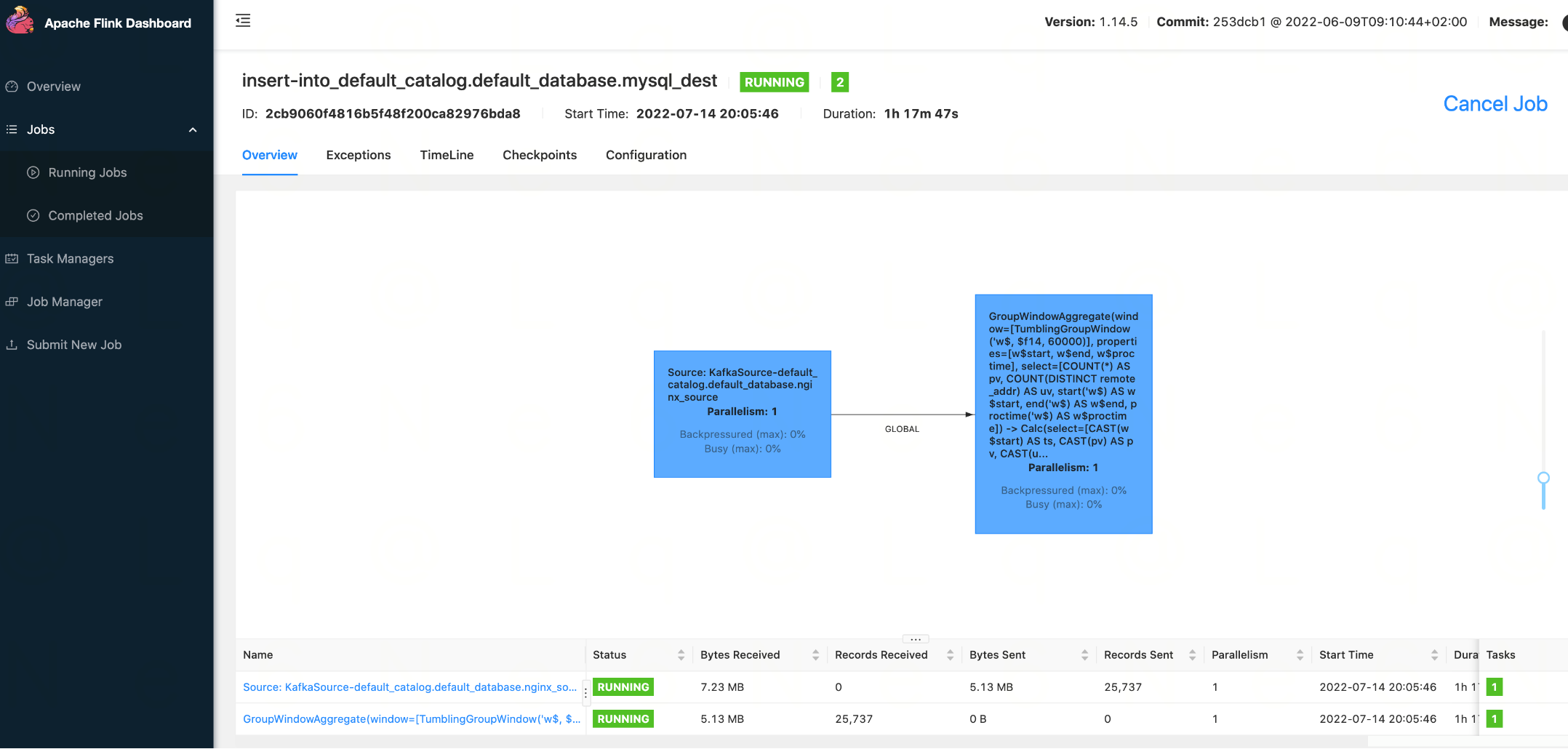
2. On the Flink task monitoring page, view the monitoring data of the task:


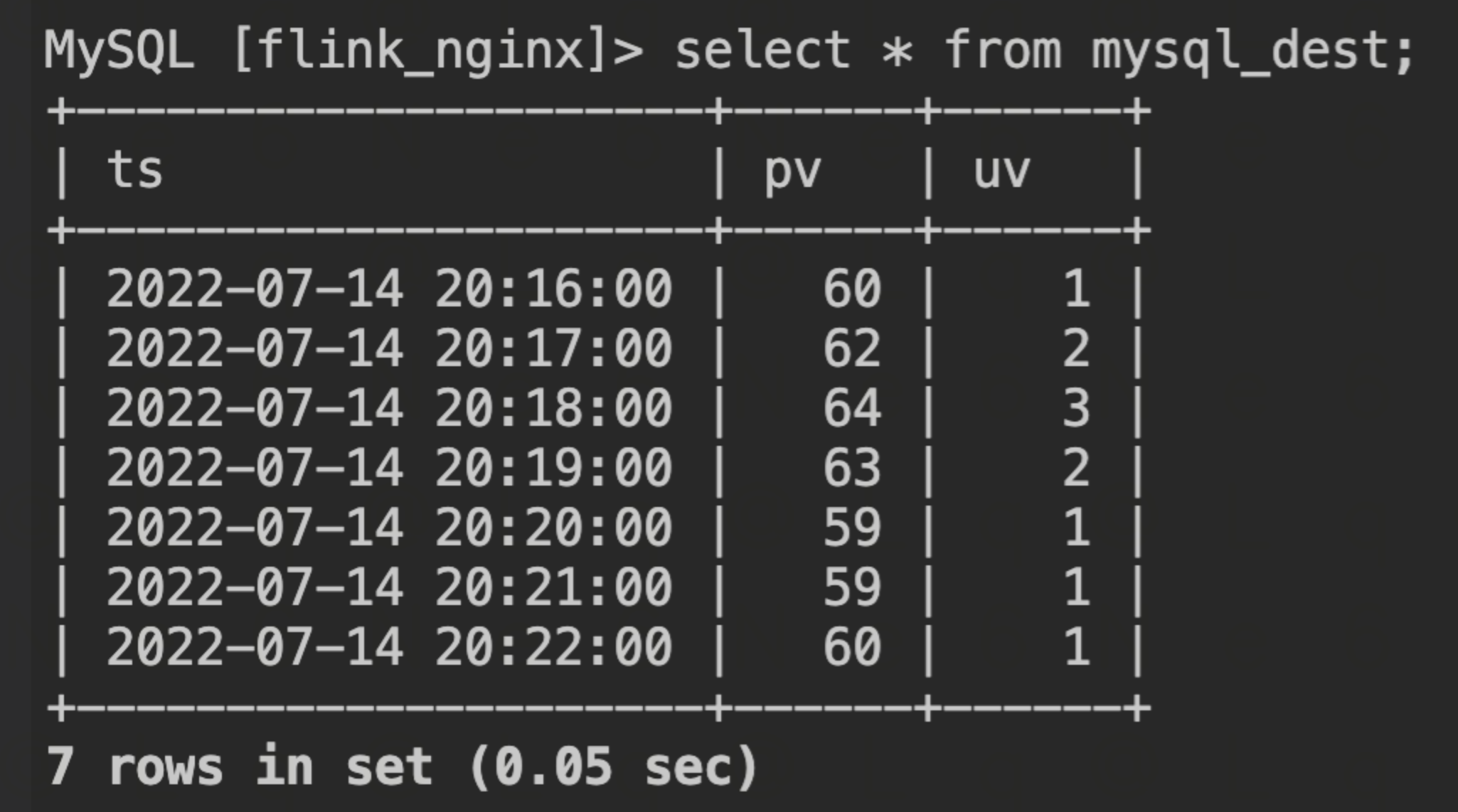
3. Go to the MySQL database, and you can see that PV and UV results are calculated and written in real time:


Help and Support

Was this page helpful?

Help us improve! Rate your documentation experience in 5 mins.

Feedback