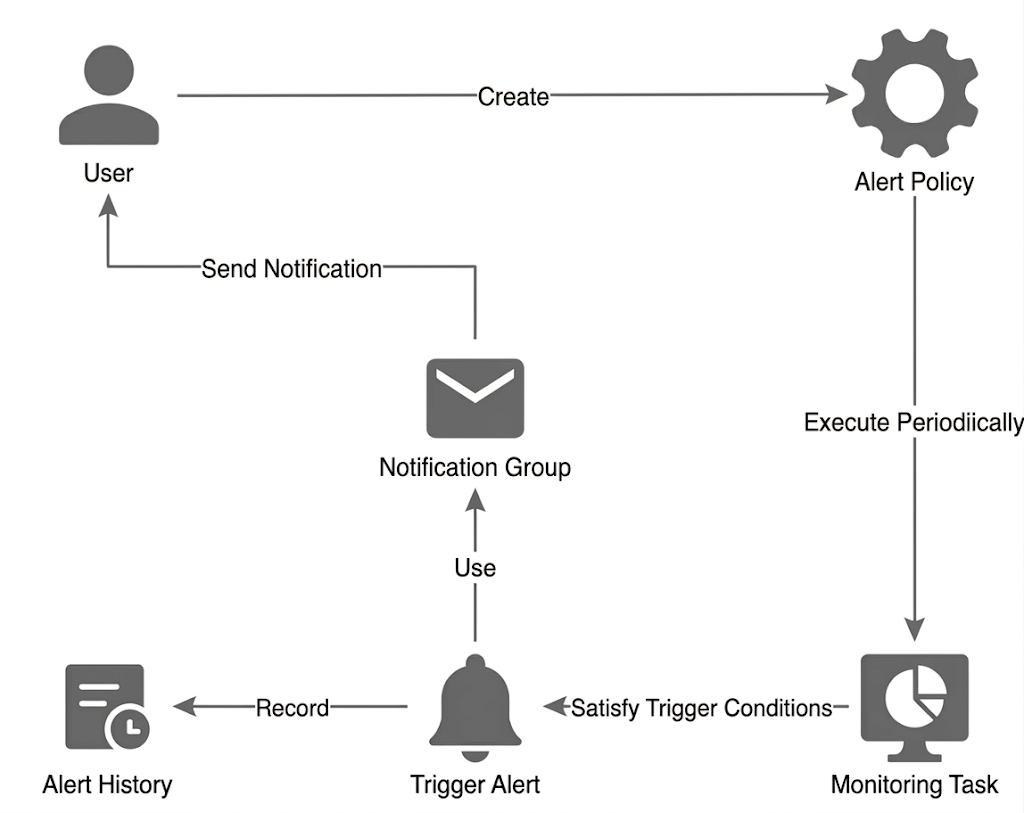
CLS supports setting alarm policies for one or more log topics. An alarm policy periodically performs monitoring tasks and sends alarm notifications when the query and analysis results meet the trigger condition, so that you can find exceptions in time.
Relevant concepts
Name
Description
Alarm policy
It is the management unit for monitoring alarms. An alarm policy contains various information such as monitoring object, monitoring period, trigger condition, alarm frequency, and notification template.
Monitoring object
A log topic can be used as the monitoring object, a query or analysis statement can be executed on the log topic, and then the query or analysis result can be checked.
Monitoring Task
Query statement
The search and analysis statement executed on the monitored object, with syntax rules consistent with search and analysis.
Trigger condition
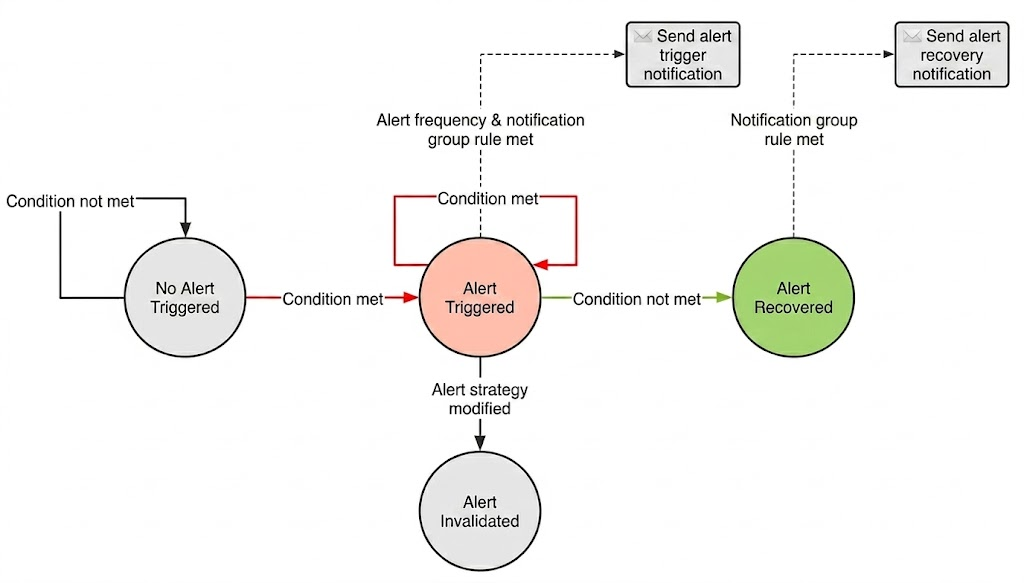
The query and analysis result is checked, and if the trigger condition expression is true, an alarm will be triggered.
When the search and analysis result no longer meets the execution condition, the alarm recovers.
Monitoring period
It is the policy execution period. A fixed period (such as every 5 minutes) and a fixed time (such as 12:00 every day) are supported.
Warning
Alarm Severity
Different trigger conditions can trigger alarms of different severity levels, including info, warning, and critical.
Alarm Status
When the trigger condition is met for the first time, the alarm is in the Not Cleared state. When the trigger condition is no longer met, the alarm is in the Cleared state. When the alarm policy is edited, alarms that have not been cleared will be set to the Invalid state.
Alarm History
View current uncleared alarms and historical cleared alarm records.
Alarm notification
Alarm frequency
It is the alarm frequency after the trigger condition is met, which helps avoid frequent alarm notifications.
Notification group
Supported notification channels include SMS, WeChat, phone calls, email, and webhook.
You can configure different rules for alarms to use different notification channels. For example, "Critical" alarms are notified via phone call, "Warning" alarms are notified via SMS, and "Info" alarms are not notified.
The system supports delivering the execution process of an alarm policy as logs to a log topic.
Notification Content Templates
Customizing alarm notification content and format.
Integration Configuration
Unified management of alarm notification addresses for WeCom, DingTalk, and Feishu bots, as well as custom API callback addresses
Advantages
The syntax rules for alarm policy execution statements are consistent with those for search and analysis:
Log topics support SQL and comply with the SQL-92 standard. You can use flexible SQL syntax and 400+ SQL functions to perform statistics on logs and obtain various alarm-related metrics from them.
Metric topics support PromQL, enabling flexible metric operations and statistics.
By employing the multi-dimensional analysis feature, you can view detailed alarm causes in the alarm notifications to improve troubleshooting efficiency.
Fee Instructions
The monitoring and alarm feature incurs no charges. The SMS and voice notification channels are currently provided free of charge. If there is any future plan to charge for them, you will be notified at least one month in advance.
Specifications and Limits
See Specifications and Limitations for the specifications and limitations of shared retrieval and analysis of alarm features.