CLS authorizes sub-accounts through Cloud Access Management (CAM). Users can create, manage, and delete users (groups) via CAM, and control other users' permissions to use Tencent Cloud resources through identity management and policy management. For details and usage of CAM policies, see the CAM Policy document.
Preset access policies
CLS offers two preset access policies to meet your basic access management demand.
QcloudCLSFullAccess: Grants permissions on all features and resources in CLS, such as creating log topics, modifying index configuration, deleting log topics, searching logs, and uploading logs.
QcloudCLSReadOnlyAccess: Grants read-only permissions on data. Operations such as creation, modification, and deletion are not permitted.
When preset policies do not meet your permission control requirements, you can use custom permission policies for fine-grained permission control. For example, you can allow a specific user to view data only from specific log topics.
A custom access policy consists of two parts:
Action: The action a user is allowed to perform, such as searching for logs, modifying index configuration, uploading logs, and creating alarm policies.
Resource: The resources a user is allowed to operate on, such as a specific log topic, dashboard, and data processing task.
Configuring a custom permission policy can be complex. In practice, you can refer to the CLS Access Policy Templates. These samples can meet most permission management requirements, and you can further customize them based on these policy samples. The detailed procedure is as follows:
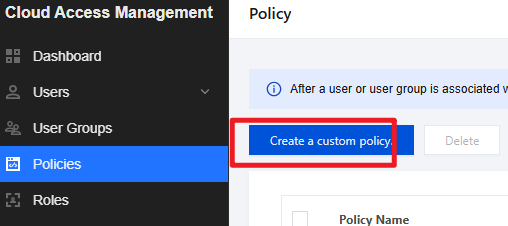
1. On the Policies page, the root account (or a user with CAM management permissions) clicks Create a custom policy.
2. In the pop-up window, click Create according to the policy syntax.
3. On the Select a Policy Template page, select Blank Template and click Next.
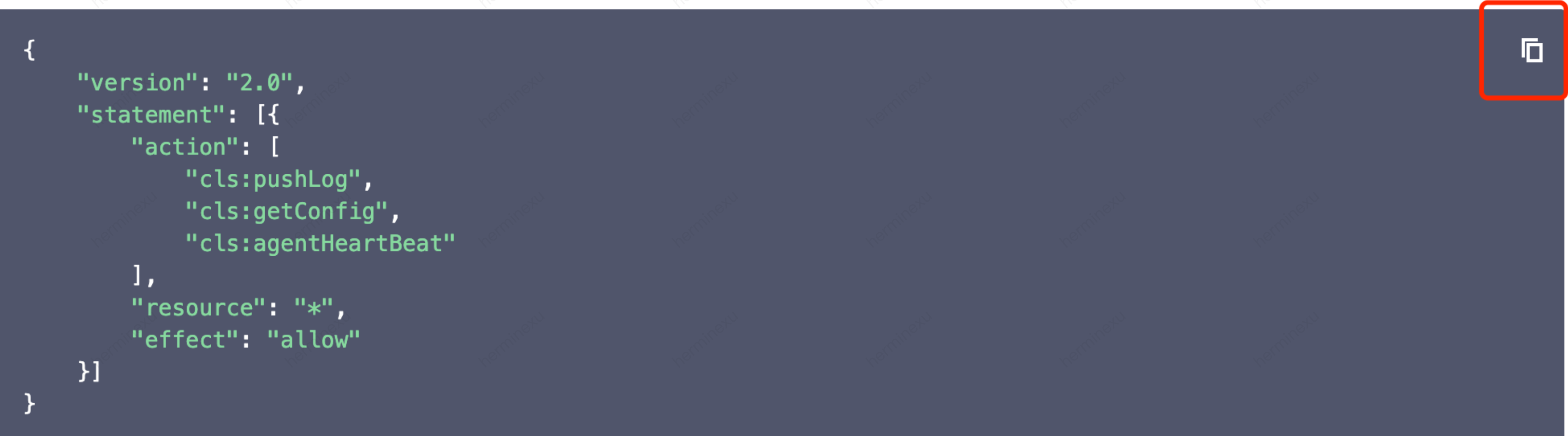
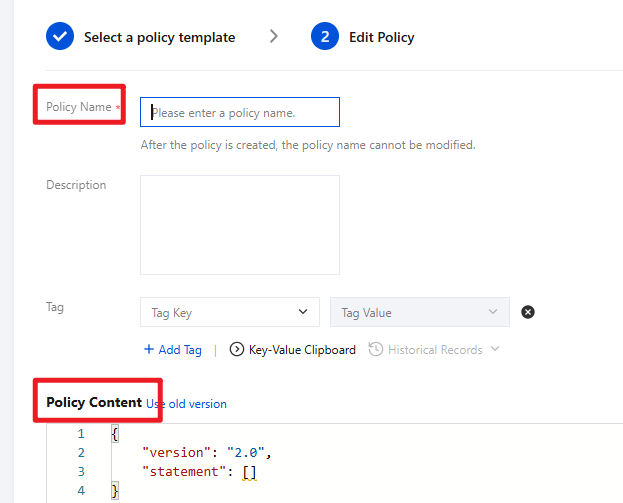
4. On the policy editing page, set the policy name and enter the policy content. The policy content can be copied from the CLS Access Policy Templates. For example: to grant a sub-account the permission to use Loglistener for data collection, copy the policy shown in the following figure:
5. Click Completed to save the policy. After the custom policy is created, you can associate it with users/user groups/roles via Authorization Management to grant them the corresponding operation permissions.