tencent cloud

Cloud Log Service

Release Notes and Announcements
Release Notes
Announcements
User Guide
Product Introduction
Overview
Features
Available Regions
Limits
Concepts
Service Regions and Service Providers
Purchase Guide
Billing Overview
Product Pricing
Pay-as-You-Go
Billing
Cleaning up CLS resources
Cost Optimization
FAQs
Getting Started
Getting Started in 1 Minute
Getting Started Guide
Quickly Trying out CLS with Demo
Operation Guide
Resource Management
Permission Management
Log Collection
Metric Collection
Log Storage
Metric Storage
Search and Analysis (Log Topic)
Search and Analysis (Metric Topic)
Dashboard
Data Processing documents
Shipping and Consumption
Monitoring Alarm
Cloud Insight
Independent DataSight console
Historical Documentation
Practical Tutorial
Log Collection
Search and Analysis
Dashboard
Monitoring Alarm
Shipping and Consumption
Cost Optimization
Developer Guide
Embedding CLS Console
CLS Connection to Grafana
API Documentation
History
Introduction
API Category
Making API Requests
Topic Management APIs
Log Set Management APIs
Index APIs
Topic Partition APIs
Machine Group APIs
Collection Configuration APIs
Log APIs
Metric APIs
Alarm Policy APIs
Data Processing APIs
Kafka Protocol Consumption APIs
CKafka Shipping Task APIs
Kafka Data Subscription APIs
COS Shipping Task APIs
SCF Delivery Task APIs
Scheduled SQL Analysis APIs
COS Data Import Task APIs
Data Types
Error Codes
FAQs
Health Check
Collection
Log Search
Others
CLS Service Level Agreement
CLS Policy
Privacy Policy
Data Processing And Security Agreement
Contact Us
Glossary

Machine Group Exception

PDF
Focus Mode
Font Size
Last updated: 2024-01-20 17:11:57

Error Description

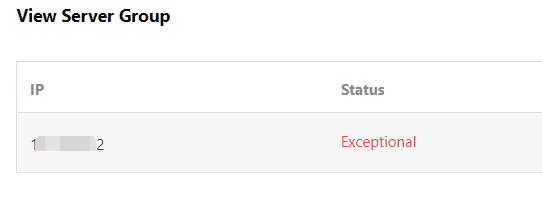
When the machine group is configured, LogListener may have an exception, such as disconnection from the CLS server and log upload failure. In this case, the machine group is exceptional, as shown below:


Troubleshooting Directions

Note:
These troubleshooting steps only apply to LogListener 2.2.4 or later. If you’re using an earlier version, see Troubleshooting Earlier LogListener Versions.

1. Use the LogListener diagnostic tool

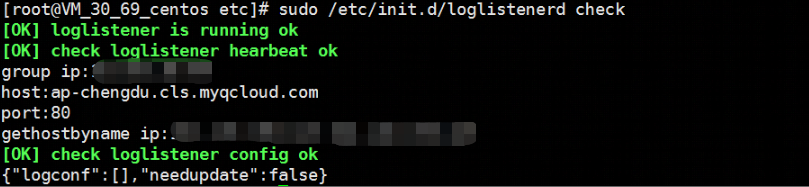
This tool helps you quickly check the LogListener operation, heartbeat and configuration. Run the following CLI commands.
/etc/init.d/loglistenerd check
The following output indicates that LogListener is running properly.
1574426236479


LogListener process exception

If the result returns “[ERROR] loglistener is not running” as shown in the following figure, it indicates that LogListener is not started. Run the /etc/init.d/loglistenerd start command to start it. For more information about the operation commands, see Using LogListener.
img


LogListener heartbeat exception

If the result returns “[ERROR] check loglistener heartbeat fail”, it indicates that LogListener has a heartbeat exception.
Many causes can lead to a LogListener heartbeat exception. Possible causes include:
Network error
telnet <cls domain name> 80
Check the network connectivity. For more information about the CLS domain name, see Available Regions.
Incorrect key
To check the LogListener key, access the LogListener installation directory and run the following command.
grep secret etc/loglistener.conf


2. Check for the IP address of the machine group

Check that the IP address added to the machine group is the one configured on LogListener during installation. Run the following command to check the IP address configured on LogListener.
grep group_ip etc/loglistener.conf

Log in to the CLS console, and select Server Group in the left sidebar. On the Server Group Management page, view and verify that the IP address of the machine group is the same as that configured on LogListener.

Help and Support

Was this page helpful?

Help us improve! Rate your documentation experience in 5 mins.

Feedback