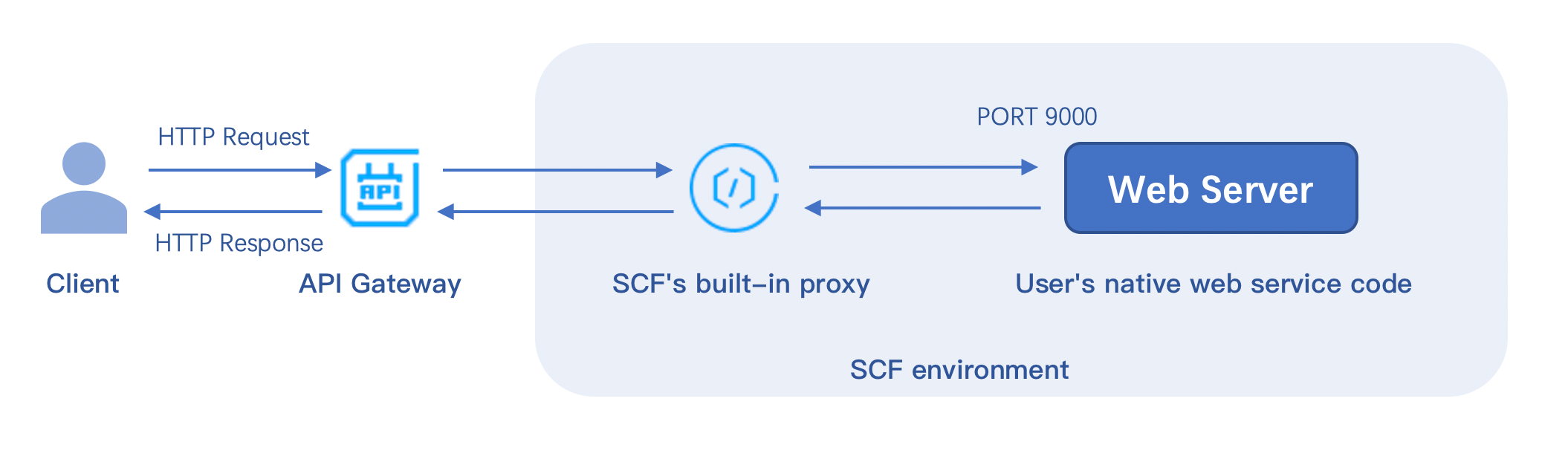
HTTP-triggered function is a function type in SCF. Compared with event-triggered function that has limits on the event format, HTTP-triggered function focuses on optimization of web service scenarios and can directly send HTTP requests to URLs to trigger function execution.
Features and Advantages
In terms of the support for web service scenarios, HTTP-triggered function excels event function in the following aspects:
Functions can directly receive and process HTTP or WebSocket requests, so API Gateway doesn't need to convert the requests to JSON format, which reduces the request processing steps and improves the web service performance.
The writing experience of HTTP-triggered function is closer to that of native web services, and native Node.js APIs can be used to deliver a service experience consistent with that of local development.
A rich set of frameworks are supported. You can use common web frameworks, such as Node.js web frameworks Express and Koa, to write HTTP-triggered functions. You can also quickly migrate your local web framework services to the cloud with minimal modification.
An HTTP-triggered function can automatically create an API Gateway service for you. After the deployment is completed, API Gateway will automatically generate a default URL for user access and invocation, which reduces the learning costs and simplifies debugging.
The SCF console provides testing capabilities for you to quickly test your services.
How It Works
How an HTTP-triggered function works is as shown below:
After your HTTP request passes API Gateway, when directly passing through the native request, API Gateway will add the content required by the gateway to trigger the function, such as function name and function region, to the request header and pass the modified request to the function environment to trigger the backend function.
In the function environment, the built-in proxy is used to implement Nginx-based forwarding, remove the request information not required by the service specification from the header, and send the native HTTP request to your web server service through the specified port.
After being configured with the specified listening port 9000 and service bootstrap file, your web server will be deployed in the cloud and use this port to get HTTP requests for processing.
Usage Limits
Feature limits
Currently, HTTP-triggered functions can be bound to only API Gateway triggers.
A function can be bound to multiple API Gateway triggers, but all APIs must be under the same API service.
Async invocations and retries are not supported.
In the Tencent Cloud standard environment, only the /tmp directory is readable and writable. When outputting files, please select the /tmp path; otherwise, the service will exit exceptionally due to the lack of write permission.
For projects that requires compression for deployment (JAVA, Go), please make sure that scf_bootstrap is included in the ZIP package.
Request limits
HTTP-triggered functions can be invoked only through API Gateway but not function APIs.
Response headers has the following limits:
The total size of all key and value values cannot exceed 4 KB.
The size of body cannot exceed 6 MB.
When deploying your web service, you must listen on the specified 9000 port and cannot listen on the internal loopback address 127.0.0.1.
Currently, the Connection field in the HTTP request header cannot be customized.
Common Function Request Headers
The common request headers received by your web server from the function environment are as detailed below, none of which can be customized:
Header Field
Description
X-Scf-Request-Id
Current request ID
X-Scf-Memory
Maximum memory that can be used during function instance execution