Benefits of Migration
Nginx Ingress offers a vast and flexible range of features and configurations that can cater to various use cases. Self-building allows you to unlock all features of Nginx Ingress, customize configurations as needed, and update versions in a timely manner.
Migration Approach
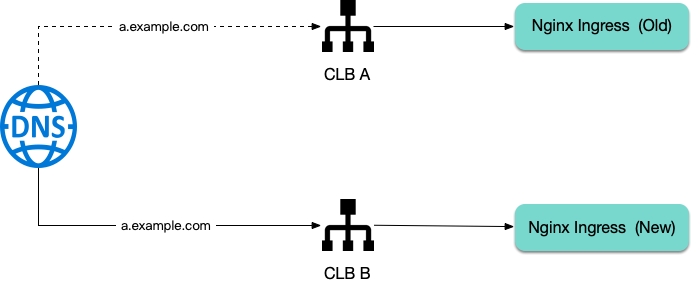
Use the self-built method described in this document to create a new Nginx Ingress instance. Share the same IngressClass with the old instance, sharing the same Ingress forwarding rules. Both traffic entries will coexist. Finally, modify the DNS to point to the new entry address for a smooth migration.
Confirming Information About the Installed Nginx Ingress
1. First, confirm the IngressClass name of the installed Nginx Ingress instance, for example:
$ kubectl get deploy -A | grep nginx
kube-system extranet-ingress-nginx-controller 1/1 1 1 216d
In this example, there is only one instance. The Deployment name is extranet-ingress-nginx-controller, and the part before -ingress-nginx-controller is the IngressClass, which is extranet.
2. Confirm the current image version of the Nginx Ingress:
$ kubectl -n kube-system get deploy extranet-ingress-nginx-controller -o yaml | grep image:
image: ccr.ccs.tencentyun.com/tkeimages/nginx-ingress-controller:v1.9.5
In this example, the image version is v1.9.5.
3. Confirm the current chart version:
$ helm search repo ingress-nginx/ingress-nginx --versions | grep 1.9.5
ingress-nginx/ingress-nginx 4.9.0 1.9.5 Ingress controller for Kubernetes using NGINX a...
In this example, the chart version is 4.9.0. Please remember this version
, as it needs to be specified when helm is used to install the new rendered version. Preparing values.yaml
Ensure that the new Nginx Ingress instance created by helm and the Nginx Ingress instance created by the TKE plugin share the same IngressClass, so that the Ingress rules are effective on both sides simultaneously.
Check the current IngressClass definition:
$ kubectl get ingressclass extranet -o yaml
apiVersion: networking.k8s.io/v1
kind: IngressClass
metadata:
creationTimestamp: "2024-03-27T10:47:49Z"
generation: 1
labels:
app.kubernetes.io/component: controller
name: extranet
resourceVersion: "27703380423"
uid: 5e2de0d1-8eae-4b55-afde-25c8fe37d478
spec:
controller: k8s.io/extranet
Obtain the controller value k8s.io/extranet and configure it in values.yaml along with the IngressClass name:
controller:
ingressClassName: extranet
ingressClassResource:
enabled: false
controllerValue: k8s.io/extranet
Installing a New Nginx Ingress Controller
helm upgrade --install new-extranet-ingress-nginx ingress-nginx/ingress-nginx \\
--namespace ingress-nginx --create-namespace \\
--version 4.9.0 \\
-f values.yaml
Ensure that the release name will not be the same as any existing Nginx Ingress Deployment name after the suffix -controller is added to the release name. If a ClusterRole with the same name exists, it will cause the helm installation to fail.
Specify the version to the chart version (that is, the chart version corresponding to the current Nginx Ingress instance version) obtained in the previous steps. Obtain the traffic entry of the new Nginx Ingress:
$ kubectl -n ingress-nginx get svc
NAME TYPE CLUSTER-IP EXTERNAL-IP PORT(S) AGE
new-extranet-ingress-nginx-controller LoadBalancer 172.16.165.100 43.136.214.239 80:31507/TCP,443:31116/TCP 9m37s
EXTERNAL-IP is the new traffic entry. Please verify that it can forward traffic normally.
Switching DNS
At this point, both new and old Nginx Ingress instances coexist, and traffic can be forwarded normally through either traffic entry.
Next, modify the DNS resolution for the domain name to point to the new Nginx Ingress traffic entry. Before the DNS resolution takes full effect, traffic can be forwarded normally through both entries. This process will be very smooth, and the production environment traffic will not be affected.
Deleting the Old NginxIngress Instance and Plugin
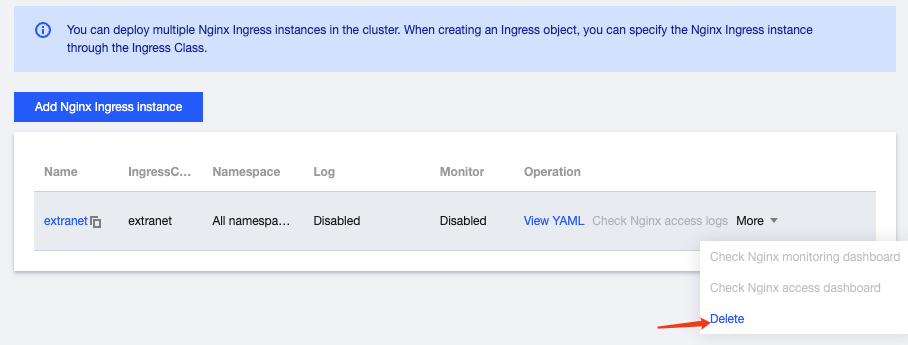
1. Once all traffic has been completely switched off from the old Nginx Ingress instances, go to the TKE console to delete the Nginx Ingress instance:
2. In Component Management, delete ingressnginx to complete the migration.