Native Kubernetes has a cascade deletion mechanism. When deleting a resource, it will automatically delete other associated resources. For example, deleting a Namespace will automatically delete all associated resources under it, such as Pods, Services, ConfigMaps, etc., possibly causing service disruption.
The vulnerabilities of K8S itself may lead to risks of stability and security in the production environment. For example, if the image pull source configured by users is not restricted, it may result in image tampering; the lack of container-level security isolation policies may cause unauthorized access behaviors in containers.
Tencent Kubernetes Engine (TKE) provides "policy management" capabilities. It prevents service failures caused by accidental deletions through system predefined policies or user-initiated policy activation. It enhances the stability and security of TKE clusters by reinforcing policies for computational resources and network resources.
Policy Description
Policy Classification
Delete Protection: Includes cluster deletion protection and cluster internal resource deletion protection. When deleting various resources within a TKE cluster, deletion is not allowed if the resource is currently in use or has a reference relationship with other resources.
Policy Control: Used to constrain and standardize resource configuration within K8S clusters. For example: requiring Pods to have Readiness or Liveness Probes; limiting container image sources to specified lists, etc.
Security Reinforcement: Includes PSP (PodSecurityPolicy) related policies. TKE provides security protection capability based on gatekeeper. For example, creation of privilege containers is prohibited, and fields such as hostPath, hostPID, and hostIPC in PodSecurityPolicy are constrained.
Support Boundary
TKE standard clusters and TKE Serverless clusters support Kubernetes version 1.16 and above. Cluster registration and edge clusters are temporarily not supported.
Policy Type
Baseline Policy: Built-in policy of TKE, including strategies to protect cluster infrastructure resources from being accidentally deleted.
Preferred Policy: Standards and specifications formed by TKE best practices, which validate user configurations to ensure user requests comply with constraints. Users can enable policies based on the actual situation and set the policy running mode.
Optional Policy: Policies supported by the official OPA gatekeeper policy library, including policies that substitute PSP capabilities and universal policies. Users can create policy instances based on the actual situation. For the specific creation process, please see Create Policy Instance.
Policy Library
Note:
To maximize prevention of accidental deletion of cluster resources, the TKE policy management system plans to implement default deny policies for newly created clusters after June 5, 2025, targeting: "Namespaces with existing pods cannot be deleted", "CRDs with existing CRs cannot be deleted", "Unblocked Nodes cannot be deleted", "CoreDNS Component Deletion Protection", "PV in binding state cannot be deleted" You can go to the Cluster Details - Policy Management module to view and modify these settings.
Baseline Policy
Policy Classification
Purpose of Policy
Policy Description
Intercepted Objects
Running Mode
Deletion Protection
Clusters with existing nodes cannot be deleted.
Clusters with any nodes (regular nodes, native nodes, registered nodes) must have the nodes decommissioned before deletion.
Cluster
Default deny
Filtering Policy
Policy Classification
Purpose of Policy
Policy Description
Intercepted Objects
Running Mode
Deletion Protection
Namespaces with existing pods cannot be deleted.
If there are pods in the namespace, you must clear them before deleting the namespace.
Namespace
Default dryrun
Deletion Protection
CRDs with existing CRs cannot be deleted.
If there is a cr resource created under the apiversion defined by crd, the cr must be cleared before the crd can be deleted.
CRD
Default dryrun
Deletion Protection
Unblocked Nodes cannot be deleted.
Node in the ready state cannot be deleted directly when it is in a non-blocking condition.
Node
Default does not create a policy instance.
Deletion Protection
CoreDNS Component Deletion Protection
Prohibit deletion of the Service, ConfigMap, and Deployment of the CoreDNS component.
Deployment,Service,ConfigMap
Default does not create a policy instance.
Deletion Protection
Resource Deletion Protection
Resources (Service, Ingress, Deployment, StatefulSet) with specified Labels cannot be deleted.
Service,Ingress,Deployment,StatefulSet
Default does not create a policy instance.
Deletion Protection
PV in binding state cannot be deleted
A PersistentVolume cannot be deleted if it is in a Bound status.
PV
Default does not create a policy instance.
Policy Control
Forbidden to mount the specified volume type.
Restrict mountable volume types to the user-specified type.
Pod
Default does not create a policy instance.
Policy Control
Forbid the image pull policy from using Always.
Forbid containers from using the Always image pull policy, reduce access to the mirror repository.
Pod
Default does not create a policy instance.
Policy Control
Container Image Access Restrictions
Only allow pulling images from specified repositories.
Pod
Default does not create a policy instance.
Policy Control
Forbidden to deploy unknown DaemonSets.
Only allow deployment of specified DaemonSets.
DaemonSet
Default does not create a policy instance.
Policy Control
Workload image version upgrade policy control
Restrict Deployment and DaemonSet to upgrade only in the configured image list.
Deployment,DaemonSet
Default does not create a policy instance.
Policy Control
ServiceAccount Permission Control
Forbid ServiceAccount from binding to Roles and ClusterRoles with large permissions, enhancing cluster security.
ServiceAccount
Default does not create a policy instance.
Policy Control
Do not allow Service to be of ClusterIP type.
Creation of ClusterIP type Service is prohibited or updating Service from other types to ClusterIP type is prohibited.
Service
Default does not create a policy instance.
Policy Control
Disable public network access
Forbidden to expose backend services to the public network by creating a public network type Service or Ingress.
Service,Ingress
Default does not create a policy instance.
Policy Control
ENI resource configuration limits
Cross-tenant ENI must be configured with Request resources.
Pod
Default does not create a policy instance.
Optional Policy
Policy Classification
Purpose of Policy
Policy Description
Intercepted Objects
Policy Control
tkeblockvolumemountpath
Forbidden to container mount the specified directory.
pods
Policy Control
k8sallowedrepos
Container image must start with a string from the specified string list.
pods
Policy Control
k8spspautomountserviceaccounttokenpod
Containers cannot set automountServiceAccountToken to true.
pods
Policy Control
k8sblockendpointeditdefaultrole
By default, many Kubernetes clusters predefine a ClusterRole named system:aggregate-to-edit. The k8sblockendpointeditdefaultrole policy definition forbids this ClusterRole from performing create, patch, and update operations on Endpoints.
clusterroles
Policy Control
k8sblockloadbalancer
Do not allow Service to be of LoadBalancer type.
services
Policy Control
k8sblocknodeport
Do not allow Service to be of NodePort type.
services
Policy Control
k8sblockwildcardingress
Prohibit ingress from configuring blank or wildcard-type hostnames.
ingresses
Policy Control
k8scontainerlimits
Limit containers must set CPU and memory Limit, and it must be less than the set maximum value.
pods
Policy Control
k8scontainerrequests
Limit the Request for CPU and memory must be set and less than the configured maximum value.
pods
Policy Control
k8scontainerratios
Limit the maximum ratio of Request and Limit for CPU and memory.
pods
Policy Control
k8srequiredresources
The Limit for memory must be configured, and the Request for CPU and memory must be set.
pods
Policy Control
k8sdisallowanonymous
ClusterRoles and Roles not in the allowlist cannot be associated with the system:anonymous User and system:unauthenticated Group.
rolebindings
clusterrolebindings
Policy Control
k8sdisallowedtags
Restrict container image tags.
pods
Policy Control
k8sexternalips
Limit the externalIP service to the allowed IP address list.
services
Policy Control
k8simagedigests
Container image must contain digest.
pods
Policy Control
noupdateserviceaccount
Deny updates to ServiceAccount for resources not in the allowlist.
replicationcontrollers
replicasets
deployments
statefulsets
daemonsets
cronjobs
Policy Control
k8sreplicalimits
Objects with the "spec.replicas" field (such as Deployments, ReplicaSets) must be within the defined scope.
deployments
Policy Control
k8srequiredannotations
The resource must include the specified annotations, whose values must match the provided regular expression.
services
Policy Control
k8srequiredlabels
The resource must include the specified tags, whose values must match the provided regular expression.
namespaces
Policy Control
k8srequiredprobes
The Pod must have a Readiness or Liveness Probe.
pods
Security Reinforcement
k8spspallowprivilegeescalationcontainer
Set the "allowPrivilegeEscalation" field in PodSecurityPolicy to false.
pods
Security Reinforcement
k8spspapparmor
Constrain the AppArmor field list.
pods
Security Reinforcement
k8spspcapabilities
Restrict the "allowedCapabilities" and "requiredDropCapabilities" fields in PodSecurityPolicy.
pods
Security Reinforcement
k8spspflexvolumes
Constrain the field type of allowedFlexVolumes in PodSecurityPolicy.
pods
Security Reinforcement
k8spspforbiddensysctls
Constrain the "sysctls" field in PodSecurityPolicy to disallow the use of the name.
pods
Security Reinforcement
k8spspfsgroup
Control the "fsGroup" field in PodSecurityPolicy within the limit range.
pods
Security Reinforcement
k8spsphostfilesystem
Constrain the parameters of the "hostPath" field in PodSecurityPolicy.
pods
Security Reinforcement
k8spsphostnamespace
Restrict the "hostPID" and "hostIPC" fields in PodSecurityPolicy.
pods
Security Reinforcement
k8spsphostnetworkingports
Restrict the "hostNetwork" and "hostPorts" fields in PodSecurityPolicy.
pods
Security Reinforcement
k8spspprivilegedcontainer
Forbid the "privileged" field in PodSecurityPolicy to be true.
pods
Security Reinforcement
k8spspprocmount
Constrain the "allowedProcMountTypes" field in PodSecurityPolicy.
pods
Security Reinforcement
k8spspreadonlyrootfilesystem
Constrain the "readOnlyRootFilesystem" field in PodSecurityPolicy.
pods
Security Reinforcement
k8spspseccomp
Constrain the "seccomp.security.alpha.kubernetes.io/allowedProfileNames" annotation on PodSecurityPolicy.
pods
Security Reinforcement
k8spspselinuxv2
Constrain the allowed list of SELinux configurations in Pod definitions.
pods
Security Reinforcement
k8spspallowedusers
Constrain the runAsUser, runAsGroup, supplementalGroups, and fsGroup fields in PodSecurityPolicy.
pods
Security Reinforcement
k8spspvolumetypes
Constrain the "volumes" field type in PodSecurityPolicy.
pods
Operation Instructions
Enable/Disable a Policy
1. Log in to the TKE console, select Cluster in the left sidebar.
2. On the cluster management page, select the target cluster ID and enter the basic information page of the cluster.
3. In the left sidebar, select Policy Management, navigate to Policy Management page to select a policy, and click Enable/Disable. Disabling a policy requires secondary confirmation, while enabling does not.
Verify Policy Effectiveness
Take the cluster deletion strategy as an example, create a TKE standard cluster, and verify whether delete requests will be intercepted when nodes exist.
1. Create a TKE standard cluster with nodes. For detailed steps, please refer to Create a cluster.
2. Initiate a delete cluster request.
Delete via the Console
Call TencentCloud API Delete
1. Delete a cluster. For detailed steps, please refer to Delete a cluster.
2. The window prompts that you need to empty the node before you can proceed to delete the cluster.
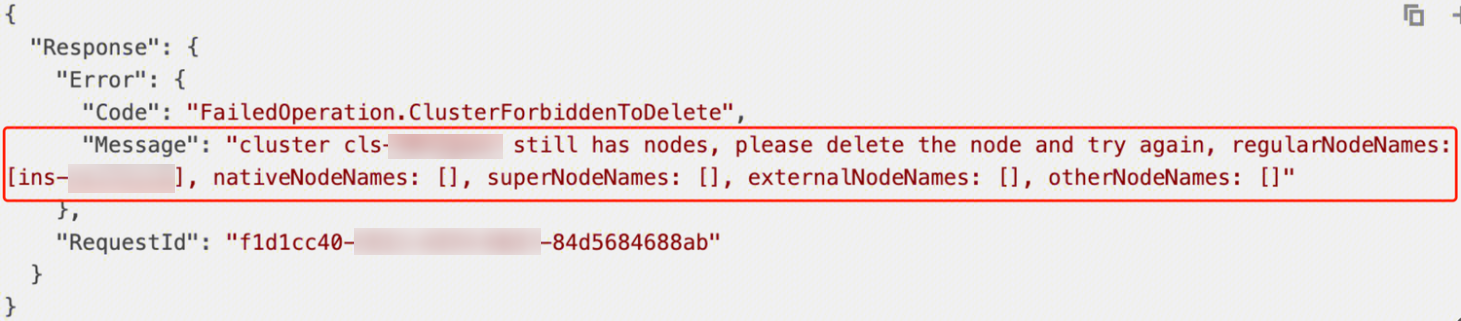
1. Call TencentCloud API Delete. For the calling method, please refer to the API document Delete a Cluster.
2. API call failure for deleting a cluster, with the error information returning a list of existing nodes in the cluster. As shown below:
3. On the Policy Management page, click the number of associated events to view interception event information.
Create a Policy Instance
For example, demonstrate how to create a Policy Instance by prohibiting the creation of a privilege container.
Policy Name: k8spspprivilegedcontainer
Policy Type: K8sPSPPrivilegedContainer
Policy description: Forbid the "privileged" field in Pod securityContext to be true.
Resource types that take effect: Pod
The parameters that need to be modified are as follows:
namespaces (optional parameter: indicates the namespace where the policy function takes effect)
If this field is left blank or the field value is empty, it means all namespaces will take effect.
Supports prefix match, for example namespaces: ["kube-*"] matches "kube-system" and "kube-public".
excludedNamespaces (optional parameter: indicates the namespaces where the policy is exempt from taking effect, and the policies in this list will not take effect in these namespaces.)
If this field is left blank or the field value is empty, it means there are no exempted namespaces.
Supports prefix match, for example excludedNamespaces: ["kube-*"] matches "kube-system" and "kube-public".
exemptInitContainers (custom parameter: boolean value. Meaning: whether to allow initContainer to use a privilege container.)
Some services' initContainers run in the way of a privilege container and perform operations similar to issuing iptables rules.
When creating a policy instance, initContainers are allowed to use a privilege container by default.
policy instance YAML:
apiVersion: constraints.gatekeeper.sh/v1beta1
kind: K8sPSPPrivilegedContainer
metadata:
name: psp-privileged-container
spec:
match:
kinds:
-apiGroups:[""]
kinds:["Pod"]
namespaces:[]
excludedNamespaces:["kube-system"]
parameters:
exemptInitContainers:true
The Pod YAML for testing whether the policy takes effect is as follows. Directly apply the YAML, and if it is intercepted by the policy, it indicates the policy is effective.
apiVersion: v1
kind: Pod
metadata:
name: privileged-pod
spec:
containers:
-name: privileged-container
image: nginx
securityContext:
privileged:true
initContainers:
-name: privileged-init-container
image: busybox
command:['sh','-c','echo Hello, Kubernetes!']
securityContext:
privileged:true
Create a Pod with a privilege container, expected output:
Error from server (Forbidden): error when creating "pod.yaml": admission webhook "validation.gatekeeper.sh" denied the request: [psp-privileged-container] Privileged container is not allowed: privileged-container, securityContext: {"privileged": true}, Pod name: privileged-pod