Using Private DNS to Implement Automatic Domain Name Resolution When Accessing Cluster via Private Network
Download
フォーカスモード
フォントサイズ
最終更新日: 2024-12-13 15:57:58
Overview
After private network access is enabled for the current cluster, TKE will access the cluster through the domain name by default. You need to configure Host on the access server to perform DNS queries on the private network. If no DNS rules (Host) are configured, an error "no such host" will be reported when you access the cluster on the access server (by running kubectl get nodes) as shown below:
In practice, configuring Host will increase your management labor costs. Therefore, we recommend you use Tencent Cloud's newly launched Private DNS service, which helps you get things done in just three steps.
Billing description
Private DNS is billed on a pay-as-you-go basis, where the number of private domains and that of DNS requests are billed on a natural day basis. For more information, see Billing Overview.
Available regions
Currently, Private DNS is not available in all the available regions of TKE. For the list of its available regions, see Use Limits.
To access clusters over the private network in regions not covered by Private DNS, you need to manually configure the Host. To use Private DNS in those regions, submit a ticket for application.
Prerequisites
A container cluster has been created and private network access has been enabled. For details, see Creating a Cluster.
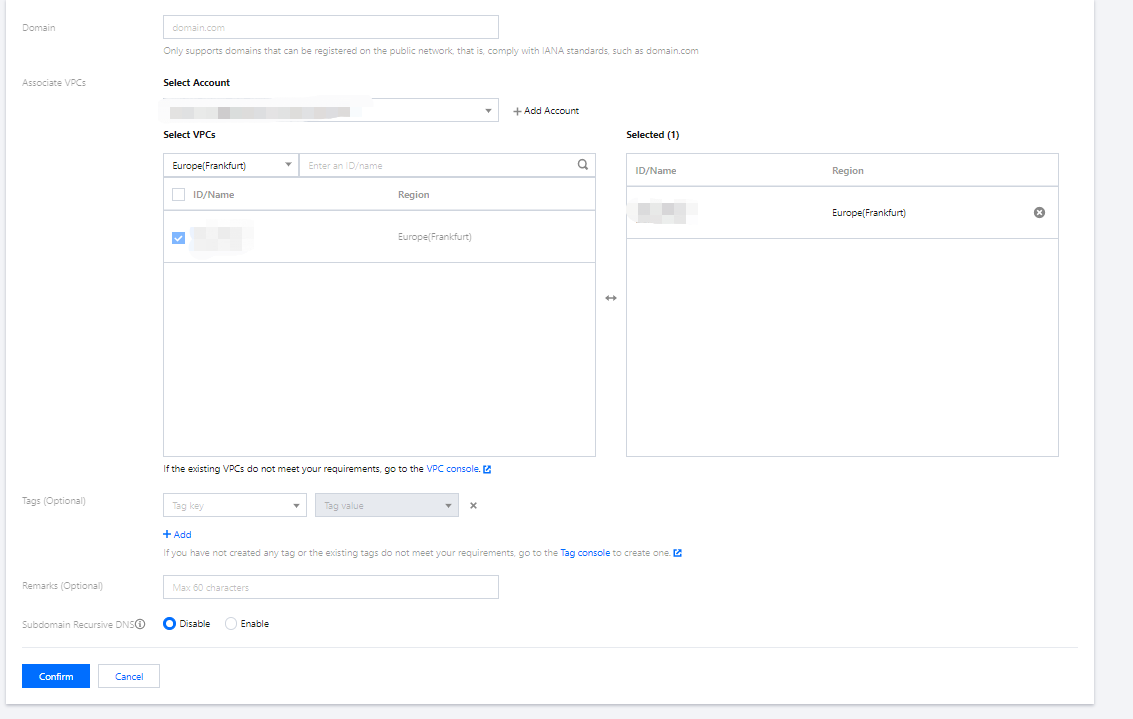
2. Click Create Private Domain and configure the following options (just use the default values for other parameters). For more information, see Creating Private Domain.
Domain: Enter tencent-cloud.com (domain name allocated by TKE for accessing the cluster).
Associated VPC: Select the node VPC that needs to access the cluster.
3. Click OK.
Configuring DNS records
1. Click the private domain name created above to enter the DNS Records page.
2. Click Add Records and configure the following options:
Host Record: Enter the secondary domain name for accessing the TKE cluster, for example, cls-{{clsid}}.css.
Record Type: Enter A.
Record Value: Enter the private IP for accessing the TKE cluster.
Note:
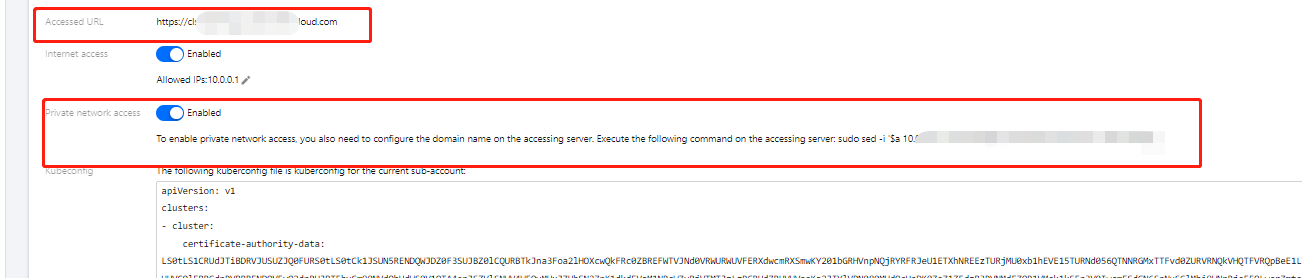
You can get the Host Record and Record Value from Cluster Management > Cluster > Basic Info. Here, Host Record is the domain name in Access Address, and Record Value is the IP address in Private Network Access, as shown below:
3. Click Save in the Operation column on the right.
Verifying effect
1. Run the following command to access the cluster again.
kubectl get nodes
2. When the following result is displayed, the cluster has been successfully accessed, and the node list has been pulled.