tencent cloud

Tencent Kubernetes Engine

소식 및 공지 사항
릴리스 노트
제품 릴리스 기록
제품 소개
제품 장점
제품 아키텍처
시나리오
제품 기능
리전 및 가용존
빠른 시작
신규 사용자 가이드
표준 클러스터를 빠르게 생성
Demo
클라우드에서 컨테이너화된 애플리케이션 배포 Check List
TKE 표준 클러스터 가이드
Tencent Kubernetes Engine(TKE)
클러스터 관리
네트워크 관리
스토리지 관리
Worker 노드 소개
Kubernetes Object Management
워크로드
클라우드 네이티브 서비스 가이드
Tencent Managed Service for Prometheus
TKE Serverless 클러스터 가이드
TKE 클러스터 등록 가이드
실습 튜토리얼
Serverless 클러스터
네트워크
로그
모니터링
유지보수
DevOps
탄력적 스케일링
자주 묻는 질문
클러스터
TKE Serverless 클러스터
유지보수
서비스
이미지 레지스트리
원격 터미널
문서Tencent Kubernetes Engine

Authorizing Tencent Cloud OPS Team for Troubleshooting

포커스 모드
폰트 크기
마지막 업데이트 시간: 2024-12-13 14:48:39
Tencent Cloud OPS team is not allowed to log in to your cluster for troubleshooting without your permission. If you need Tencent Cloud OPS team to assist in troubleshooting, please refer to the following steps to grant Tencent Cloud OPS team related permissions. You can cancel the permissions authorized to Tencent Cloud OPS team at any time.

Grant permissions to Tencent Cloud though console

1. Log in to the TKE console.
2. On Cluster Management page, select the cluster where Tencent Cloud assistance is needed.
3. On the cluster details page, select Authorization Management > Authorize Tencent Cloud OPS team.
4. When configuring the cluster RBAC, select the operation permissions that you want to authorize to Tencent Cloud OPS team.

5. After the configuration is completed, you can check the progress in My Tickets.
Note:
Tencent Cloud OPS team is not allowed to log in to your cluster for troubleshooting without your permission. If you need Tencent Cloud OPS team to assist in troubleshooting, you can grant Tencent Cloud OPS team related permissions. You can also cancel the permissions authorized to Tencent Cloud OPS team at any time. You can withdraw permissions authorized to Tencent Cloud OPS team by deleting relevant resources (ClusterRoleBinding/tkeopsaccount-ClusterRole, ServiceAccount/tkeopsaccount, and Sercet/tkeopsaccount-token-xxxx).

Grant permissions to Tencent Cloud OPS team through Kubernetes API

You can grant permissions to Tencent Cloud OPS team by creating the following Kubernetes resources.

ServiceAccount: authorize Tencent Cloud OPS team to access cluster credential

kind: ServiceAccount
apiVersion: v1
metadata:
name: tkeopsaccount
namespace: kube-system
labels:
cloud.tencent.com/tke-ops-account: tkeops

ClusterRoleBinding/RoleBing: rules on granting Tencent Cloud OPS team permissions

Note:
1. Name and label should be created according to the following rule.
2. roleRef can be replaced with the permissions you want to grant to Tencent Cloud OPS team.
apiVersion: rbac.authorization.k8s.io/v1beta1
kind: ClusterRoleBinding
metadata:
annotations:
cloud.tencent.com/tke-ops-account: tkeops
labels:
cloud.tencent.com/tke-ops-account: tkeops
name: tkeopsaccount-ClusterRole
roleRef:
apiGroup: rbac.authorization.k8s.io
kind: ClusterRole
name: tke:admin
subjects:
- kind: ServiceAccount
name: tkeopsaccount
namespace: kube-system

(Optional) ClusterRole/Role: permissions authorized to Tencent Cloud OPS team

If there is relevant ClusterRole/Role in the cluster, you can use ClusterRoleBinding/RoleBinding to associate. Policies will be created automatically if you authorize through console.
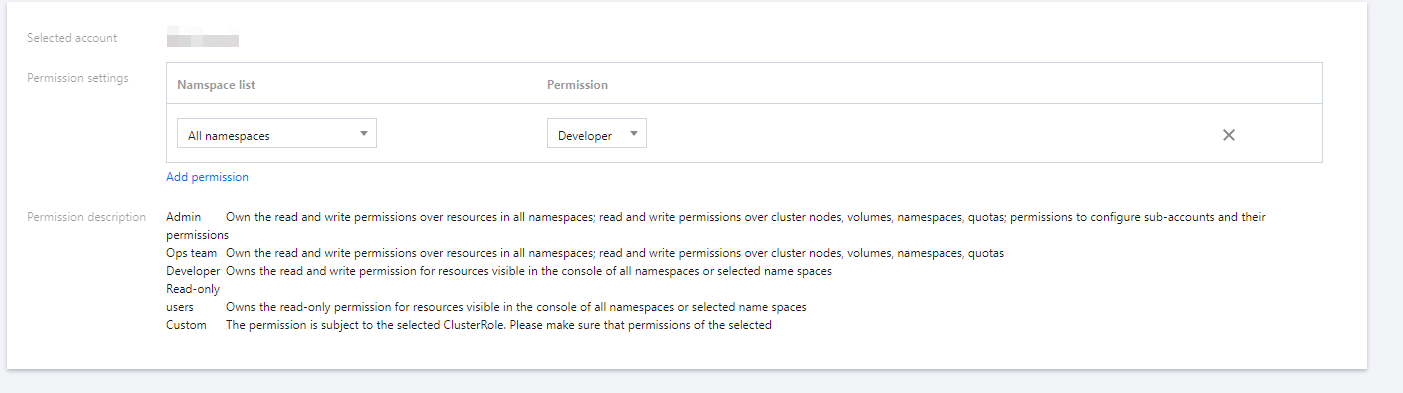
Admin permissions
Read-only
apiVersion: rbac.authorization.k8s.io/v1beta1
kind: ClusterRole
metadata:
labels:
cloud.tencent.com/tke-rbac-generated: "true"
name: tke:admin
rules:
- apiGroups:
- '*'
resources:
- '*'
verbs:
- '*'
- nonResourceURLs:
- '*'
verbs:
- '*'

apiVersion: rbac.authorization.k8s.io/v1beta1
kind: ClusterRole
metadata:
labels:
cloud.tencent.com/tke-rbac-generated: "true"
name: tke:ro
rules:
- apiGroups:
- ""
resources:
- pods
- pods/attach
- pods/exec
- pods/portforward
- pods/proxy
verbs:
- get
- list
- watch
- apiGroups:
- ""
resources:
- configmaps
- endpoints
- persistentvolumeclaims
- replicationcontrollers
- replicationcontrollers/scale
- secrets
- serviceaccounts
- services
- services/proxy
verbs:
- get
- list
- watch
- apiGroups:
- ""
resources:
- nodes
- persistentvolumes
verbs:
- get
- list
- watch
- apiGroups:
- ""
resources:
- events
- replicationcontrollers/status
- pods/log
- pods/status
- componentstatuses
verbs:
- get
- list
- watch
- apiGroups:
- apps
resources:
- daemonsets
- deployments
- deployments/rollback
- deployments/scale
- replicasets
- replicasets/scale
- statefulsets
verbs:
- get
- list
- watch
- apiGroups:
- autoscaling
resources:
- horizontalpodautoscalers
verbs:
- get
- list
- watch
- apiGroups:
- storage.k8s.io
resources:
- storageclasses
verbs:
- get
- list
- watch
- apiGroups:
- batch
resources:
- cronjobs
- jobs
verbs:
- get
- list
- watch
- apiGroups:
- extensions
- networking.k8s.io
resources:
- daemonsets
- deployments
- deployments/rollback
- deployments/scale
- ingresses
- replicasets
- replicasets/scale
- replicationcontrollers/scale
verbs:
- get
- list
- watch
- apiGroups:
- servicecatalog.k8s.io
resources:
- clusterserviceclasses
- clusterserviceplans
- clusterservicebrokers
- serviceinstances
- servicebindings
verbs:
- get
- list
- watch
- apiGroups:
- policy
resources:
- poddisruptionbudgets
verbs:
- get
- list
- apiGroups:
- networking.istio.io
- config.istio.io
- rbac.istio.io
- authentication.istio.io
- security.istio.io
- install.istio.io
resources:
- '*'
verbs:
- get
- list
- watch
- apiGroups:
- apiextensions.k8s.io
resources:
- customresourcedefinitions
verbs:
- get
- list
- watch
- apiGroups:
- networking.tke.cloud.tencent.com
resources:
- '*'
verbs:
- get
- list
- watch
- apiGroups:
- cloud.tencent.com
resources:
- '*'
verbs:
- get
- list
- watch
- apiGroups:
- ccs.cloud.tencent.com
resources:
- '*'
verbs:
- get
- list
- watch
- apiGroups:
- cls.cloud.tencent.com
resources:
- '*'
verbs:
- get
- list
- watch


도움말 및 지원

문제 해결에 도움이 되었나요?

피드백