Bucket Encryption Overview
Download
Focus Mode
Font Size
Feature Overview
By setting bucket encryption, you can encrypt all new objects uploaded to a bucket with the specified encryption method by default.
Currently, the supported encryption methods for buckets are:
SSE-COS Encryption: Server-side encryption managed by Cloud Object Storage (COS).
SSE-KMS Encryption: Server-side encryption using a key managed by KMS.
How to Use
Using COS console
Setting encryption during bucket creation
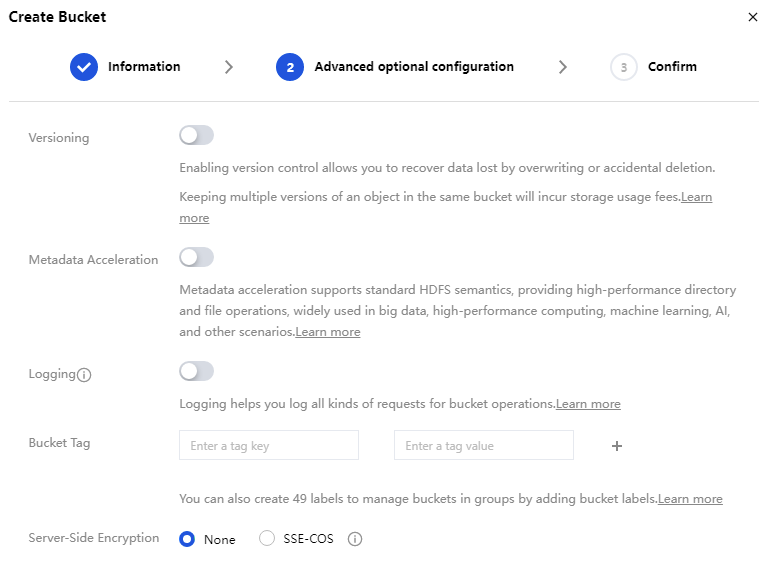
You may add bucket encryption when creating a bucket, as shown below. For the description of relevant configuration items, please refer to Creating a Bucket.
Setting encryption for existing bucket
If you did not set encryption when creating a bucket, follow the steps below to set it subsequently.
1. On the Bucket List page, click the name of the target bucket to enter the bucket configuration page.
2. Click Security Management > Server-Side Encryption on the left sidebar.
3. In the Server-Side Encryption configuration item, toggle the feature on.
4. Select the specified encryption method and click Save.
Currently, the supported encryption methods for the bucket are:
SSE-COS encryption: Server-side encryption managed by Cloud Object Storage (COS) with keys hosted by the service.
SSE-KMS encryption: Server-side encryption using keys managed by KMS.
Note:
For an introduction to server-side encryption and supported regions, please refer to the Server-Side Encryption Overview.
Using the REST API
You can configure bucket encryption by using the following APIs:
Supports and Limits
Uploading object to encrypted bucket
For buckets requiring encryption, note the following:
Configuring encryption for a bucket will not lead to encryption operations on objects that already exist in it.
After encryption is configured for a bucket, for objects uploaded to the bucket:
If your PUT request does not contain encryption information, the uploaded objects will be encrypted based on the encryption configuration of the bucket.
If your PUT request contains encryption information, the uploaded objects will be encrypted based on the contained encryption information.
After encryption is configured for a bucket, for inventory reports delivered to the bucket:
If encryption is not configured for the inventory, the delivered reports will be encrypted based on the encryption configuration of the bucket.
If encryption is configured for the inventory, the delivered reports will be encrypted based on the encryption configuration of the inventory.
After encryption is configured for a bucket, the data retrieved from the origin to the bucket will be encrypted based on the encryption configuration of the bucket by default.
Encrypting a bucket that has a cross-region replication rule configured
For the destination bucket that has a cross-region replication rule configured, if you configure encryption for it, note the following:
If the objects in the source bucket are not encrypted, the object copies in the destination bucket will be encrypted by default.
If the objects in the source bucket are encrypted, the object copies in the destination bucket will inherit the encryption from the source bucket, and the bucket encryption settings will not be applied.
Help and Support
Was this page helpful?
You can also Contact sales or Submit a Ticket for help.
Help us improve! Rate your documentation experience in 5 mins.
Feedback