TencentDB for PostgreSQL supports Data Backup, Manual Backup, and Log Backup. You can schedule regular database backups through automatic backup settings. In the event of a database failure or accidental deletion, you can restore the database from the stored backup files. TencentDB for PostgreSQL supports storing database backups in a compressed format. The size of a compressed backup file is approximately 30% of its original size (the exact compression ratio depends on the amount of duplicated data stored in the instance, the more duplicate data, the greater the compression ratio).
Backup Principles
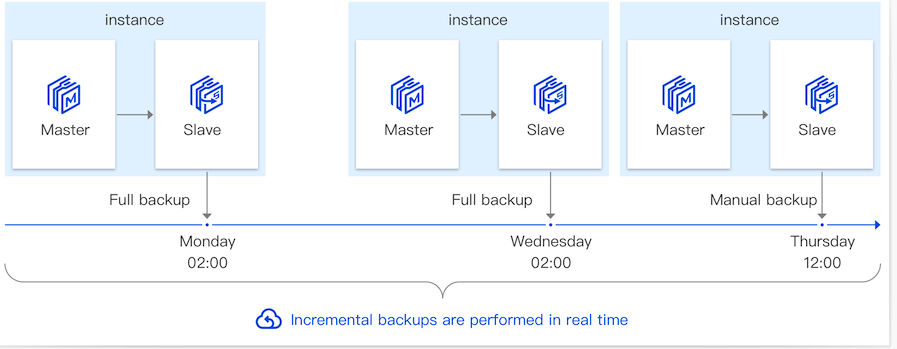
For the double-availability (primary-standby) architecture, when a backup task is triggered, the system pulls data from the instance's standby node and compresses it before uploading it to the object storage service. Backup space does not occupy the disk space of the instance. If a database failure or accidental deletion occurs, you can recover the database from the stored backup files. When restoring data, you can use the cloning method, please refer to Cloning Instances, or you can download the backup files for recovery, please refer to Restoring PostgreSQL Data on CVMs. The principle is shown in the following figure:
Backup Plans
Operation Type
Backup Type
Operation Details
Data Backup
Data Backup
The system will trigger a full data backup according to your automatic backup setting within the specified time. The backup method is physical backup, which offers fast backup speed and higher recovery efficiency.
The generated full automatic backup data is retained based on the data backup retention time you set. The backup data will not be deleted when the instance is terminated. It will be automatically deleted when it expires. This can meet your need to extend the retention of backup data to prevent serious impact due to accidental deletion of instances. Since full backup uses backup storage space, you can delete it promptly if necessary.
The automatic backup data within one week cannot be deleted, while data older than one week can be flexibly deleted according to your needs. Please be cautious when deleting backup data as it cannot be recovered after deletion.
Manual Backup
You can manually initiate a full instance backup based on application needs through the console. After the manual backup task is initiated, the system will perform a full instance backup using the physical backup method within 1 minute.
The expiration time of manual backups is one week after they are initiated. Since manual backups occupy backup storage space, you can delete manual backups promptly if necessary.
Incremental Backup
Incremental backup is WAL log backup, which is automatically enabled by default and cannot be disabled. The incremental backup is stored based on the data backup retention time you set. The system will perform real-time backup based on the WAL log generated by the database. Since incremental backup occupies backup storage space, you can delete it promptly if necessary.
Incremental backup data within a week is not allowed to be deleted, while data older than one week can be flexibly deleted according to your needs. After the incremental backup data is deleted, point-in-time recovery cannot be performed, so exercise caution when deleting incremental backup data.
Backup Files Download
Download Full Backup
Supports local browser download and download by address.
Download Incremental Backup
Supports local browser download and download by address.
Transfer Historical Backup Through Serverless Cloud Function
TencentDB for PostgreSQL Backup files are stored in the form of compressed files, and the compressed backup file size is about 30% of the original file size. The single instance backup space is given according to the purchased capacity and most instances don't need to pay. For the specific billing rules, please refer to Backup Space Billing.