tencent cloud

Video on Demand

Release Notes and Announcements
Release Notes
Announcements
Product Introduction
Overview
Product Features
Features
Strengths
Scenarios
Solutions
Professional Edition
Introduction to Video On Demand Professional Edition
Quick Start
Console Guide
Development Guide
Purchase Guide
Billing Overview
Billing Modes
Purchase Guide
Viewing Bills
Renewal
Overdue Policy
Refund Policy
Getting Started
Console Guide
Console Overview
Service Overview
Application Management
Media Management
Package Management
License Management
Real-Time Log Analysis
Practical Tutorial
Media Upload
Smart Cold Storage of VOD Media Asset Files
Video Processing
Distribution and Playback
How to Receive Event Notification
How to Migrate Files from Origin Server to VOD
Live Recording
How to Pull from Custom Origin Servers
How to Use EdgeOne to Distribute Content in VOD
Development Guide
Media Upload
Media Processing
Video AI
Event Notification
Video Playback
Media Encryption and Copyright Protection
Broadcast Channel
CAM
Media File Download
Subapplication System
Error Codes
Player SDK
Overview
Basic Concepts
Features
Free Demo
Free Trial License
Purchase Guide
SDK Download
Licenses
Player Guide
Integration (UI Included)
Integration (No UI)
Advanced Features
API Documentation
Player Adapter
Player SDK Policy
Server APIs
History
Introduction
API Category
Other APIs
Media Processing APIs
Parameter Template APIs
Task Management APIs
Media Upload APIs
Media Management APIs
Event Notification Relevant API
Media Categorization APIs
Domain Name Management APIs
Distribution APIs
AI-based Sample Management APIs
Region Management APIs
Data Statistics APIs
Carousel-Related APIs
Just In Time Transcode APIs
No longer recommended APIs
Making API Requests
AI-based image processing APIs
Task Flow APIs
Data Types
Error Codes
Video on Demand API 2024-07-18
FAQs
Mobile Playback
Fees
Video Upload
Video Publishing
Video Playback
Web Playback
Full Screen Playback
Statistics
Access Management
Cold Storage
Agreements
Service Level Agreement
VOD Policy
Privacy Policy
Data Processing And Security Agreement
Contact Us
Glossary

How to Moderate Media Content

PDF
Focus Mode
Font Size
Last updated: 2023-04-27 15:00:32
Non-compliant content may expose your business to legal risks and hurt your brand. VOD offers audio/video moderation and image moderation capabilities to help you ensure the compliance of your content.

Audio/Video Moderation

The audio/video moderation feature of VOD analyzes your video and audio content and gives suggestions on whether to publish or block the content.
You can initiate audio/video content moderation in the following two ways:
1. Initiate it in the VOD console.

Using a server-side API to initiate audio/video moderation

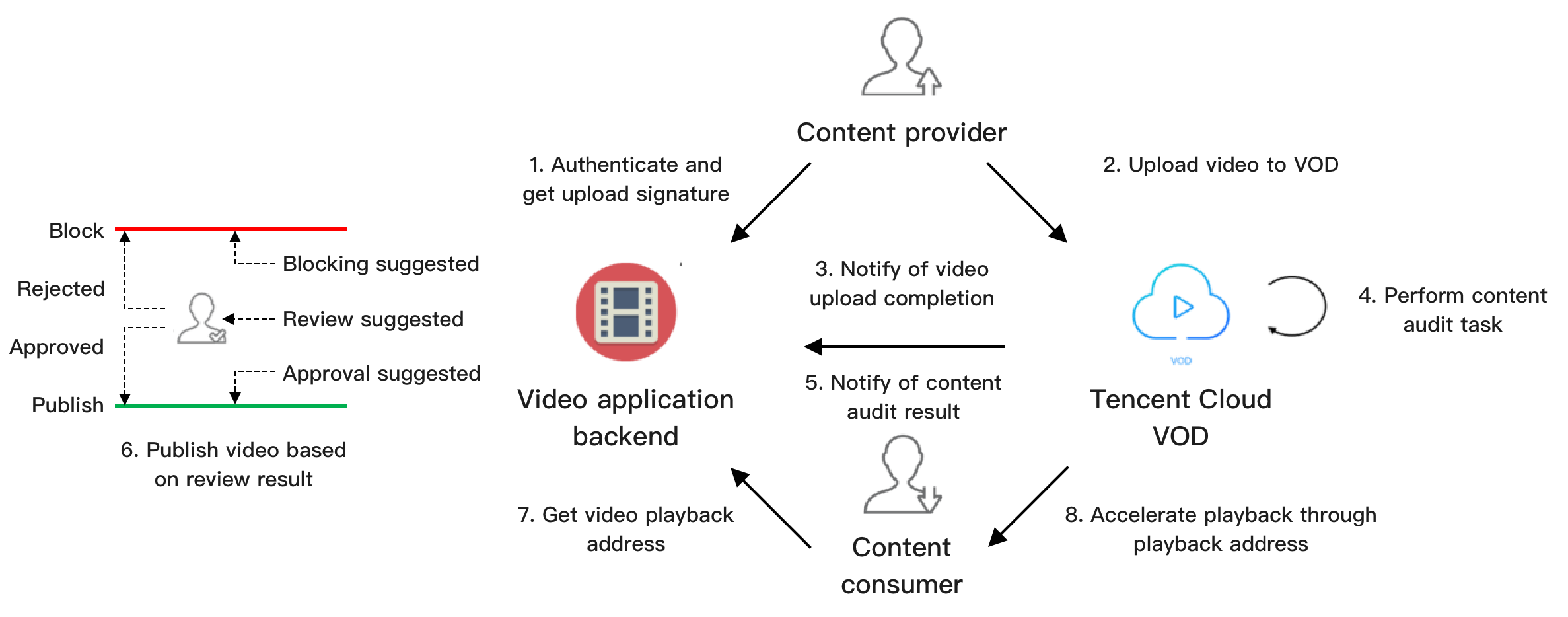
The figure below shows how a video application moderates the videos uploaded by users using the server-side API.

1. The video application backend authenticates the content provider and distributes a signature for upload from client.
2. The content provider uploads the content to VOD.
3. VOD sends information including the file ID and playback URL of the uploaded video to the application backend.
4. VOD executes a moderation task (ReviewAudioVideoTask) according to the procedure parameter passed in when the video is uploaded.
5. VOD sends the result to the application backend via the ReviewAudioVideoComplete notification.
If the moderation result is "block", there’s a high chance that the content is non-compliant. We recommend you block the content.
If the moderation result is "pass", the probability of the content being non-compliant is low. We recommend you allow the content to pass.
If the moderation result is "review", the probability of the content being non-compliant is high; in this case, manual verification is recommended.
6. The application backend publishes videos whose suggestion is "pass" as well as those that are given a "review" suggestion and have passed manual verification.
7. Viewers request a playback URL for a published video from the application backend.
8. Viewers play the video via the URL (VOD offers acceleration services).
Steps 4-6 ensure that the video obtained in step 7 is compliant.
Note:
In the above process, videos are moderated before being published (only videos that pass the moderation or review are published). You can also use the post-moderation mode, in which videos are published first before moderation is performed (non-compliant content detected will be removed).

Image Moderation

The image moderation feature of VOD analyzes images and gives suggestions on whether to pass or block them. Unlike audio/video moderation, image moderation is performed synchronously, and results are generated immediately.
If the moderation result is "block", there's a high chance that the content is non-compliant. We recommend you block the content.
If the moderation result is "pass", the probability of the content being non-compliant is low. We recommend you allow the content to pass.
If the moderation result is "review", the probability of the content being non-compliant is high; in this case, manual verification is recommended.
You can initiate image moderation in two ways:
1. Initiate it in the VOD console.
2. Call the server-side API ReviewImage.

Billing

For details about how content moderation is billed, see Purchase Guide.
Help and Support

Was this page helpful?

Help us improve! Rate your documentation experience in 5 mins.

Feedback