User-generated content (UGC) and professionally generated Content (PGC) platforms are two common scenarios in the video industry where video content can be freely uploaded and shared.
However, third-party video platforms may impersonate normal users to upload videos to your platform and then put the URLs of those videos on their own platforms. In this way, they can "live" on your platform like a parasite and get "free" access to video storage and playback acceleration. As a result, your video platform is used maliciously by others as a free video hosting service, which is called "malicious video hosting".
Malicious video hosting can cause serious economic losses since all the storage, bandwidth, and traffic fees incurred by the parasites have to be borne by you.
Causes of Malicious Video Hosting
Note:
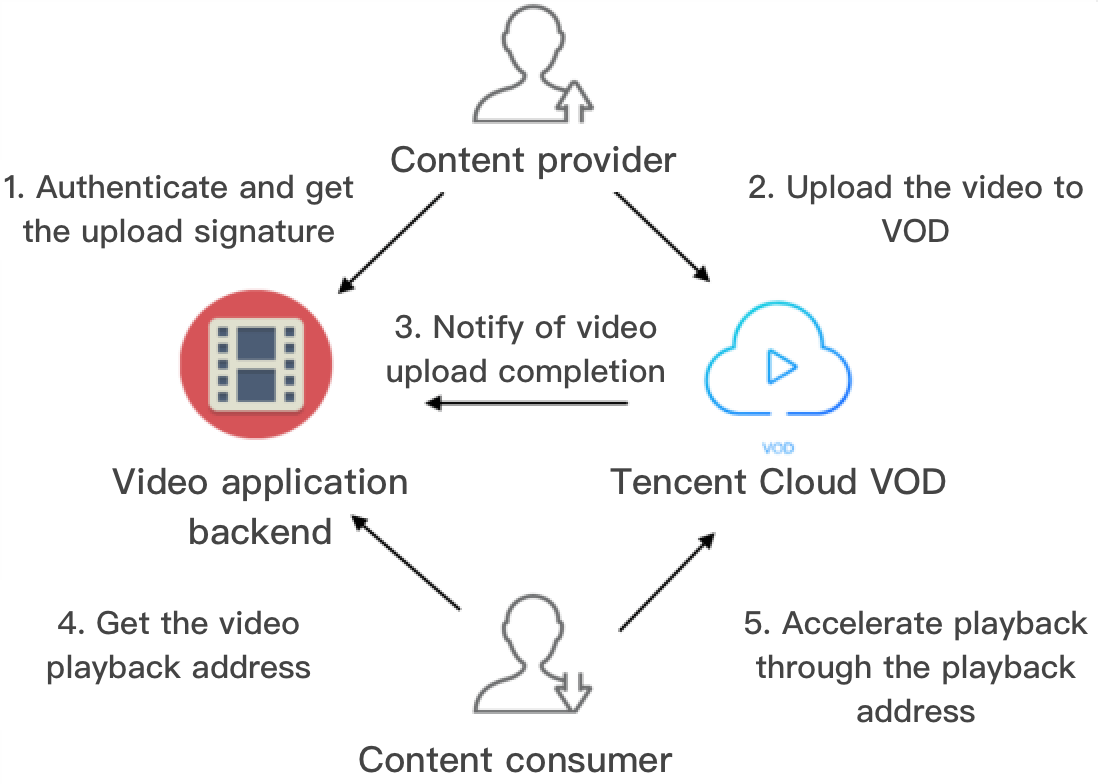
Arrows in the figure represent the network request directions.
Generally, a UGC or PGC video platform interacts with content providers, content consumers, and VOD in the following ways (for more information on steps 1–3, please see Upload from Client): 1. The application backend authenticates the content provider and distribute to them a video upload signature after authentication is passed.
2. The content provider uploads the content to be shared to VOD.
3. VOD notifies the application backend of relevant information such as the fileId and playback URL of the uploaded video.
4. The content consumer requests the playback URL from the application backend.
5. The content consumer accelerates video playback via VOD through the URL.
How malicious video hosting is implemented
Note:
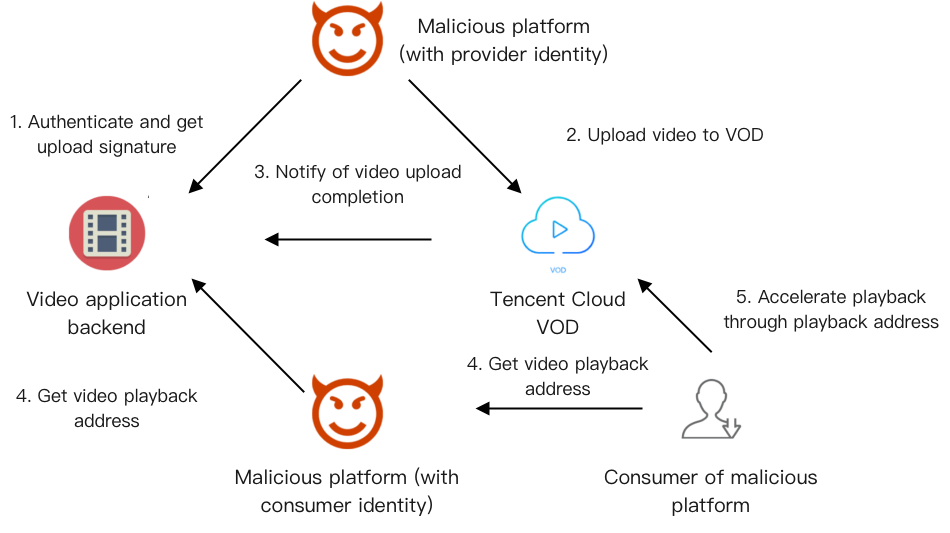
Arrows in the figure represent the network request directions.
A malicious third-party video platform impersonates a normal user of your platform:
It upload its own videos to VOD as a video provider (steps 1 and 2).
Then, it gets the playback URLs of these videos from your platform as a consumer (step 4).
The users of the malicious platform get these URLs (step 4) and accelerate playback through VOD (step 5).
Core causes of problem
The ultimate purpose of malicious video hosting is to steal others' CDN bandwidth resources (while taking advantage of their storage resources). Malicious users do so mainly for the following:
Step 4. The malicious platform can quickly get the playback URLs from the application, store them, and distribute them to its own users.
Step 5. After the users of the malicious platform get the URLs, they can accelerate video playback unlimitedly.
Malicious Video Hosting Prevention
In view of the core causes of malicious video hosting listed above, the key solutions lie in:
Preventing unrestricted access to playback URLs as mentioned in step 4.
Preventing unrestricted playback acceleration as mentioned in step 5.
The following describes how VOD helps you restrict playback of and access to URLs.
Restricting playback of URLs
VOD's key hotlink protection provides the ability to limit the number of devices allowed to play back a video from a URL, so as to prevent the URL from being distributed to any number of devices for playback. In order to implement effective control of the playback URL, you need to enable hotlink protection in the console; in step 4, a hotlink protection-enabled URL needs to be generated on the application backend according to the key hotlink protection URL generation rules (please see the example of "maximum number of IPs allowed for playback at a video playback address") in order to limit the validity period of the URL and the number of IPs allowed for playback. Restricting access to URLs
Restricting playback of URLs alone cannot effectively prevention malicious video hosting. This is because in step 4, a malicious platform can make countless requests for different hotlink protection-enabled URLs for the same video and then distribute those URLs to its own users, thus bypassing the restriction on the number of IPs allowed for playback.
In response, the application backend needs to verify user identity in step 4 and impose frequency control, i.e., how many times an individual user can get the same playback URL within a specified period of time. This can prevent malicious users from getting a large number of video playback addresses in a short period of time.