tencent cloud

Domains

Release Notes and Announcements
Announcements
Product Introduction
Overview
Strengths
Domain Suffixes
Introduction to Domain Name Registrars
Product Rules
Rules for 60-Day Inter-Registrar Transfer Lock
Domain Transfer-Out Rules
Domain Naming Rules
Purchase Guide
Purchase Method
Domain Registration
Registration Guide
.ai Domain Registration
Domain Management
Domain Renewal
Enabling Domain Security Protection
Mobile and Email Verification
Modifying DNS Servers
Domain Redemption
Custom DNS Host
Modifying Registrant Profile
Domain Registrant Profile
Managing Domain Expiration Reminders
Domain Lookup
Domain Status
Batch Operation
Batch Domain Renewal
Bulk Modifying DNS Servers
Batch Setting Update Prohibition Lock for Domains
Batch Setting Transfer Prohibition Lock for Domains
Domain Transfer
Cross-Account Domain Transfer
Domain Transfer Out
Domain Transfer In
Domain Push
Troubleshooting
Domain Registration
Domain Transfer-In
API Documentation
History
Introduction
API Category
Making API Requests
Domain Management APIs
Domain Query APIs
Bulk Operation APIs
Registrant Profile APIs
Other APIs
Data Types
Error Codes
FAQs
Domain Registration
Domain Transfer
Domain Renewal
Domain Transfer-In
DNS Settings
Cross-Account Domain Transfer
Domain Security
DNS Abuse Complaints
Product Policy
Privacy Policy
Data Processing And Security Agreement
Domain Name Registration Service Agreement
TLD registry policies

Domain Transfer Out

PDF
포커스 모드
폰트 크기
마지막 업데이트 시간: 2024-01-29 18:05:05

Overview

Domain transfer out is to transfer your domain from DNSPod to another domain registrar that will continue to provide domain services. The transfer process takes about 5–7 business days. After transfer out, your domain will no longer be entitled to the Tencent Cloud domain service; therefore, proceed with caution.
Note:
As stipulated by the domain registry, a new domain cannot be transferred out in the first 60 days after registration. If you select Enable the 60-day registrar transfer lock period when modifying the domain information, you also need to wait for 60 days before you can transfer out the domain.
Domains in the serverTransferProhibited status cannot be transferred out.
Verify the domain information carefully. The auth-code will be sent to the email address specified in the domain information.
In 15 days before a domain expires (for Chinese mainland domains) or after it expires, it cannot be transferred out. You need to renew it before transferring it. For detailed directions, see Domain Renewal.
If an expired domain was renewed or redeemed less than 45 days ago, transferring it out is not recommended, as doing so may invalidate the renewal, shorten the renewal period, or fail.
To ensure the domain security, quick transfer out is not supported.
For more applicable rules, see Domain Transfer Out Rules.

Directions

Getting domain auth-code

1. Log in to the Domains console.
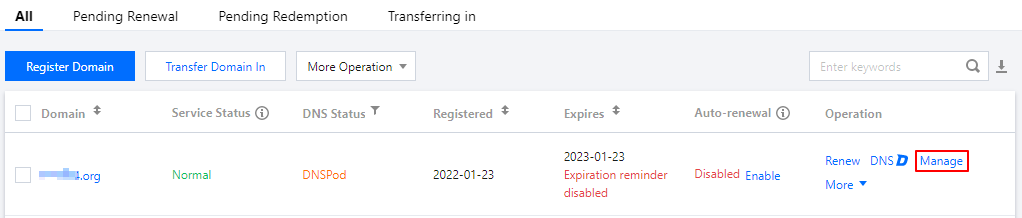
2. In the row of the domain to be transferred out, click Manage as shown below:


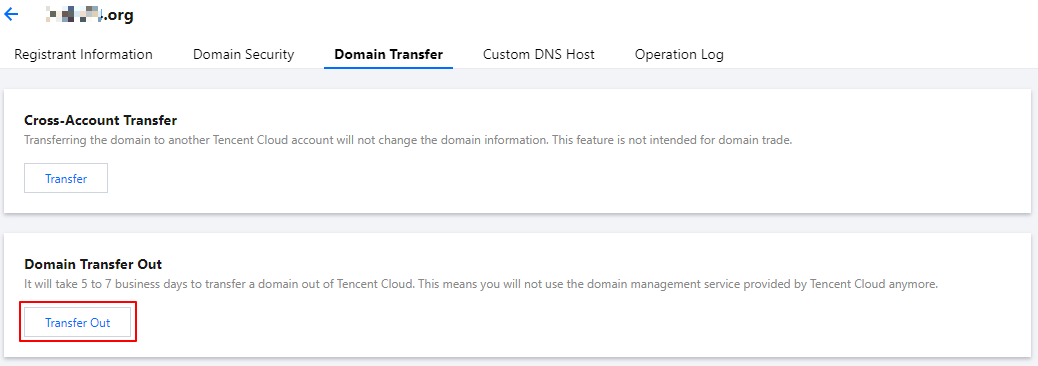
3. Enter the Domain Name Info page, select the Domain Transfer Out tab, and click Transfer Out after Cross-Account Transfer as shown below:
Note:
Before transferring out a domain, check whether Transfer Prohibition Lock is enabled, and if so, the domain cannot be transferred out. You need to disable this option before you can transfer the domain out. For detailed directions, see Enabling Domain Security Protection.


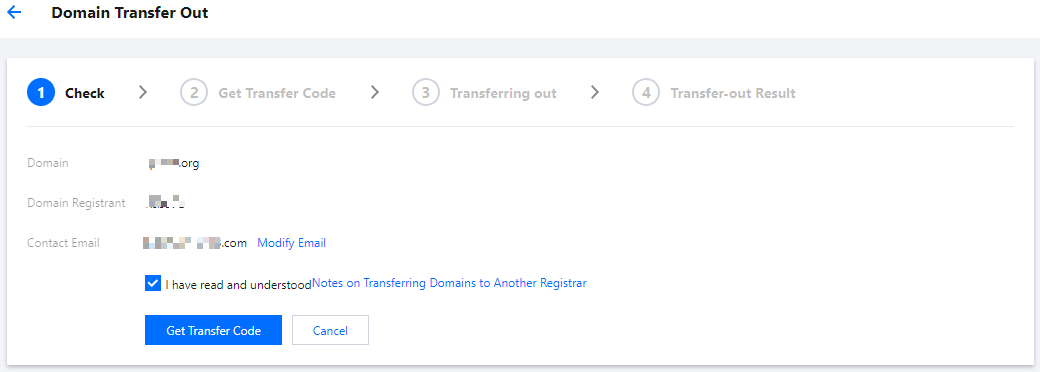
4. On the Domain Transfer Out page, check the email address, read and agree to the Notes for Domain Transfer Out, and click Get Auth-Code as shown below:
Note:
Before getting the auth-code, check whether your email address can receive emails normally.


5. If the page that you are redirected to displays "Sent the auth-code successfully", the auth-code has been sent to your email address as shown below:
Note:
If you haven't received the email, click Resend.
If the email address is incorrect, click Cancel Transfer Out and get a new auth-code after modifying the owner information.

Entering auth-code

Enter the obtained auth-code in the domain transfer information at the new registrar and complete the transfer process as prompted.
Note:
Domain transfer out generally takes 5–7 business days, subject to the handling time of the registry and target registrar. Please wait patiently.
An auth-code is valid for 5 days. If you don't transfer your domain to another registrar within this period, you need to get a new auth-code.

도움말 및 지원

문제 해결에 도움이 되었나요?

피드백