Configure Backup Task
Download
Focus Mode
Font Size
TencentDB for SQL Server supports configuring backup tasks (setting backup file format, backup task execution options). This document describes how to configure backup tasks through the console.
Supported Versions
Currently, only instances with database versions 2017/2019/2022/2025 Enterprise and two-node instance architectures are supported for backup task configuration.
Operation Steps
1. Log in to the SQL Server console.
2. Select a region above, locate the target instance, click Instance ID or Manage in the Operation column to go to the instance management page.

3. On the Instance Management page, select the Backup Management page, choose More > Backup Task Settings.

4. Complete the following configurations in the pop-up dialog box and click OK.
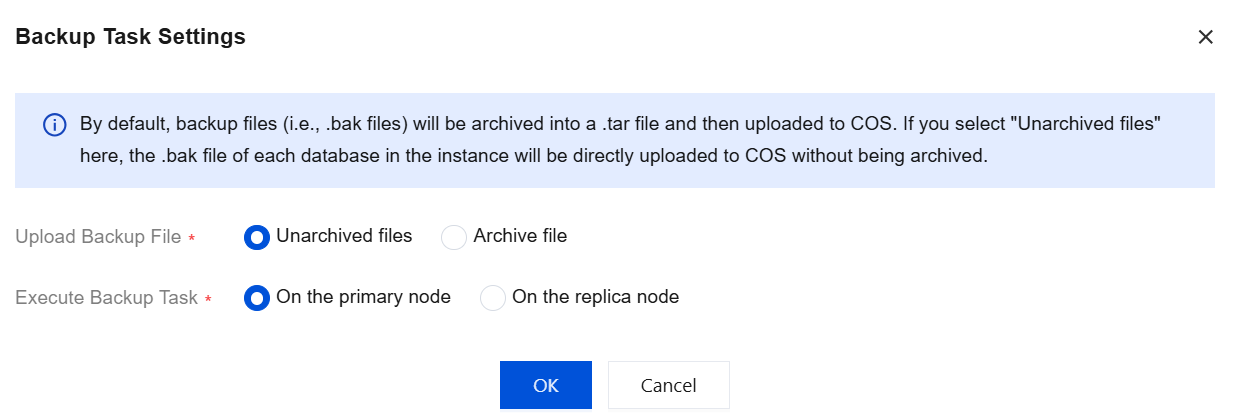
Parameter | Description |
Upload Backup File | Select the backup file format. Unarchived files: an unarchived .bak file for each database in the instance. Archive file: a file containing all databases (non-system) in the instance after archiving. Note: For archived backup files: By default, the current backup logic uses Unarchived files. You can switch to archived backup files as needed. When the Archive file format is selected, the backup status is displayed as "Backing up" during the archiving process after the backup is completed. When data volume is large, the archiving process takes longer, and the backup progress is displayed as 99%. After archiving is complete, the progress is displayed as 100%. |
Execution Backup Task | Select the execution instance for the backup task. By default, the backup task is performed on the primary node. On the primary node. On the replica node. |
Related APIs
API | Description |
The API (DescribeBackupFiles) is used to query the details of single-database backup files. |
Help and Support
Was this page helpful?
You can also Contact sales or Submit a Ticket for help.
Help us improve! Rate your documentation experience in 5 mins.
Feedback