tencent cloud

TencentDB for MariaDB

Release Notes and Announcements
Release Notes
Announcements
Product Introduction
Overview
Strengths
Use Cases
System Architecture
Instance Types
Instance Architecture
TDSQL Edition
Database Version
Purchase Guide
Billing Overview
Pricing
Refund
Payment Overdue
Upgrade Pricing
Backup Space Billing
Getting Started
Creating Instance
Managing Account
Accessing Instance
Operation Guide
Precautions
Instance Management
Disaster Recovery Read-Only Instance
Account Management
Read/Write Separation
Changing Networks
Backup and Rollback
Migrating Data
Database Sync(Legacy)
Security Management
Monitoring and Alarms
Killing Threads
Parameter Templates and Settings
Database Audit
Practical Tutorial
Programming and Usage Specification
Programming and Usage Specification of Distributed Version
Using Hotspot Update for Flash Sales
Security White Paper
Platform Security Features
Tenant Security Features
Development Guide
Functional Limitations
Performance Test
Intra-city Active-Active Solution
Binlog Consumption Format
Slow Query Analysis
Database Audit
Syntax Supported
API Documentation
History
Introduction
API Category
Making API Requests
Security Group APIs
Other APIs
Account APIs
Parameter Management APIs
Monitoring Management APIs
Instance Management APIs
Backup and Restoration APIs
Data Types
Error Codes
FAQs
Product
Account Login
Features
Performance
Backup
Ops
Disk Overuse
IO Metric Exception
General References
Standards and Certification
Main Specification Performance Description
Performance Comparison Data for Strong Sync
Glossary

Transparent Data Encryption (TDE)

PDF
Mode fokus
Ukuran font
Terakhir diperbarui: 2024-01-11 15:28:38

Overview

TencentDB for MariaDB comes with the transparent data encryption (TDE) feature. Transparent encryption means that the data encryption and decryption are transparent to users. TDE supports real-time I/O encryption and decryption of data files. It encrypts data before it is written to disk, and decrypts data when it is read into memory from disk, which meets the compliance requirements of static data encryption.
This document describes how to enable data encryption and encrypt/decrypt data in the console.

Limits

The TDE feature is currently supported only for MySQL 8.0.24 or later and Percona 5.7.
Note:
To use TDE feature, submit a ticket to apply for it.
KMS must be activated in advance or as prompted when TDE is enabled.
KMS key permissions must be granted in advance or as prompted when TDE is enabled.

Notes

After KMS is activated, KMS fees may be incurred as detailed in Purchase Method.
TDE can't be disabled once enabled.
If disaster recovery read-only instances are created, TDE cannot be enabled.
After TDE is enabled, disaster recovery read-only instances cannot be created. After TDE is enabled, the database instances can't be restored from a backup file. You recommend that you restore them as instructed in Rolling back Databases.
TDE enhances the security of static data while compromising the read-write performance of encrypted databases. Therefore, use it based on your actual needs.
After TDE is enabled, more CPU resources will be consumed, and about 5% of the performance will be compromised.

Directions

1. Log in to the TencentDB for MariaDB console. Click an instance ID or Manage in the Operation column to enter the instance management page.
2. On the instance management page, select Data Security > Data Encryption and toggle on Encryption Status.

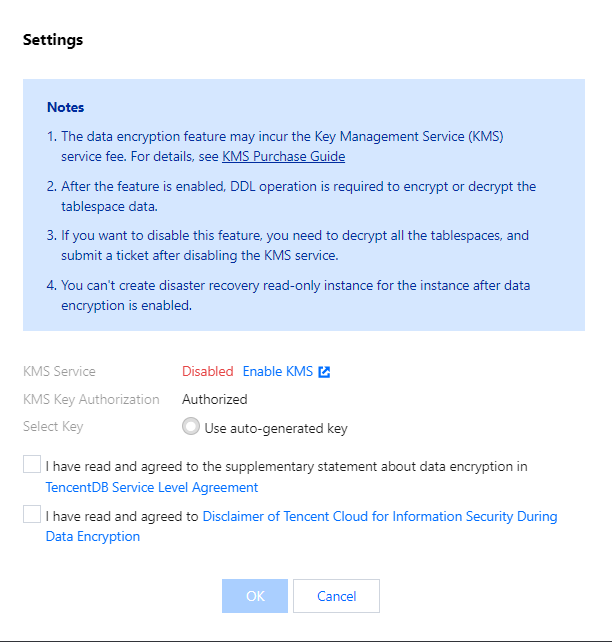
3. In the pop-up dialog box, activate the KMS, grant the KMS key permissions, select a key, and click OK.

4. After data encryption is enabled, you must perform DDL operations on the database table to encrypt or decrypt data. The detailed steps are as follows:
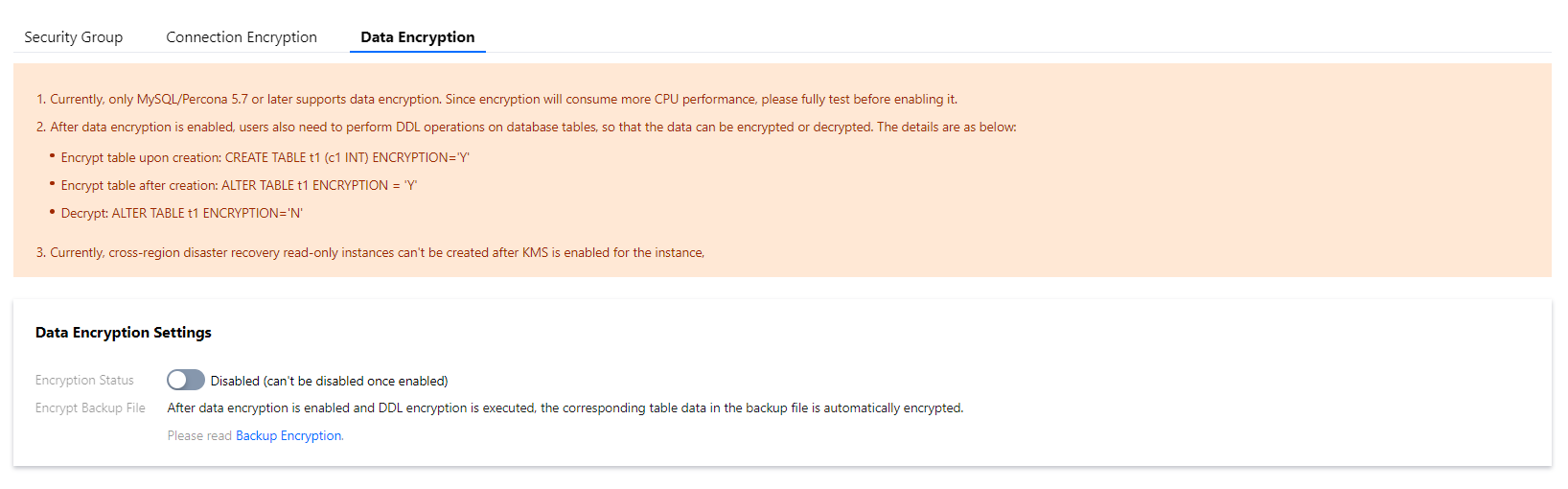
Encrypt a new table:
CREATE TABLE t1 (c1 INT) ENCRYPTION='Y'
Encrypt an existing table:
ALTER TABLE t1 ENCRYPTION='Y'
Decrypt a table:
ALTER TABLE t1 ENCRYPTION='N'

Bantuan dan Dukungan

Apakah halaman ini membantu?

masukan