Billing Overview
Download
Focus Mode
Font Size
This section introduces the billing instructions related to the CPU Elastic Scaling feature.
Billing for Automatic Scaling
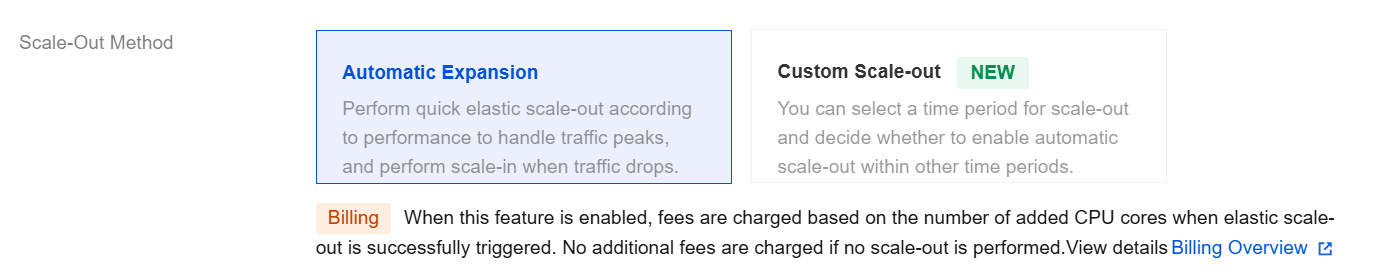
After Elastic CPU Expansion >Automatic Expansion is enabled, fees are charged based on the number of added CPU cores when elastic scale-out is successfully triggered. No additional fees are charged if no scale-out is performed.
To avoid the impact of continuous intermittent peaks, a minimum protection period of 10 minutes applies during automatic scale-out. If automatic scale-out lasts more than 10 minutes, the fees are charged based on the actual scale-out time; if automatic scale-out lasts 10 minutes or less, the fees are charged for 10 minutes.
Fee Calculation
When the method of the CPU elastic scale-out feature is automatic scale-out, the fees are charged in pay-as-you-go mode on a minute basis and are deducted once per hour.
Billing Formula = (Unit price x Number of added CPU cores) x Scaling duration (minutes) / 60.
Automatic Scaling Billing Example
Example 1
For a two-node instance in the Guangzhou region with a CPU specification of 4 cores, its CPU increases to 8 cores, with a scale-out duration of 1 hour after automatic performance scale-out is triggered. The unit price in the Guangzhou region is 0.08 USD/core/hour. The price is calculated as follows: 0.08 (unit price) x 4 (additional CPU cores) x 1 (scale-out duration) = 0.32 USD.
Example 2
For a two-node instance in the Guangzhou region with a CPU specification of 2 cores, its CPU increases to 4 cores, with a scale-out duration of 30 minutes after automatic performance scale-out is triggered. The unit price in the Guangzhou region is 0.08 USD/core/hour. The price is calculated as follows: 0.08 (unit price) x 2 (additional CPU cores) x 30/60 (scale-out duration) = 0.08 USD.
Custom Scale-out Billing Instructions
Fee Calculation
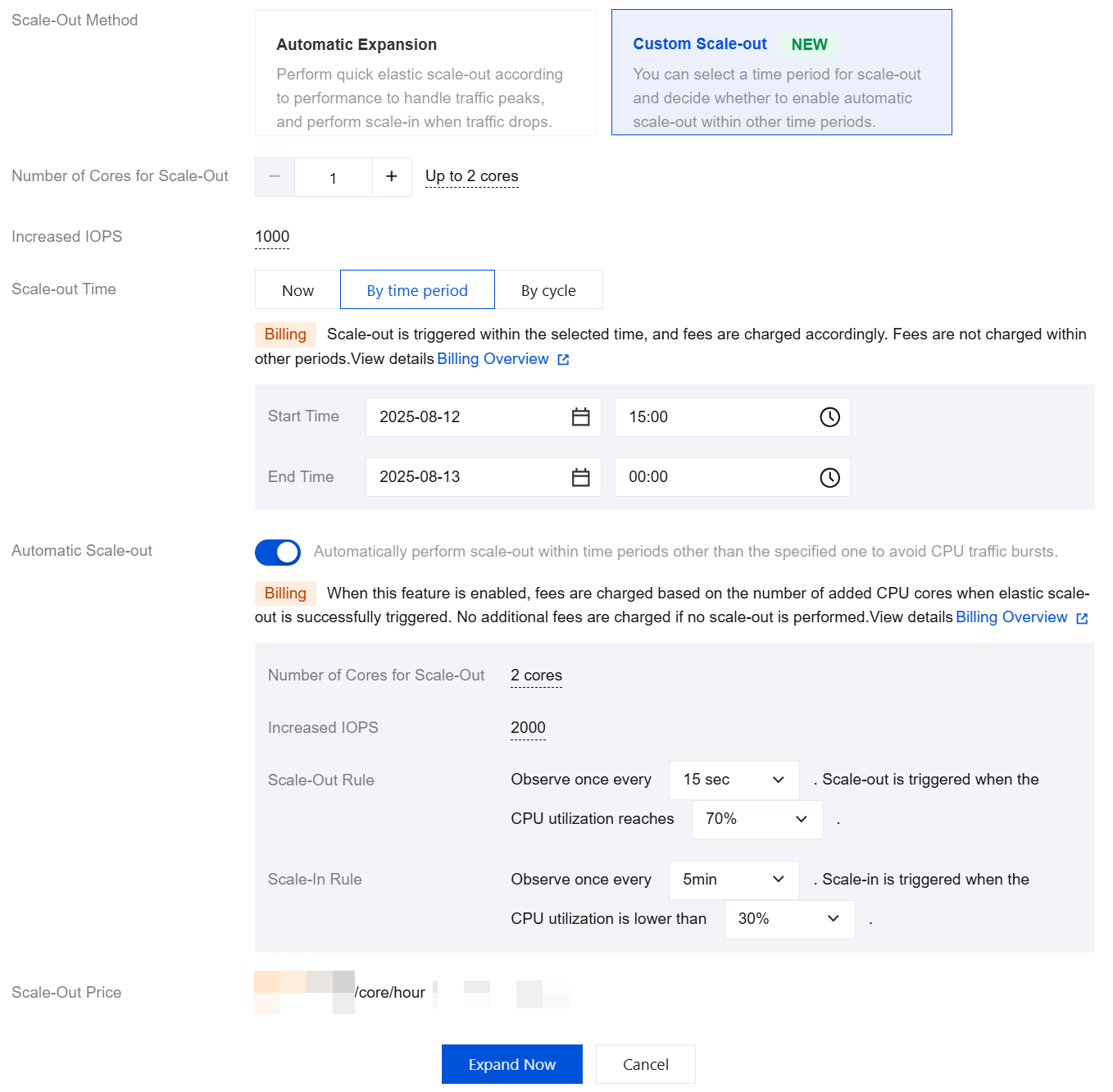
When the method of the CPU elastic scale-out feature is custom scale-out, the fees are charged in pay-as-you-go mode on a minute basis and are deducted once per hour.
Billing Formula = (Unit price x Number of added CPU cores) x Scaling duration (minutes)/60.
Scale-out Time Selection and Billing Instructions
When the scale-out time is set to now, the feature takes effect immediately upon enabling, and scale-out is triggered, with fees being charged synchronously until you disable scale-out. For operations related to disabling scale-out, see Setting Custom Scale-out. For a billing example, see Example 1.
When the scale-out time is set by period or cycle, and automatic scale-out is not enabled, the feature takes effect according to the selected period or cycle upon enabling, and scale-out is triggered, with fees being charged synchronously. No fees are charged in other periods or cycles. For billing examples, see Example 2 and Example 3.
When the scale-out time is set by period or cycle, and automatic scale-out is enabled, the feature takes effect within the selected period or cycle upon enabling, and scale-out is triggered, with fees being charged synchronously. In other periods or cycles, fees are charged based on the number of added CPU cores when elastic scale-out is successfully triggered. No additional fees are charged if no scale-out is performed. For billing examples, see Example 4 and Example 5.
Custom Scale-out Billing Example
Example 1
A two-node instance in the Beijing region has a CPU specification of 2 cores. At 10:00 AM, the CPU elastic scale-out is enabled for the instance, with the scale-out method of custom scale-out and scale-out time set to now. 2 CPU cores are added additionally. The feature is disabled at 5:00 PM, with a scale-out duration of 7 hours. The unit price in the Beijing region is 0.08 USD/core/hour. The custom scale-out price of the instance is calculated as follows: 0.08 (unit price) x 2 (additional CPU cores) x 7 (scale-out duration) = 1.12 USD.
Example 2
A two-node instance in the Beijing region has a CPU specification of 2 cores. The CPU elastic scale-out is enabled for the instance, with the scale-out method of custom scale-out, and scale-out time set by period. 2 CPU cores are scaled out. The scale-out duration is from May 1, 2025, 00:00 to May 15, 2025, 00:00, without enabling automatic scale-out, and the CPU elastic scale-out policy is not changed until May 31. The custom scale-out price for this instance in May 2025 is calculated as follows: 0.08 (unit price) x 2 (additional CPU cores) x 360 (scale-out duration) = 57.6 USD.
Example 3
A two-node instance in the Beijing region has a CPU specification of 2 cores. The CPU elastic scale-out is enabled for the instance on April 30, 2025, with the scale-out method of custom scale-out and scale-out time set by cycle. 2 CPU cores are scaled out. The cycle is from Monday to Friday, and the start time and end time are from 00:00 to 00:00 without enabling automatic scale-out, and the CPU elastic scale-out policy is not changed until May 31. The custom scale-out price for this instance in May 2025 is calculated as follows: 0.08 (unit price) x 2 (additional CPU cores) x 528 (scale-out duration) = 84.48 USD.
Example 4
A two-node instance in the Beijing region has a CPU specification of 2 cores. The CPU elastic scale-out is enabled for the instance, with the scale-out method of custom scale-out and scale-out time set by period. 2 CPU cores are scaled out. The scale-out duration is from 00:00 on May 1, 2025 to 00:00 on May 15, 2025, with automatic scale-out enabled, and the CPU elastic scale-out policy is not changed until May 31. Assuming that during the period from May 16 to May 31, the total time of triggered performance automatic scale-out for this instance is 10 hours, the custom scale-out price for this instance in May 2025 is calculated as follows: {0.08 (unit price) x 2 (additional CPU cores) x 360 (scale-out duration)} + {0.08 (unit price) x 2 (additional CPU cores) x 10} = 59.2 USD.
Example 5
A two-node instance in the Beijing region has a CPU specification of 2 cores. The CPU elastic scale-out is enabled for the instance on April 30, 2025, with the scale-out method of custom scale-out and scale-out time set by cycle. 2 CPU cores are scaled out. The cycle is from Monday to Friday, and the start time and end time are from 00:00 to 00:00 with automatic scale-out enabled, and the CPU elastic scale-out policy is not changed until May 31. Assuming that during the period from May 1 to May 31, the total time of triggered performance automatic scale-out for this instance on all Saturdays and Sundays is 20 hours, the custom scale-out price for this instance in May 2025 is calculated as follows: {0.08 (unit price) x 2 (additional CPU cores) x 528 (scale-out duration)} + {0.08 (unit price) x 2 (additional CPU cores) x 20 (scale-out duration)} = 87.68 USD.
Unit Price per Core
Region | Unit Price (USD/Core/Hour) |
Chengdu, Chongqing | 0.03 |
Guangzhou, Shanghai, Beijing, Nanjing | 0.04 |
Hong Kong (China), Tokyo, Seoul, Bangkok | 0.0495 |
Frankfurt, Sao Paulo | 0.0365 |
Singapore, Jakarta, Silicon Valley, Virginia | 0.061 |
Region | Unit Price (USD/Core/Hour) |
Chengdu, Chongqing | 0.06 |
Guangzhou, Shanghai, Beijing, Nanjing | 0.08 |
Hong Kong (China), Tokyo, Seoul, Bangkok | 0.099 |
Frankfurt, Sao Paulo | 0.073 |
Singapore, Jakarta, Silicon Valley, Virginia | 0.122 |
Region | Unit Price (USD/Core/Hour) |
Chengdu, Chongqing | 0.09 |
Guangzhou, Shanghai, Beijing, Nanjing | 0.12 |
Hong Kong (China), Tokyo, Seoul, Bangkok | 0.1485 |
Frankfurt, Sao Paulo | 0.1095 |
Singapore, Jakarta, Silicon Valley, Virginia | 0.183 |
Help and Support
Was this page helpful?
You can also Contact sales or Submit a Ticket for help.
Help us improve! Rate your documentation experience in 5 mins.
Feedback