tencent cloud

Cloud Load Balancer

Introdução
Introdução ao CLB
Introdução ao CLB IPv6
Implementação do Nginx no CentOS
Implementação do Java Web no CentOS
Guia de operação
Instância do CLB
Listener do CLB
Servidor de back-end
Verificação de integridade
Gerenciamento de certificados
Gerenciamento de log
Monitoramento e alarmes
Cloud Access Management
CLB clássico
Tutoriais Práticas
Configurações de encaminhamento HTTPS
Implementação do HA em várias AZs
Configuração de algoritmos e peso
Configuração da proteção WAF para nomes de domínio de escuta do CLB
Diretrizes OPS
Soluções para excesso de tempo de espera do cliente
Teste de desempenho do serviço HTTPS do balanceador de carga
Perguntas frequentes sobre o teste de estresse
Permissões de operação do certificado CLB
DocumentaçãoCloud Load Balancer

Directions for Upgrading to Domain Name-Based CLB

Modo Foco
Tamanho da Fonte
Última atualização: 2024-10-17 18:05:02
You can upgrade your existing public network Cloud Load Balancer (CLB) instances to domain name-based CLB instances. After the upgrade, the CLB service will be delivered through domain names, and VIPs may change dynamically with business requests and will no longer be displayed in the console.

CLB Service Comparison Before and After the Upgrade

Item
After Upgrade
Before Upgrade
SLA
99.99%
99.95%
Domain names supported
Yes
No
Automatic VIP scaling supported
Yes
No
VIP changes
VIPs may change dynamically with business requests and will no longer be displayed in the console.
VIPs are fixed.
Health check source IP
100.64.0.0/10 IP range by default, helping prevent IP conflicts
CLB instance VIP by default, which can be switched to the 100.64.0.0/10 IP range

Restrictions

Classic networks do not support the upgrade of CLB instances. If your CLB instance is in a classic network, migrate the instance first. For more information, see Ending Support for Classic Network.
Classic CLB does not support upgrade. Upgrade classic CLB instances to CLB instances as instructed in Classic CLB Upgrade Prompt.
CLB instances created by containers currently do not support direct upgrade through the console. If upgrade is needed, please submit a ticket for assistance.
Anti-DDoS Pro currently does not support protection for domain name-based CLB. After upgrading to domain name-based CLB, Anti-DDoS Pro will fail and seriously affect business security. For users with public network CLB instances already bound to Anti-DDoS Pro, or users with Anti-DDoS needs for public network CLB instances, upgrading to domain name-based CLB instances is not recommended. For other issues, please submit a ticket for assistance.

Prerequisites

1. Your business service is accessible through CNAME resolution.
2. The health check source IP has been changed to the 100.64.0.0/10 IP range. For more information, see Changing Health Check Source IP.

Directions

Method 1: Upgrading a specific CLB instance

1. Log in to the CLB Console.
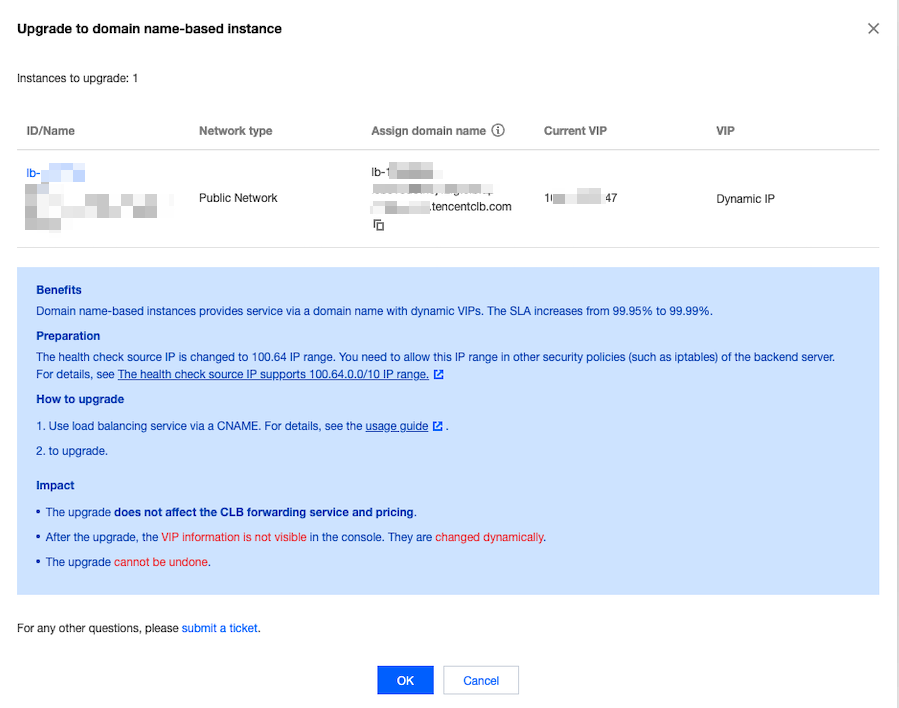
2. Select a region in the top-left corner of the Instance management page. In the instance list, locate the target instance, click More in the Operation column of the instance, and select Upgrade to domain name-based instance.
3. In the Upgrade to domain name-based instance pop-up window, click OK.


Method 2: Upgrading instances in batches

1. Log in to the CLB Console.
2. Select a region in the top-left corner of the Instance management page and select the instances to upgrade in the instance list.
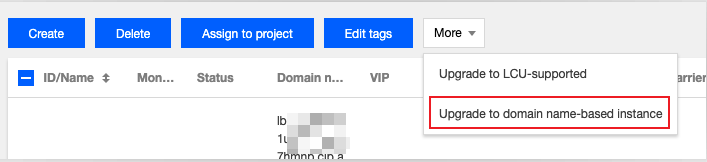
3. Click More above the instance list, and select Upgrade to domain name-based instance.


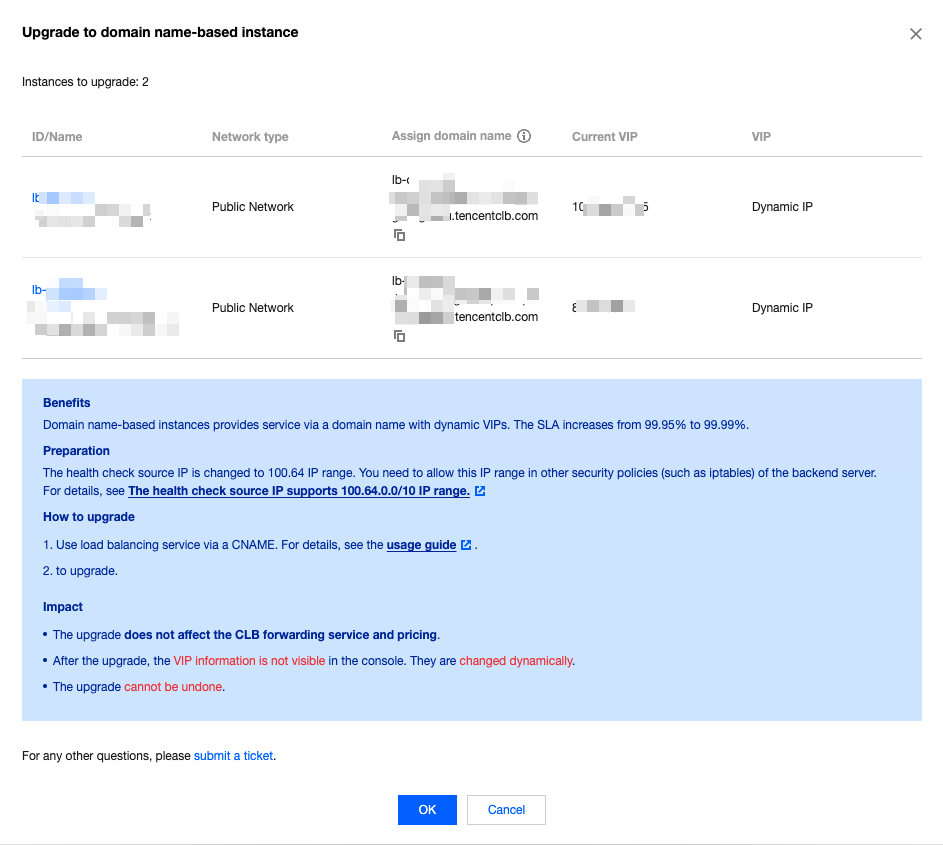
4. In the Upgrade to domain name-based instance pop-up window, click OK.


Ajuda e Suporte

Esta página foi útil?

comentários