Topic and Wildcard Subscriptions
다운로드
포커스 모드
폰트 크기
In the MQTT‑based IoT ecosystem, the publish–subscribe model enables complete decoupling between devices and applications. At the center of this mechanism are topics
and wildcards.
A topic is a UTF‑8 encoded string organized in a hierarchical structure similar to a URL path (for example,
sensor/room1/temperature). It serves not only as an addressing channel for message delivery but also as a mapping of business logic at the communication layer. During message transmission, a publisher sends data to a specific topic, and the broker routes the message precisely according to the subscriber's topic filter.To address the complex communication needs of massive devices, MQTT introduces the wildcard subscription mechanism. This extends "exact match" to "pattern match," allowing clients to capture multiple related data streams with a single subscription, significantly reducing network load and client logic complexity. Therefore, deeply understanding the hierarchical logic of topics and mastering the usage of wildcards is the first step in building scalable, maintainable, and high-performance IoT systems.
Topic Name, Topic Filter, and Topic
In the MQTT protocol communication mechanism, there are three roles: publisher, broker, and subscriber. A message is sent from the publisher to the broker and then delivered to the subscriber, with the topic serving as the agreed-upon message channel between the publisher and the subscriber. To achieve precise message routing, we need to clearly define these three roles:
Topic Name
Definition: The string used when a message is published.
Purpose: Used to identify the unique channel for a specific message.
Rule: Wildcards are not allowed. A topic name must be a definite and concrete path.
Example:
sensor/room1/temperature. The publisher instructs the broker: "Deliver this message to the temperature endpoint of room1."Topic Filter
Definition: The string used when messages are subscribed to.
Purpose: Used to inform the broker which messages the subscriber intends to receive.
Rule: Wildcards can be used, or omitted (for exact match). A topic filter essentially acts as a matching template.
Example:
sensor/+/temperature: The subscriber tells the broker: "I want the temperature data for all rooms."sensor/room1/temperature: The subscriber tells the broker: "I only want the temperature data for room1."Topic
Definition: The logical channel formed after the broker matches a topic name with a topic filter.
Relationship: The broker matches the Topic Name (message source) with the Topic Filter (subscription requirement). If the match is successful, the message is delivered.
Note:
In TDMQ for MQTT, topics do not need to be created in advance. A topic is created automatically when a client publishes or subscribes to a message, and no deletion is required.
To better understand the differences mentioned above, let's examine a typical MQTT publish and subscribe flow diagram: APP 1 subscribes to the topic
sensor/+/temperature and therefore receives messages published by both Sensor 1 and Sensor 2. APP 2 subscribes to the topic sensor/2/temperature and receives only the messages published by Sensor 2 to this topic.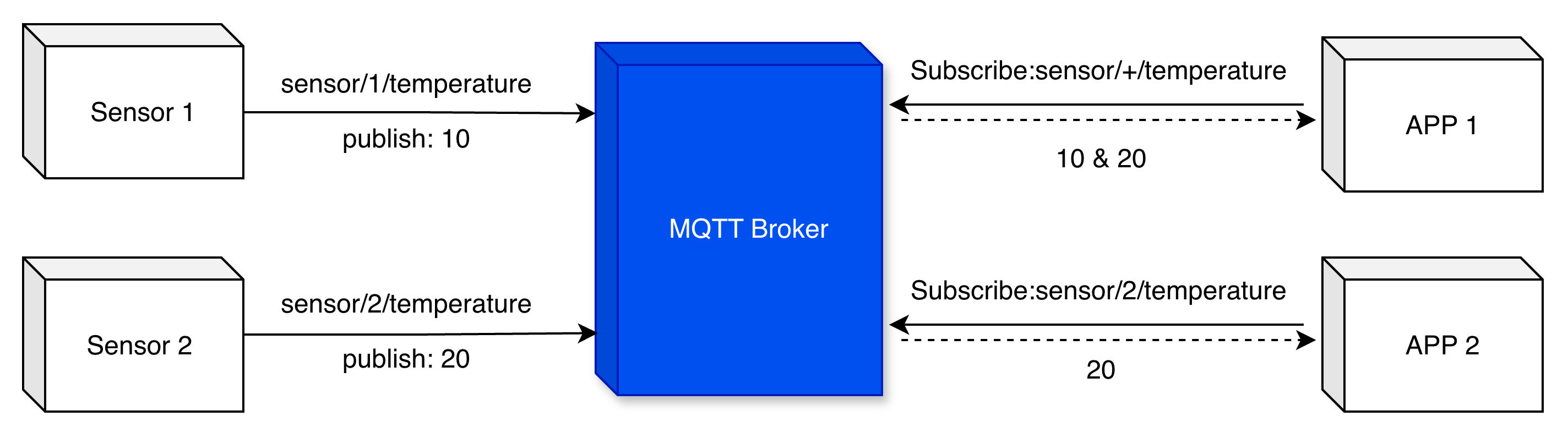
MQTT Wildcards
MQTT wildcards are a special type of topic that can only be used for subscriptions (exclusively in Topic Filter), not for publishing. Clients can subscribe to topics containing wildcards to receive messages from multiple matching topics, thereby flexibly subscribing to multiple topics and reducing overhead. MQTT supports two types of wildcards:
+ single-level wildcard and # multi-level wildcard.Single-Level Wildcard
The single-level wildcard is represented by the plus sign
+, which can be used to match a single topic level. This wildcard must occupy an entire level and cannot be part of a level (for example, room+ is invalid). A subscription containing a single‑level wildcard matches all topics where the wildcard level can be any string. For example:Subscribing to
sensor/+/temperaturematches
sensor/bedroom/temperaturematches
sensor/living_room/temperaturedoes not match
sensor/bedroom/upstairs/temperature (because + can only match one level).does not match
sensor/temperature (because there is a missing level between sensor and temperature).Multi-Level Wildcard
The multi-level wildcard is represented by the hash sign
#, which matches zero or more topic levels. It must be the last character of the topic filter and preceded by a forward slash. For example:Subscribing to
sensor/bedroom/#matches
sensor/bedroom/temperaturematches
sensor/bedroom/humiditymatches
sensor/bedroom/light/intensitymatches
sensor/bedroom (# can match zero levels).does not match
sensor/living_room/temperature (because bedroom is fixed).Note: If the service is expected to have high throughput, using only multi-level wildcards for subscriptions may constitute a "bad" practice. Subscribing to overly broad topics can result in a large volume of messages being delivered to the client, potentially impacting system performance and bandwidth consumption. Follow best practices to optimize topic filter design and avoid unnecessary message overload.
MQTT Topics Starting with $
Event Topic $events
The MQTT system publishes triggered events to the following system topics as QoS 0 messages. Business systems can subscribe to these topics as needed.
Topic Name | Remarks |
$events/client_connected | The client is connected. |
$events/client_disconnected | The client is disconnected. |
$events/session_subscribed | A subscription was added to the client session. |
$events/session_unsubscribed | A subscription was removed from the client session. |
$events/certificate_registered | The client registered a device certificate. |
$events/certificate_rejected | The client device certificate was rejected. The certificate status is inactive, such as PENDING_ACTIVATION. |
Shared Subscription
Shared subscription is a new feature introduced in MQTT 5.0 that enables load balancing of subscriptions among multiple subscribers. The shared subscription topic specified by MQTT 5.0 begins with
$share.A shared subscription topic filter is structured as:
$share/{ShareName}/{TopicFilter}Parameter | Description |
$share | Literal constant, a fixed string. |
{ShareName} | Name of a shared subscription group. It must not contain " / ", " + ", or " # ". |
{TopicFilter} | Follows the same rules and semantics as a standard MQTT topic filter. |
MQTT Topic Usage Recommendations
1. Case-sensitive:
myhome/temp and MyHome/Temp are completely distinct topics.2. Hierarchy and character limits:
Hierarchy depth: It is recommended to keep it within 7 levels. The deeper the hierarchy, the higher the resource consumption for matching by the broker.
Character type: Each topic must contain at least one character. Avoid spaces and non-ASCII special characters.
Naming convention: Within the same topic level, use underscores "_" or hyphens "-" to join words (or use camelCase).
3. Place unique identifiers first: When wildcards are used, position the topic level with unique values (such as device ID) as close to the first level as possible. For example:
device/{deviceID}/status is preferable to device/status/{deviceID}.4. Documentation: Maintain comprehensive documentation detailing your MQTT topic structure, including its purpose, expected message load, and other complete conventions or guidelines.
FAQs
Are There Limits on Topic Hierarchy and Length?
The MQTT protocol specifies that the topic length is limited to two bytes, allowing a maximum of 65,535 characters per topic.
It is recommended to keep the topic hierarchy within 7 levels. Using shorter topic names and fewer hierarchy levels means less resource consumption. For example,
my-home/room1/data is better than my/home/room1/data.Is There a Limit on the Number of Topics a Server Can Handle?
Different message servers vary significantly in their support for the maximum number of topics. Currently, there is no default limitation on the number of topics. However, a larger number of topics will consume more server memory and incur higher routing lookup overhead. Since the number of devices connected to the MQTT broker is generally substantial, we recommend limiting the number of topics subscribed by a single client to 10 or fewer.
Is Wildcard Subscription Performance the Same as Regular Topic Subscription?
Wildcard topic subscriptions have lower performance and consume more server resources than regular topic subscriptions. Users can choose the subscription type based on actual business needs.
How Do I Use System Topics?
Subscribe to specific event topics based on business needs. For details, refer to Event Topics $events. By subscribing to
$events/#, you will receive messages for all client events.
피드백