TDMQ for MQTT provides flexible subscription management features, supporting dynamic maintenance of subscription lists: subscription addition and removal.
Subscription addition: New topics can be subscribed to without reconnecting.
Subscription removal: Topic subscriptions that are no longer needed can be removed at any time.
Scenarios
IoT Device Management Scenario
Suitable for traditional IoT devices with hard-to-update firmware.
Addresses the inability to reconfigure subscriptions on legacy devices through OTA upgrades.
Avoids device restarts or reconnections caused by subscription changes.
Development and Testing Scenarios
Significantly improves development and debugging efficiency, avoiding frequent ROM flashing operations.
Supports quick verification of message processing logic under different topics.
Makes it easier to perform multi-topic parallel tests and shorten the development cycle.
Note:
TencentCloud APIs for subscription addition and removal take effect in real time.
API Details
Adding a Subscription
MQTT provides TencentCloud APIs to add new subscriptions to the session of a specified client ID.
Parameter Name
Description
Example
InstanceId
Instance ID
mqtt-sample
ClientId
Client ID
v-xy34213qz
TopicFilter
Topic Filter
home/#
QoS
Quality of Service. Valid values: 0, 1, or 2.
1
Deleting a Subscription
MQTT provides TencentCloud APIs to delete subscriptions from the session of a specified client ID.
Parameter Name
Description
Example
InstanceId
Instance ID
mqtt-sample
ClientId
Client ID
v-xy34213qz
TopicFilter
Topic Filter
home/#
Automatic Subscription Management
Automatic subscription management is an event-driven MQTT application mode that significantly enhances the flexibility and automation of subscription management, making it suitable for IoT scenarios with highly dynamic devices and complex subscription relationships.
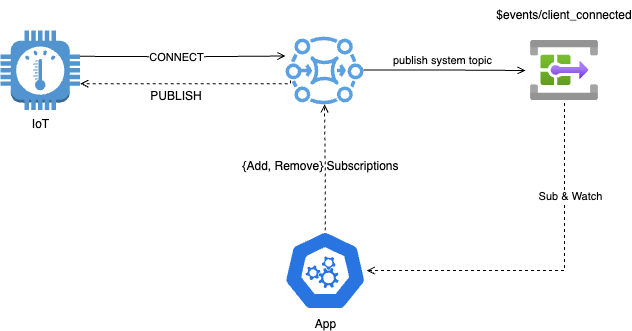
The complete workflow is as follows:
Device connection: An IoT device comes online and successfully connects to the MQTT Broker.
Event trigger: Upon detecting a device connection, the MQTT Broker immediately generates a "Client Connected" event and publishes the event details (including metadata such as client ID, connection timestamp, and so on) to the system topic $events/client_connected.
Event listening and reception: The application that consistently subscribes to the $events/client_connected topic receives this event notification in real time.
Subscription logic execution: The application parses the event message to obtain information such as the client ID of the newly connected device, and then initiates corresponding subscription management operations with the MQTT Broker on behalf of the device according to predefined business logic, such as subscribing to specific topics or unsubscribing from certain ones.
By combining client lifecycle events with subscription list management capabilities, you can easily build a flexible automatic subscription mechanism. This mode automatically adds or modifies subscriptions based on business needs during device connections, significantly enhancing the system's adaptability and operational efficiency in dynamic environments.