C SDK
Baixar
Modo Foco
Tamanho da Fonte
Feature Overview
Eclipse Paho C and Eclipse Paho Embedded C are C-language client libraries (MQTT C clients) under the Eclipse Paho project, each being a full-featured MQTT client written in ANSI C.
Eclipse Paho Embedded C can be used on desktop operating systems, but is mainly for embedded environments such as Mbed, Arduino, and FreeRTOS.
It provides two API types, synchronous and asynchronous, starting with MQTTClient and MQTTAsync respectively:
Synchronous APIs aim to be easier and more useful. Specific calls will block until the operation completes, making programming simpler.
The asynchronous API contains only one blocking call, API-waitForCompletion, which performs result notification via callback and is more suitable for non-main thread environments.
Cloud Resource Preparation
Environment Preparation
Note:
Paho MQTT C SDK requires CMake version 3.5+.
Example of Installing the Paho MQTT C SDK
cd paho.mqtt.c && cmake .make && make installecho '/usr/local/lib64' > /etc/ld.so.conf.d/paho.confecho '/usr/local/lib' >> /etc/ld.so.conf.d/paho.confldconfig
Sample Code
Copy the content below to
/root/mqtt-example.c#include "stdio.h"#include "stdlib.h"#include "string.h"#include "MQTTClient.h"#define ADDRESS "tcp://mqtt-********.mqtt.tencenttdmq.com:1883"#define CLIENTID "sample_client"#define TOPIC "testtopic/1"#define PAYLOAD "Hello World!"#define QOS 1#define TIMEOUT 10000L#define USERNAME "your-username"#define PASSWORD "your-password"int main(int argc, char* argv[]){MQTTClient client;MQTTClient_connectOptions conn_opts = MQTTClient_connectOptions_initializer;MQTTClient_message pubmsg = MQTTClient_message_initializer;MQTTClient_deliveryToken token;int rc;MQTTClient_create(&client, ADDRESS, CLIENTID,MQTTCLIENT_PERSISTENCE_NONE, NULL);// MQTT connection parametersconn_opts.keepAliveInterval = 20;conn_opts.cleansession = 1;conn_opts.MQTTVersion = MQTTVERSION_3_1_1;conn_opts.username = USERNAME;conn_opts.password = PASSWORD;if ((rc = MQTTClient_connect(client, &conn_opts)) != MQTTCLIENT_SUCCESS){printf("Failed to connect, return code %d\\n", rc);exit(-1);}// Publish a message.pubmsg.payload = PAYLOAD;pubmsg.payloadlen = strlen(PAYLOAD);pubmsg.qos = QOS;pubmsg.retained = 0;MQTTClient_publishMessage(client, TOPIC, &pubmsg, &token);printf("Waiting for up to %d seconds for publication of %s\\n""on topic %s for client with ClientID: %s\\n",(int)(TIMEOUT/1000), PAYLOAD, TOPIC, CLIENTID);rc = MQTTClient_waitForCompletion(client, token, TIMEOUT);printf("Message with delivery token %d delivered\\n", token);// Disconnect.MQTTClient_disconnect(client, 10000);MQTTClient_destroy(&client);return rc;}
Parameter Description
Parameter | Description |
ADDRESS | Broker connection address, copied from the Basic Information > Access Information section of the target cluster in the console, as shown below. Format: mqtt-xxx-gz.mqtt.qcloud.tencenttdmq.com:1883. 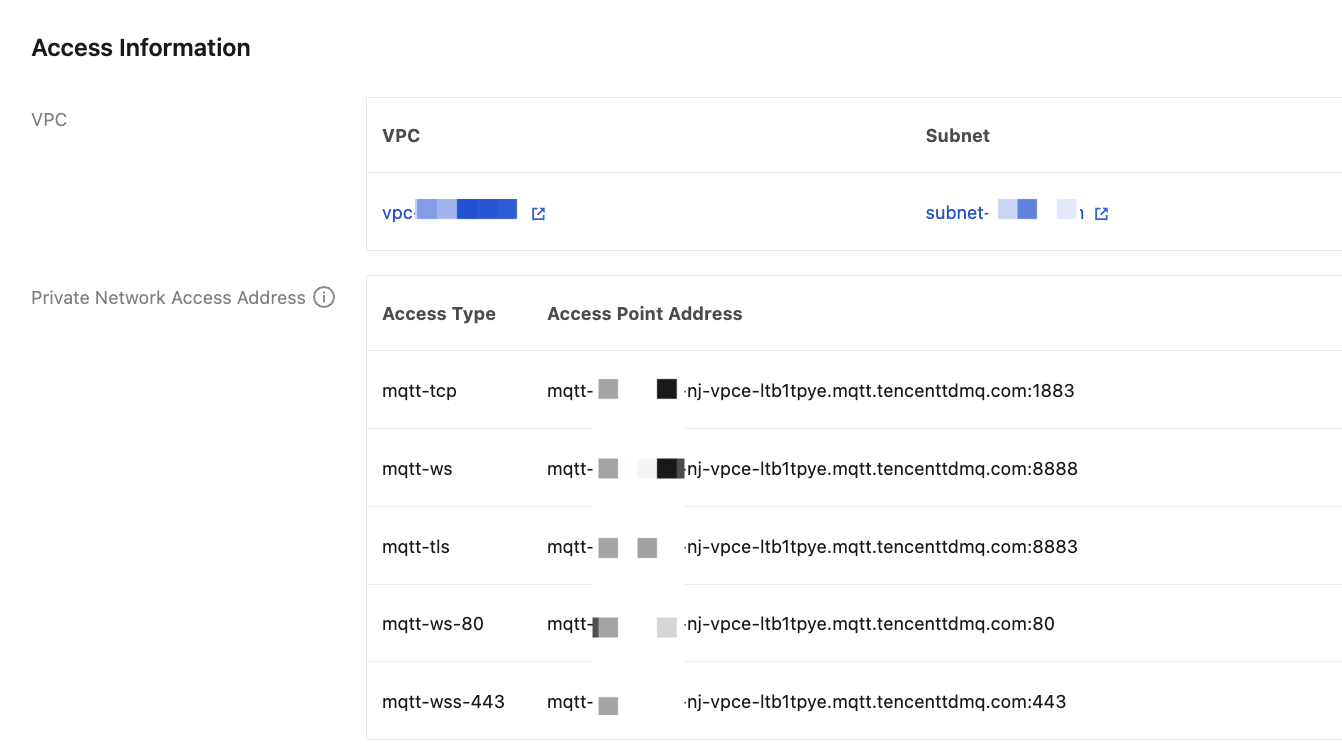 |
CLIENTID | Client ID, obtained from the Client Management page on the cluster details page in the console. |
USERNAME | User name, obtained on the Authentication Management page in the console. |
PASSWORD | Password, obtained on the Authentication Management page in the console. |
Compilation Example
cd /rootgcc mqtt-example.c -lpaho-mqtt3c -o mqtt-example
Paho C MQTT 5.0 Support
Paho C currently has complete support for MQTT 5.0.
Example of One-Device-One-Certificate
Scenario Introduction
For high-value devices with high security requirements, "one-device-one-certificate" is recommended for client authentication, which is an enhancement of mutual authentication (mTLS). On the basis of mutual authentication, the cloud performs management of the status of client certificates, including activating, deactivating, and revoking operations.
Generating a Certificate
Generating a CA Certificate
openssl ecparam -genkey -name prime256v1 -out CA.keyopenssl req -new -x509 -key CA.key -sha256 -subj "/C=CN/ST=ZheJiang/L=HangZhou/O=TencentCloud/CN=MQTT-CA" -days 3650 -out CA.crt
openssl genrsa -out CA.key 4096openssl req -new -x509 -key CA.key -sha256 -subj "/C=CN/ST=ZheJiang/L=HangZhou/O=TencentCloud/CN=MQTT-CA" -days 3650 -out CA.crt
Issuing a Server Certificate
Create a configuration file server.conf
[req]distinguished_name = req_distinguished_namereq_extensions = v3_reqprompt = no[req_distinguished_name]C = CNST = ZheJiangL = HangZhouO = ExampleCN = mqtt.example.com[v3_req]basicConstraints = critical, CA:FALSE# Common Key Usage Combinations# TLS Server: keyUsage=digitalSignature,keyEncipherment + extendedKeyUsage=serverAuth# TLS Client: keyUsage=digitalSignature + extendedKeyUsage=clientAuth# Code Signing: keyUsage=digitalSignature + extendedKeyUsage=codeSigningkeyUsage = critical, digitalSignature, keyEnciphermentextendedKeyUsage = serverAuthsubjectAltName = @alt_names[alt_names]DNS.1 = mqtt.example.comDNS.2 = www.example.comDNS.3 = api.example.comDNS.4 = *.example.comIP.1 = 192.168.1.100IP.2 = 10.0.0.50
openssl ecparam -genkey -name prime256v1 -out server.keyopenssl req -new -key server.key -out server.csr -config server.confopenssl x509 -req -in server.csr -CA CA.crt -CAkey CA.key -CAcreateserial -out server.crt -days 365 -sha256 -extensions v3_req -extfile server.conf
openssl genrsa -out server.key 4096openssl req -new -key server.key -out server.csr -config server.confopenssl x509 -req -in server.csr -CA CA.crt -CAkey CA.key -CAcreateserial -out server.crt -days 365 -sha256 -extensions v3_req -extfile server.conf
Verifying the Server Certificate
openssl x509 -in server.crt -text -nooutopenssl verify -CAfile CA.crt server.crtopenssl x509 -in server.crt -text -noout | grep -A 10 "Subject Alternative Name"
Create a complete server certificate chain file.
cat server.crt > server.chain.crtcat CA.crt >> server.chain.crt
Issuing a Client Certificate
Create a configuration file client.conf.
[v3_req]basicConstraints = critical, CA:FALSEkeyUsage = critical, digitalSignatureextendedKeyUsage = clientAuth
openssl ecparam -genkey -name prime256v1 -out client.keyopenssl req -new -key client.key -out client.csr -subj "/C=CN/ST=ZheJiang/L=HangZhou/O=IoV/CN=SN0001"openssl x509 -req -in client.csr -CA CA.crt -CAkey CA.key -CAcreateserial -out client.crt -days 365 -sha256 -extfile client.conf -extensions v3_req
openssl genrsa -out client.key 4096openssl req -new -key client.key -out client.csr -subj "/C=CN/ST=ZheJiang/L=HangZhou/O=IoV/CN=SN0001"openssl x509 -req -in client.csr -CA CA.crt -CAkey CA.key -CAcreateserial -out client.crt -days 365 -sha256 -extfile client.conf -extensions v3_req
Ajuda e Suporte
Esta página foi útil?
Você também pode entrar em contato com a Equipe de vendas ou Enviar um tíquete em caso de ajuda.
comentários