Release Notes
Viewing Client Details
This document describes how to view client information on the MQTT console, including basic information, connection information, and subscription relationships, helping you monitor client status in real time and promptly address related issues.
Viewing Client Details
There are two ways to view client information:
Method 1:
1. Log in to the MQTT Console.
2. In the left sidebar, choose Resource Management > Cluster Management. Select a region and click the target cluster ID to enter the Cluster Basic Information page.
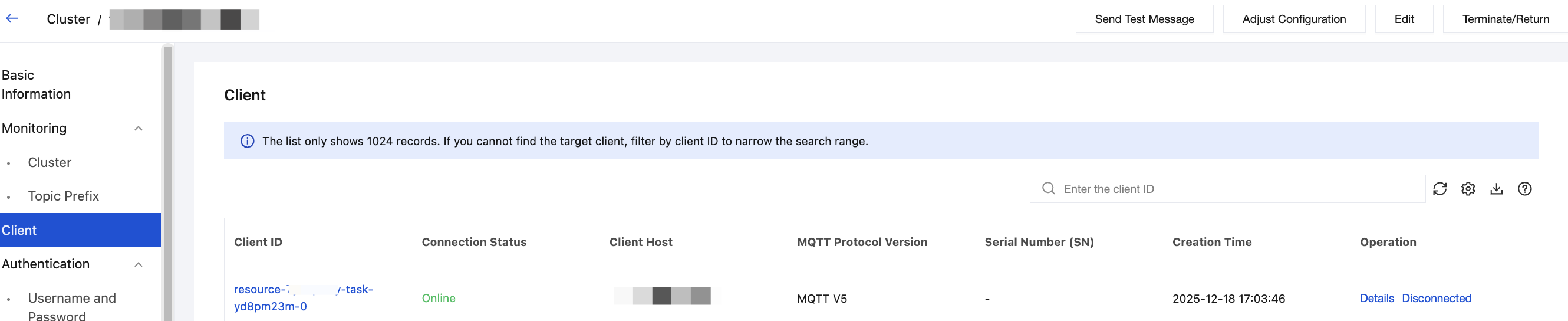
3. Select Client Management tab on the left to view the client list.
Note:
The Client Management page allows you to search by the entered client ID and supports fuzzy search.
If no client ID is specified, up to 1,024 sessions are displayed randomly.
Method 2:
1. Log in to the MQTT Console.
2. In the left sidebar, choose Resource Management > Client Management. Select a region and cluster to view the client list.
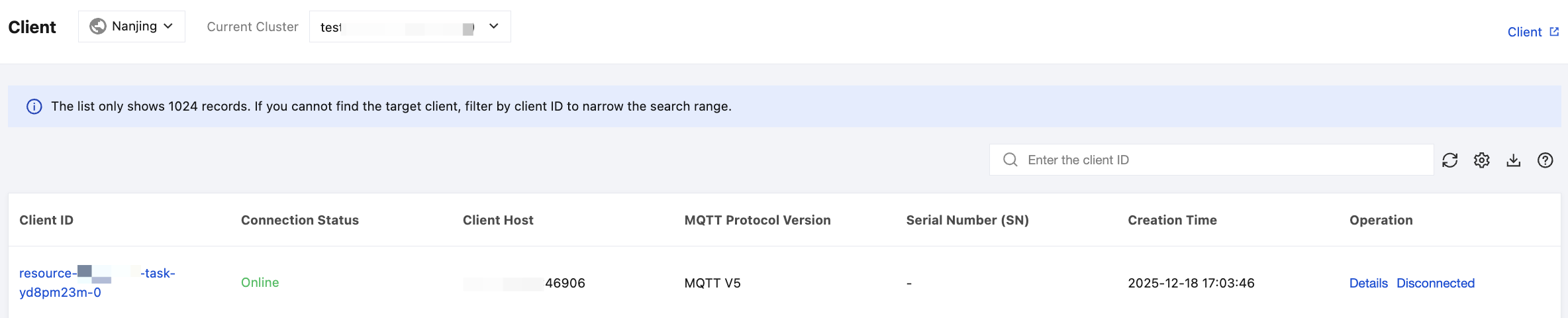
Viewing Client Information: Click the client ID or click Details in the Operation column of the target client to view the client information.
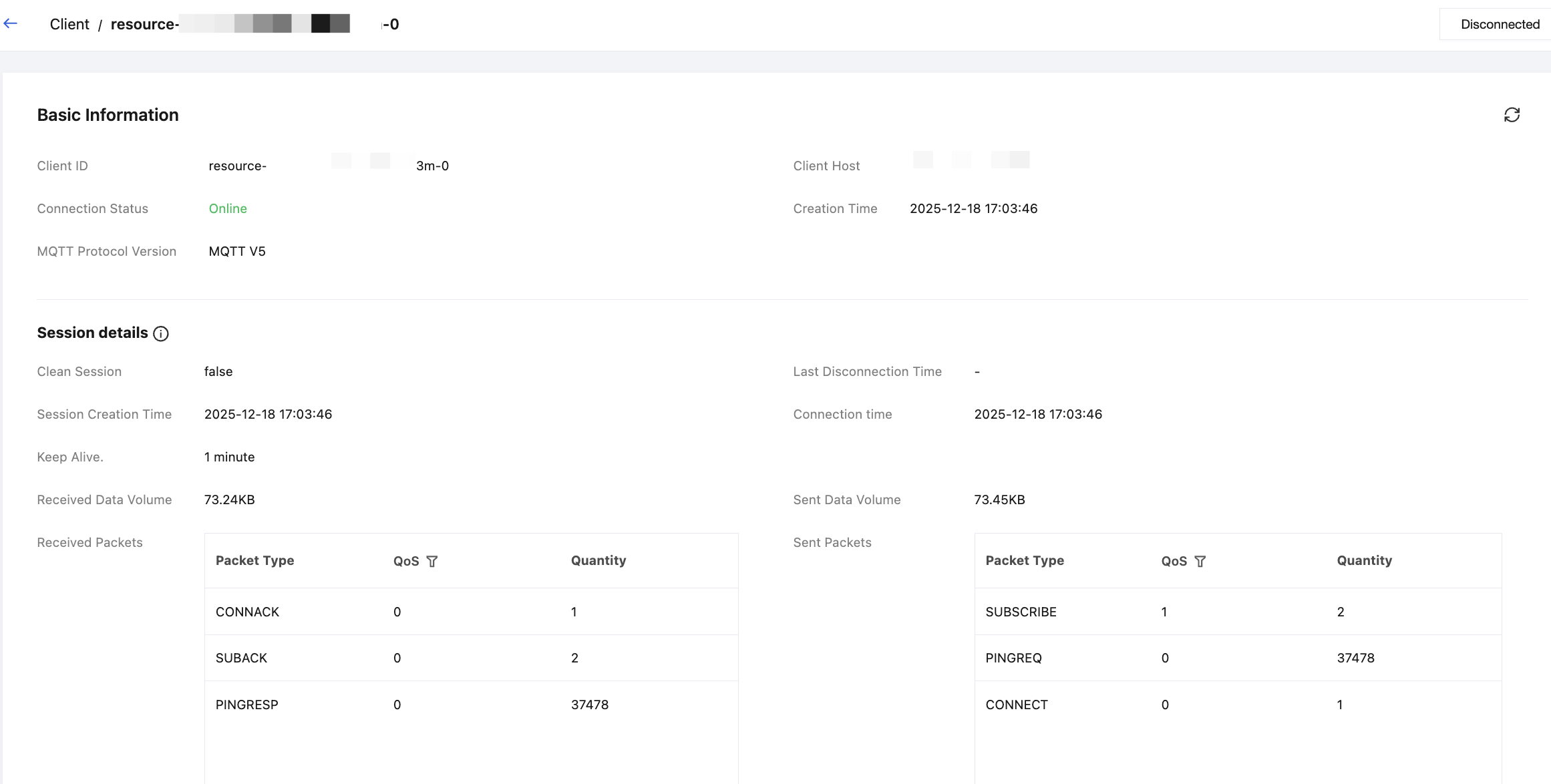
Client Details
Basic Information
Displays basic client information, including the client ID, address, connection status, creation time, and MQTT protocol version.
Parameter | Description |
Client ID | The client's unique identifier, typically starting with Paho or Hive. |
Client Host | The network source address where the client establishes a connection with the server, including the IP address and port number. |
Connection Status | The client's connection status. When online, you can manually disconnect the client from the Operation column. Disconnected clients cannot consume messages. |
Creation Time | The time when the client was created. |
MQTT Protocol Version | TDMQ for MQTT is fully compatible with the standard MQTT 3.1, MQTT 3.1.1, and MQTT 5.0 protocols. For protocol compatibility details, see MQTT Protocol Compatibility Notes. |
Spread Attribute (Optional) | Optional configuration. After configuring the spread attribute for a specified client through the API, the spread attribute follows message delivery and is converted into the user property of messages sent by the client. You can leverage this feature, combined with specific business scenarios, to add business context information to messages. When integrating with an MQTT trigger function, you can also trigger the function based on specified filtered spread attributes. |
Session Details
The Session Details section shows in-memory information for the current session connection. This information is not persistent. When the network disconnects and reconnects, the data is reset.
Parameter | Description |
Clean Session (MQTT v3.1.1) Clean Start (MQTT v5.0) | Determines how the client and server handle previous sessions. true(1): The client establishes a temporary, stateless session. The server discards saved session state (including unconfirmed QoS 1/2 messages and subscriptions) for the client ID when the connection closes. This is suitable for temporary data collection clients, devices that do not require historical state, or scenarios where a clean restart is desired. false(0): The client establishes a persistent, stateful session. The server retains subscription information and unconfirmed QoS 1/2 messages after disconnection for restoration upon reconnection. This is suitable for clients that require reliable receipt of all messages, where even messages missed during disconnection are re-delivered after reconnection. |
Connection Time | Displayed for clients whose current connection status is "online". Records the timestamp of the current session's successful establishment, that is, the last time a CONNECT packet was received and a CONNACK success reply was sent, indicating the start time of the current connection. |
Last Connection Time | Displayed for clients whose current connection status is "not connected". Records the timestamp of the last successful session establishment. |
Session Creation Time | Records the timestamp when the session was initially created. When Clean Session = false, this is the time when the first connection created the session. Even if the client disconnects and reconnects, this creation time remains unchanged as long as the session has not expired. When Clean Session = true, a temporary new session is created each time a connection is established. The creation time of this session is the connection time, and the session is destroyed after disconnection. |
Last Disconnection Time | Records the timestamp of the last normal or abnormal disconnection. Combined with the connection time, this calculates device online rate and offline duration. |
Keep Alive | The heartbeat interval declared by the client in the CONNECT packet. The client guarantees that the interval between two consecutive packets does not exceed Keep Alive * 1.5. The server uses this to determine client liveness. If no packet is received within Keep Alive * 1.5, the server considers the client offline and disconnects. |
Received Data Volume | The total number of network bytes received by the server from the client in the current connection, including all types of MQTT packets (such as CONNECT, PUBLISH, SUBSCRIBE, and PINGREQ) and the underlying protocol header overhead. It measures inbound traffic. |
Received Packets | The number of MQTT packets received by the server from the client in the current connection. CONNECT: Number of connection requests. DISCONNECT: Number of disconnection requests. PUBLISH: Number of received publish messages. PUBACK: Publish acknowledgment (QoS 1). The client's acknowledgment for QoS 1 messages forwarded by the server. PUBREC: Publish received (QoS 2, step 1). The client's first acknowledgment for QoS 2 messages forwarded by the server. PUBREL: Publish release (QoS 2, step 2). The client responds to the server's PUBREC, indicating it is ready to complete message transmission. PUBCOMP: Publish complete (QoS 2, step 3). The client's final acknowledgment of the server's PUBREL packet. PINGREQ: Number of heartbeat requests. SUBSCRIBE/UNSUBSCRIBE: Number of subscribe/unsubscribe requests. |
Sent Data Volume | The total number of network bytes sent by the server to the client in the current connection, including all downstream packets (such as CONNACK, PUBLISH, and PINGRESP) and the underlying protocol overhead. It measures outbound traffic. |
Sent Packets | The number of MQTT packets sent by the server to the client in the current connection. CONNACK: Number of connection acknowledgments. PUBLISH: Number of messages forwarded to the client. PUBACK: Number of publish acknowledgments. PUBREC: Publish received (QoS 2, step 1). The server, as the receiver, sends the first acknowledgment for QoS 2 messages published by the client. PUBREL: Publish release (QoS 2, step 2). The server, as the sender, sends this packet upon receiving the client's PUBREC to request final acknowledgment. PUBCOMP: Publish complete (QoS 2, step 3). The server, as the receiver, sends the final acknowledgment for the client's PUBREL packet, completing the entire QoS 2 message flow. SUBACK/UNSUBACK: Number of subscription acknowledgments/unsubscription acknowledgments. The server's response to the client's SUBSCRIBE packet, which includes the granted QoS level for each subscription. PINGRESP: Number of heartbeat responses. DISCONNECT: Disconnect. |
Subscription
The client subscription relationship refers to the association between a specific client and all its subscribed topic filters. For details, see Subscribing to Messages Using the Client.
Parameter | Description |
Topic Filter | The topic filter subscribed to by the client. |
QoS | The Quality of Service (QoS) level specified by the client when subscribing to a topic. |
Unacknowledged Messages | The number of messages sent to the client but not yet fully acknowledged (ACK), mainly for QoS 1 and QoS 2 messages: QoS 1: The Broker has sent the PUBLISH packet but has not received the PUBACK from the client. QoS 2: The Broker has sent the PUBLISH packet but has not completed the full PUBREC > PUBREL > PUBCOMP flow. For QoS 0 messages, there is no acknowledgment mechanism, so the "unacknowledged" status does not exist. |
Accumulated Messages | The total number of messages temporarily stored on the server, waiting to be sent to the client. |
SUBSCRIBE Properties | Displays the user property in SUBSCRIBE properties for different topic filter subscriptions, making it easy for O&M personnel to trace the subscription source and quickly locate abnormal subscription behavior. |
Client Certificate
A client certificate is a digital certificate issued by a CA to a client device. When the client establishes a connection with the server, the server verifies the client's identity based on the client certificate. After successful verification, both parties can achieve secure communication using the encryption key built into the certificate. If verification fails, the server rejects the client's connection request.
After a client certificate is registered, you can manage registered client certificates on this page at any time, such as viewing the status of registered certificates, filtering invalid or soon-to-expire (expiring within 30 days) client certificates, and viewing client details. For client registration methods, see Step 4: Configuring Client Certificates.
Client Events
Client events are status changes and interaction notifications triggered during MQTT protocol communication. Tracking events helps troubleshoot issues and ensure system stability. This page supports displaying and querying certificate events and various client behavior events (such as online/offline status and connections) within a specified time range. For details, see Querying Client Events.
Client Message Trace
Supports querying details of specific client messages, including message ID, request time, and QoS. If the target trace is not found, narrow the search by precise time and message ID filtering. Obtain the message ID from the Message Query page.
Help and Support
Was this page helpful?
You can also Contact sales or Submit a Ticket for help.
Help us improve! Rate your documentation experience in 5 mins.
Feedback