MQTT
Industry standard protocol for Internet of Things (IoT) and mobile Internet, suitable for handling data transmission between mobile devices.
MQTT Server
Server that implements the MQTT protocol, responsible for maintaining persistent connections with MQTT clients, routing messages to corresponding clients or forwarding messages to other MQTT servers, while also handling the storage of MQTT offline messages.
MQTT Client
Device or application that uses the MQTT protocol to connect to the MQTT server.
Topic
Used to identify the category and structure of messages. The Publisher publishes messages to specific topics, and the Subscriber subscribes to specific topics to receive related messages.
Topic Prefix
A topic prefix is a core concept in TDMQ for MQTT that enables aggregated management and monitoring of topics sharing the same hierarchical prefix. It allows multiple subtopics with a common prefix to be treated as a single logical entity for data monitoring.
Subscribers can use wildcards to subscribe to multiple topics at once. MQTT supports two types of topic wildcards: single-level wildcard (+) and multi-level wildcard (#), to satisfy different subscription demands.
The single-level wildcard (+) can be used at any level of a topic filter. It can be used in multiple levels of a topic filter and can be combined with multi-level wildcards. For example, "sport/tennis/+" matches "sport/tennis/player1" and "sport/tennis/player2", but does not match "sport/tennis/player1/ranking". In addition, since the single-level wildcard only matches a single level, "sport/+" does not match "sport", but matches "sport/".
The multi-level wildcard (#) can match any number of levels within a topic. It represents the parent level and any number of child levels. For example, if a client subscribes to "sport/tennis/player1/#", it will receive messages published under these topic names: "sport/tennis/player1", "sport/tennis/player1/ranking", and "sport/tennis/player1/score/wimbledon". "sport/#" also matches messages with the topic "sport" because "#" includes the parent level.
Session
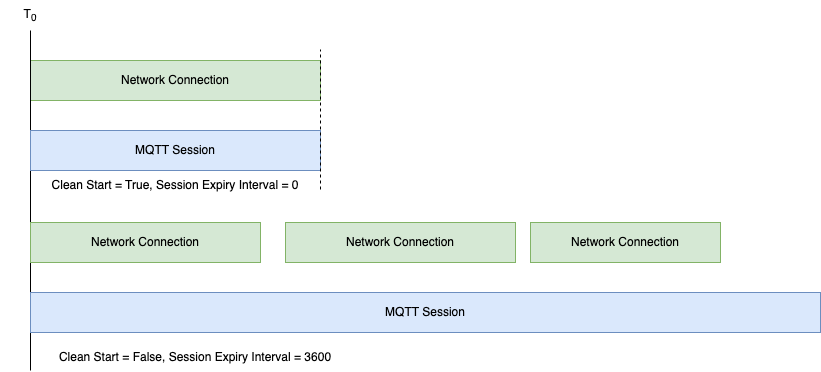
A session is the sum of stateful interactions between a client and a server. The session duration may be consistent with the underlying transport layer network connection, or may span multiple transport layer network connection cycles.
The MQTT v5 protocol defines the session lifecycle through two fields: Clean Start and Session Expiry Interval.
Note:
MQTT v3.1 and v3.1.1 include only the Clean Session property, which defines the following mappings:
- | Clean Start | Session Expiry Interval |
CleanSession=True | True | 0 |
CleanSession=False | False | 259,200 |
Client Identifier
A client ID is a unique identifier for a client. Users must ensure it is globally unique according to their business scenarios. Connections using the same client ID will be rejected by the MQTT server.
QoS
Quality of Service (QoS) refers to the service quality of message transmission. Each message can have its QoS set individually when sent. It includes the following levels:
QoS level 0 means at-most-once delivery, and messages may be lost.
QoS level 1 means at-least-once delivery. Messages are guaranteed to be delivered, but duplicates may occur.
QoS level 2 means exactly-once delivery. Messages are guaranteed to be delivered without duplication.
Message Retention
Message retention ensures that devices newly subscribing to a topic can promptly receive the latest status messages, even if the messages were published prior to the subscription. When a client publishes a message with the "Retain" tag, the proxy server retains the message. Therefore, any client subscribing to the corresponding topic will receive the last retained message, even if the recent publisher is not active.
Will Message
A will message is used to notify other subscribers of a client's offline status or perform some predefined operations when the client unexpectedly disconnects. In the event of an unexpected client disconnection (for example, network failure or client crash), the MQTT broker automatically publishes its will message to other subscribers. This allows them to be notified of the client's offline status or to perform predefined operations, such as updating its online status.
Shared Subscription
A shared subscription allows multiple clients to share a subscription to a topic, with only one client receiving messages published to that topic. When the primary client goes offline, it can seamlessly switch to another client to continue receiving messages, ensuring high availability.