This document describes how to troubleshoot an offline Linux agent, including how to troubleshoot agent process startup failures and network failures.
Note:
When the image security scan reports an offline agent, you need to locate the associated server based on the image name/ID before troubleshooting the offline agent.
Agent process startup failures
1. Enter the ps -ef|grep YD command to check whether the TCSS processes exist.
Normally, TCSS has two processes as shown below:
If the processes do not exist, possible reasons include the following:
The TCSS agent is not installed on the server or has been uninstalled from the server. In this case, install it as instructed in Getting Started.
The agent has a conflict or crash and thus cannot be started.
2. If the TCSS agent has been installed on the server, troubleshoot the problem as follows:
View the agent log stored in /usr/local/qcloud/YunJing/log.
Run the sh /usr/local/qcloud/YunJing/startYD.sh command to start TCSS.
Network failures
If the processes exist, but TCSS is offline, the cause is network disconnection in most cases. Then, troubleshoot the problem as follows:
1. If you cannot access the TCSS domain name, change the DNS. Run the following command to check whether the domain name is accessible:
VPC or CPM environment: telnet s.yd.tencentyun.com 5574.
Normally, the returned result is as shown below:
If it is inaccessible:
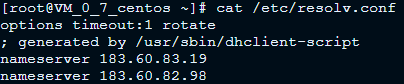
i. Change the dns nameserver field: vim /etc/resolv.conf.
nameserver 183.60.83.19nameserver 183.60.82.98
ii. Then, run telnet s.yd.tencentyun.com 5574 again to check whether you can connect to it.
iii. If it can be connected, wait for a few minutes (the time length depends on the network conditions), and then you will see that the server is online again.
Classic network environment (non-VPC servers): telnet s.yd.qcloud.com 5574.
Normally, the returned result is as shown below:
If it is inaccessible:
i. Change the dns nameserver field: vim /etc/resolv.conf. Comment out the original nameserver field first, and then add the nameserver field. For more information on the nameserver IP, see Private Network Access.
ii. Then, run telnet s.yd.qcloud.com 5574 again to check whether you can connect to it.
iii. If it can be connected, wait for a few minutes (the time length depends on the network conditions), and then you will see that the server is online again.
2. Make sure your firewall policies allow the TCP ports 5574, 8080, 80, and 9080.
3. If the TCSS processes exist and the offline status of the agent is not caused by network issues, package the agent logs (log path: /usr/local/qcloud/YunJing/log) and contact us for assistance.