Use Cloud Firewall with Other Products
Download
Focus Mode
Font Size
Cloud Firewall can be used with Anti-DDoS Advanced, Web Application Firewall (WAF), and Security Group for protection:
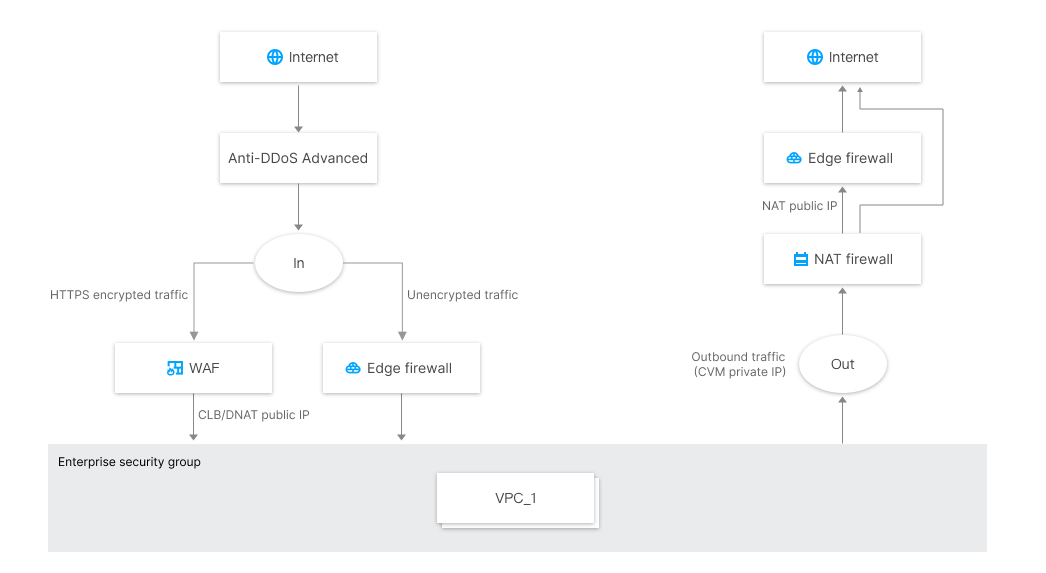
For inbound traffic
Cloud Firewall and WAF work together as the overall perimeter protection layer for cloud security. WAF offers protection for encrypted HTTPS traffic, while Cloud Firewall integrates threat intelligence, intrusion prevention system (IPS), and virtual patching to protect unencrypted traffic.
SaaS WAF and the edge firewall work in parallel. After the traffic passes through the SaaS WAF, it does not goes through the edge firewall. However, the traffic can go back to the source DNAT IP of the NAT firewall.
CLB WAF is deployed after Cloud Firewall. Traffic goes through the edge firewall before CLB WAF.
If Tencent Cloud CDN is used, traffic that goes back to CLB or CVM still passes through the edge firewall.
For outbound traffic
The NAT firewall can help control outgoing requests based on CVM and control access based on domain name. With Tencent Threat Intelligence, it can automatically block any malicious IP addresses or domain names for outgoing requests.
If the NAT firewall is not enabled, access control for outbound traffic is only available with the edge firewall after the traffic goes through the NAT gateway. From the perspective of Cloud Firewall, the traffic comes from a public IP address.
Since Cloud Firewall and Security Group are standalone systems, traffic is allowed only when it is allowed by the policies of both systems.
Cloud Firewall Enterprise offers enterprise-grade security group features, which allow flexible access control and blocked request logging between VPCs, subnets in a VPC, and IDC direct connections.
Note
Cloud Firewall offers protection based on public IP addresses, so you can enable it according to your demands:
Only enable protection for certain assets to save costs. We recommend that you enable protection for all your cloud assets to prevent intrusion from non-essential assets if your budget permits.
If only the web services of your cloud assets are exposed and they are protected by WAF, you can just enable outgoing request protection. This way, Cloud Firewall is used with WAF for overall network protection to secure both inbound and outbound connections at a lower cost.
Cloud Firewall has been used in gaming, e-commerce, and many other large-scale scenarios that require a bandwidth of dozens of Gbps. If your business traffic demands exceed 1 Gbps, contact our business manager for a custom business solution.
Help and Support
Was this page helpful?
You can also Contact sales or Submit a Ticket for help.
Help us improve! Rate your documentation experience in 5 mins.
Feedback