Relevant Concepts
Download
포커스 모드
폰트 크기
Internet Boundary
The internet boundary refers to the boundary between the internet and the Tencent Cloud private network. Internet boundary traffic refers to the traffic communicated between cloud assets and the internet, also known as north-south traffic.
North-south traffic must be traffic between public IP addresses. Based on direction, it can be further categorized into "outbound traffic" and "inbound traffic":
Outbound traffic: traffic initiated by cloud assets to the internet via their bound public IP addresses.
Inbound traffic: traffic initiated from the internet to the public IP addresses of cloud assets.
Internet Firewall
The Internet Firewall is a firewall that inspects north-south traffic and is a cluster-based firewall. It takes effect between the assets associated with your EIPs and the external internet. Its working principle is illustrated in the following diagram:
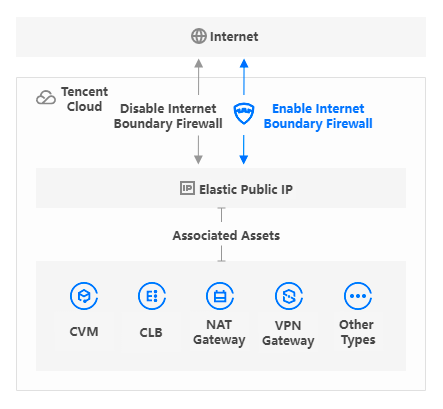
The internet boundary firewall supports access control and log auditing, and comes with a built-in intrusion prevention module. It requires no complex network connection configuration or image file installation, and supports immediate use, default cluster deployment, and smooth performance expansion.
NAT Firewall
The NAT Firewall is a firewall that manages private network assets. It supports proactive outbound connection control at the CVM level and can locate internal CVMs that initiate malicious outbound connections. Its working principle is illustrated in the following diagram:
Add Mode: If there is no NAT Gateway in the current region, this mode enables specified instances to access the internet through the firewall by leveraging the built-in NAT feature of the NAT Firewall.
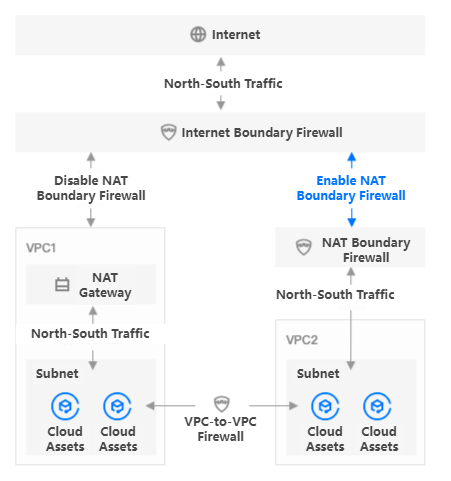
Access Mode: If a NAT Gateway already exists in the current region, or if you wish to keep the egress IP address for public network access unchanged, you can use this mode to smoothly integrate the NAT Firewall between the NAT Gateway and the CVM instances.
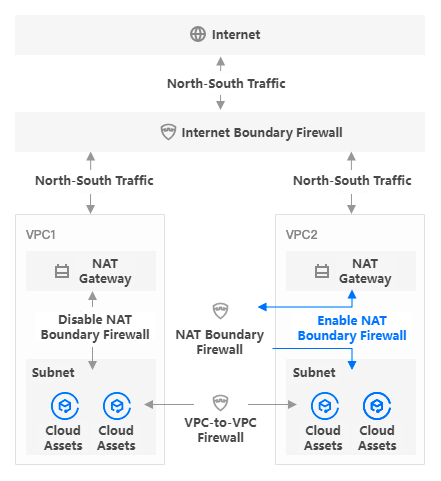
The NAT Firewall supports traffic control and security protection for private network assets, and also supports network traffic forwarding based on SNAT and DNAT.
Virtual Private Cloud (VPC)
A Virtual Private Cloud (VPC) is a logically isolated network space that you customize on Tencent Cloud, similar to a traditional network you operate in a data center. The service resources hosted within a Tencent Cloud VPC are your Tencent Cloud resources, including CVMs, CLBs, cloud databases, and more.
VPC provides you with:
Elastic IP: Allows Internet access.
Peering Connection: Enables interconnection between VPCs. For details, see the Peering Connection.
CCN: Enables communication between VPCs. For details, see Cloud Connect Network.
You can achieve interconnection between VPCs in the cloud through Peering Connection or CCN. Traffic between VPCs is also referred to as east-west traffic. For details, see the Virtual Private Cloud.
VPC Firewall
VPC Firewall is a distributed firewall that detects east-west traffic between VPCs. VPC Firewall takes effect between your two VPCs, as shown in the figure below:
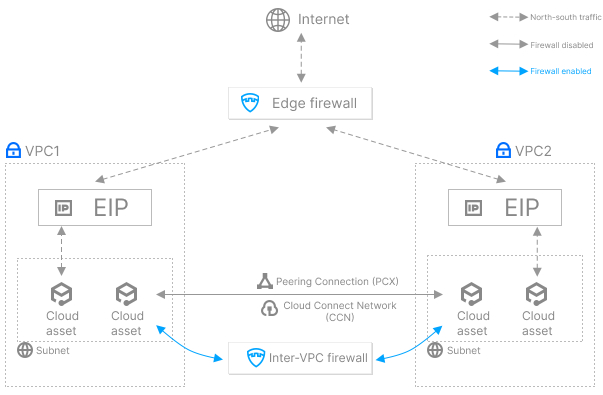
The VPC Firewall is deployed between two VPCs connected via a Peering Connection or CCN. It supports features such as Access Control, topology visualization, and Log Auditing. It requires no complex routing configuration or image file installation, supports immediate use, and provides dedicated resource allocation for users.
Access Control
ACL is a collection of traffic filtering rules. All rules that take effect on the same type of traffic form an access control list. Each ACL rule is composed of the rule body and description:
Rule body: Specifies whether communication from a specific address and port to another address and port using a certain protocol is allowed or denied.
Source: The address initiating the communication, which is typically an IP address.
Destination: The address receiving the communication, which can be an IP address or a domain name.
Destination port: The port number of the destination address.
Protocol: The network protocol used by both parties in the communication.
Policy: When a traffic matches all of the preceding conditions, it is considered a hit traffic, and the firewall will execute the corresponding action based on the policy defined in the rule.
Pass: Allow traffic that hits a rule, record the number of hits but not the Access Control logs, and record traffic logs.
Monitor: Allow traffic that hits a rule, record the number of hits, and record both Access Control logs and traffic logs.
Block: Block traffic that hits a rule, record the number of hits and the Access Control logs. The traffic logs record information about one request packet of the traffic.
Rule description: Records the purpose of the access control rule.
Note:
A reasonable and standardized rule description helps improve the rule's readability, reduce subsequent maintenance costs, and enhance efficiency.
Rule Priority
The execution order is the position of the rule in the list, and the rule with execution order 1 has the highest priority. For each data flow passing through the firewall, the firewall will match the rules in the list in a top-down order:
If a data flow hits a rule, the firewall executes the corresponding policy and stops matching further rules.
If a data flow does not hit the current rule, the firewall continues matching the next rule.
If a data flow hits no rules, the firewall allows the data flow by default.
In an access control list, the value of the execution priority is an integer ranging from 1 to n. 1 indicates the highest priority, and n indicates the total number of rules, namely, the lowest priority in the current rule list, usually used for wildcard rules.
The execution order adheres to two principles: continuity principle and non-repeatability principle.
Continuity principle: The execution order should be consecutive positive integers. If the number of current rules is n, the maximum value of the execution order is n.
Non-repeatability principle: No duplicate execution order values are allowed within the same rule list.
The continuity and non-repeatability of execution priorities are ensured by the following three points:
Adding a rule: The execution order is set to n+1.
Inserting a rule: The execution order is based on the insertion position. All subsequent rules will automatically shift one position backward, with their execution order values increasing by 1.
Editing a rule: By modifying the execution order, you can move the rule to a new position. The execution order can be adjusted to the target position's execution order value, with a minimum of 1 and a maximum of n. After you enter the target position's execution order value, the rule will be inserted at that position. All subsequent rules will automatically shift one position backward, with their execution order values increasing by 1.
Intrusion Defense
Intrusion Defense is a system that monitors network traffic and checks for suspicious activities. It issues alarms or takes proactive countermeasures when suspicious events are detected. CFW integrates features such as Tencent Cloud Threat Intelligence, basic defense, and virtual patches. It performs real-time monitoring, statistics, and analysis on your internet boundary traffic, proactively identifies unknown risks like external intrusions and malicious outbound connections, and provides real-time protection and alarms.
Logs
Rule Hit Logs: Rule hit records are logged in the Rule Hit Logs to assist Ops personnel with security auditing. The logs display the 5-tuple information of data flows that are allowed, observed, or blocked. You can view the corresponding effective rules by clicking a button.
Operation Logs: CFW operation logs are categorized into user login logs, switch operation logs, and rule operation logs.
User Login Logs: Record the login activities of all accounts for the user.
Switch Operation Logs: These logs record the status of the CFW toggle.
Rule Operation Logs: User operations for adding, deleting, and editing Access Control rules are recorded here.
피드백