This document introduces the purpose, installation methods, and core scenario examples of Tencent Cloud EdgeOne Skill, helping you get started quickly and fully leverage the capabilities of AI-assisted Ops.
1. What is EdgeOne Skill
EdgeOne Skill is an AI-powered intelligent plugin for the Tencent Cloud EdgeOne platform, which can run in tools such as CodeBuddy. It encapsulates EdgeOne's API invocation capabilities, Ops best practices, and security operation guidelines into a structured AI knowledge base. This allows you to have AI perform end-to-end operations, ranging from site onboarding, cache management, and certificate Ops to security protection configuration and threat IP address blocking, without needing to memorize complex API documentation. You simply describe your requirements in natural language.
Core Capabilities Overview
Capability Module
Covered Scenarios
Site Acceleration
Site onboarding, cache refresh and warm-up, HTTPS certificate management, and so on
Security Protection
Security weekly report generation, template coverage audit, domain blocklist IP group identification, threat IP auto-blocking, and so on
Metric Analysis
Fault log analysis, offline log download, origin health status metric analysis, data daily report generation, and so on
Note:
All operations involving changes (such as creating sites, refreshing caches, modifying security rules, and so on) will display the operation details before execution and require confirmation to proceed.
2. Preparations
Go to CAM > API Key Management, obtain TencentCloud API keys (SecretId, SecretKey, used to identify the identity of the API caller). For details, refer to Access Key Management Instructions. Please keep SecretKey safe and do not disclose it to others.
Note:
The plugin is strictly prohibited from directly providing SecretId/SecretKey to AI. Browser OAuth authorization must be uniformly used to protect credential security.
3. Installation Method
In AI tools that support Skill installation, you can have AI automatically install this Skill through natural language conversation. It is currently available on ClawHub and SkillHub. Click the following link to learn about the installation method:
After installation is completed, you can directly describe your requirements in natural language within the chat boxes of AI tools such as CodeBuddy and clawcode. The Skill will automatically identify the task type and load relevant EdgeOne module knowledge.
Skill Trigger Method: The Skill automatically takes effect when EdgeOne/EO-related configuration or query requirements are mentioned, without requiring special commands. Below are several common usage examples:
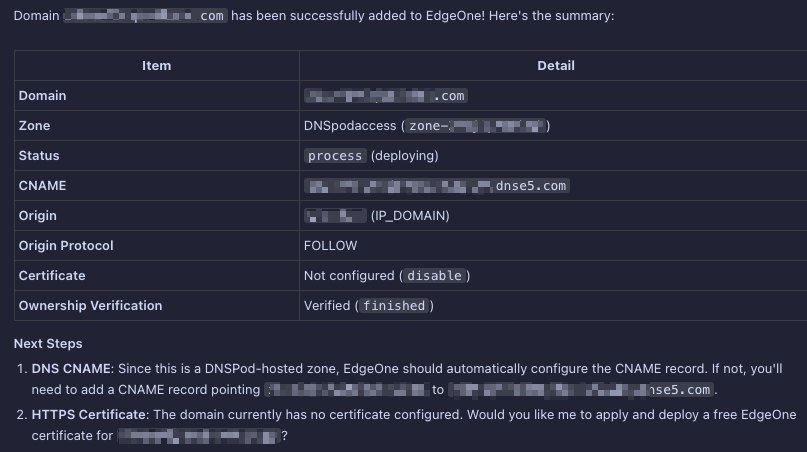
Example Scenario 1: Onboard a new domain to EdgeOne
User says:
For example: help me onboard shop.example.com to EdgeOne.
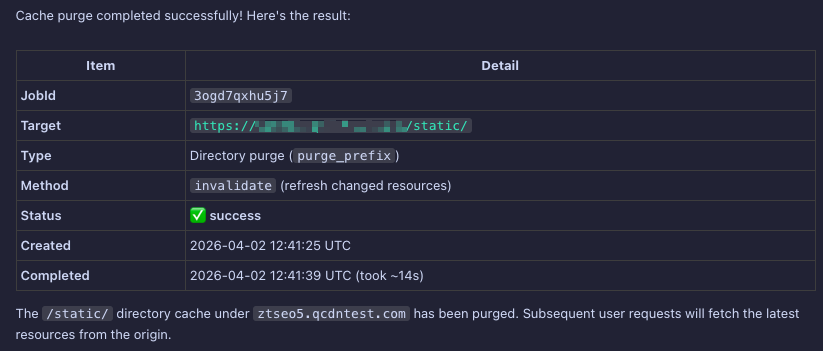
Example Scenario 2: Batch refresh CDN cache
User says:
For example: A new version has just been released. Please refresh all caches under the /static/ directory for the domain shop.example.com.
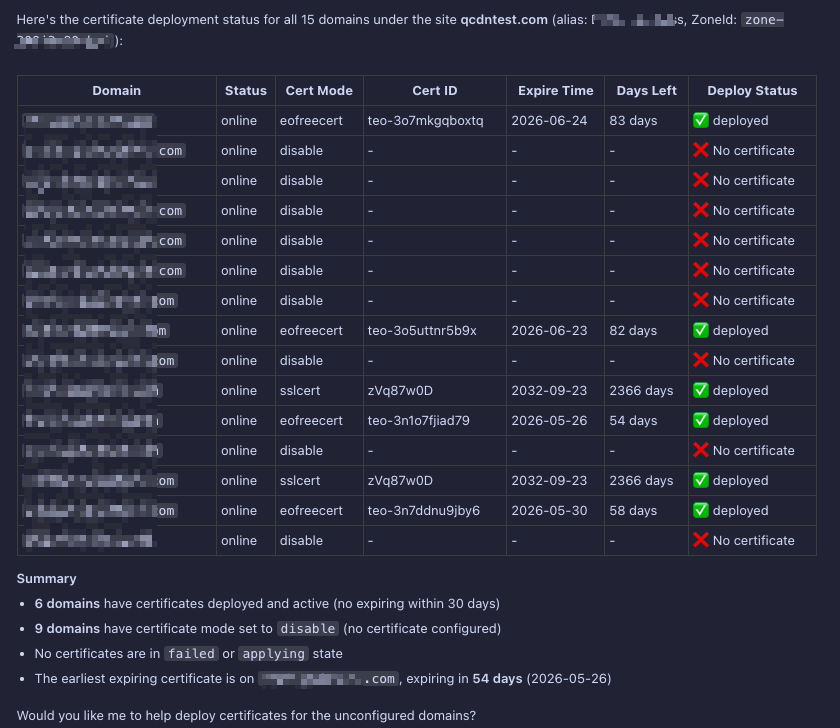
Example scenario 3: Query the certificate deployment status for all domains
User says:
For example: help me check the certificate status of all domains.
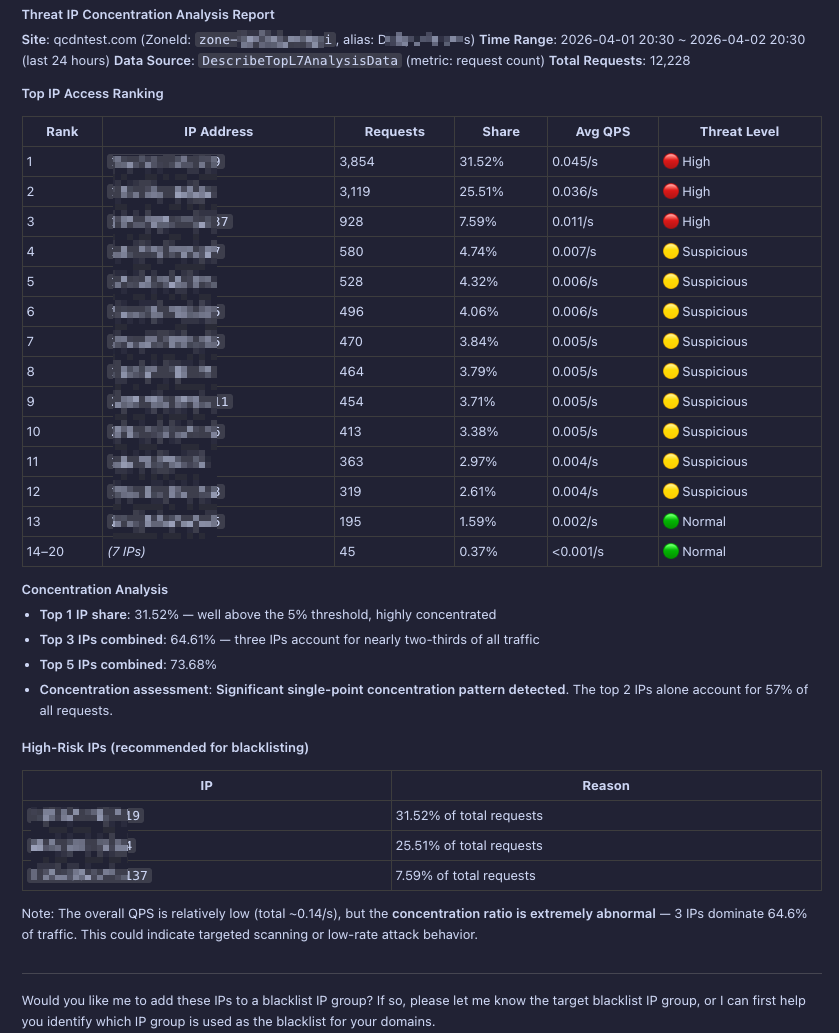
Example Scenario 4: Analyze attacking IPs and automatically block them
User says:
Help me analyze the attack IPs from the last 24 hours and block those with high concentration.
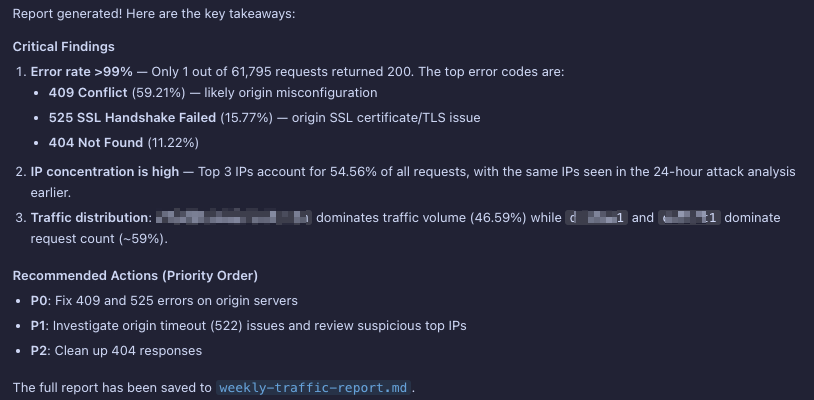
Example Scenario 5: Generate Traffic Analysis Weekly Report
User says:
Help me query the traffic analysis for the site example.com last week and generate a corresponding summary report.