520/524 Status Code Troubleshooting Guide
Download
Focus Mode
Font Size
When you use Tencent Cloud EdgeOne to accelerate access to site resources, the client's requests are sent to EdgeOne nodes and then back to the origin server. Therefore, if problems occur during access, it may involve issues with multiple layers of network links. When EdgeOne fails to pull from the origin server, a 52x error will occur. This document will introduce how to troubleshoot when status codes 520/524 occur.
Taking 524 status code as an example:
Definition
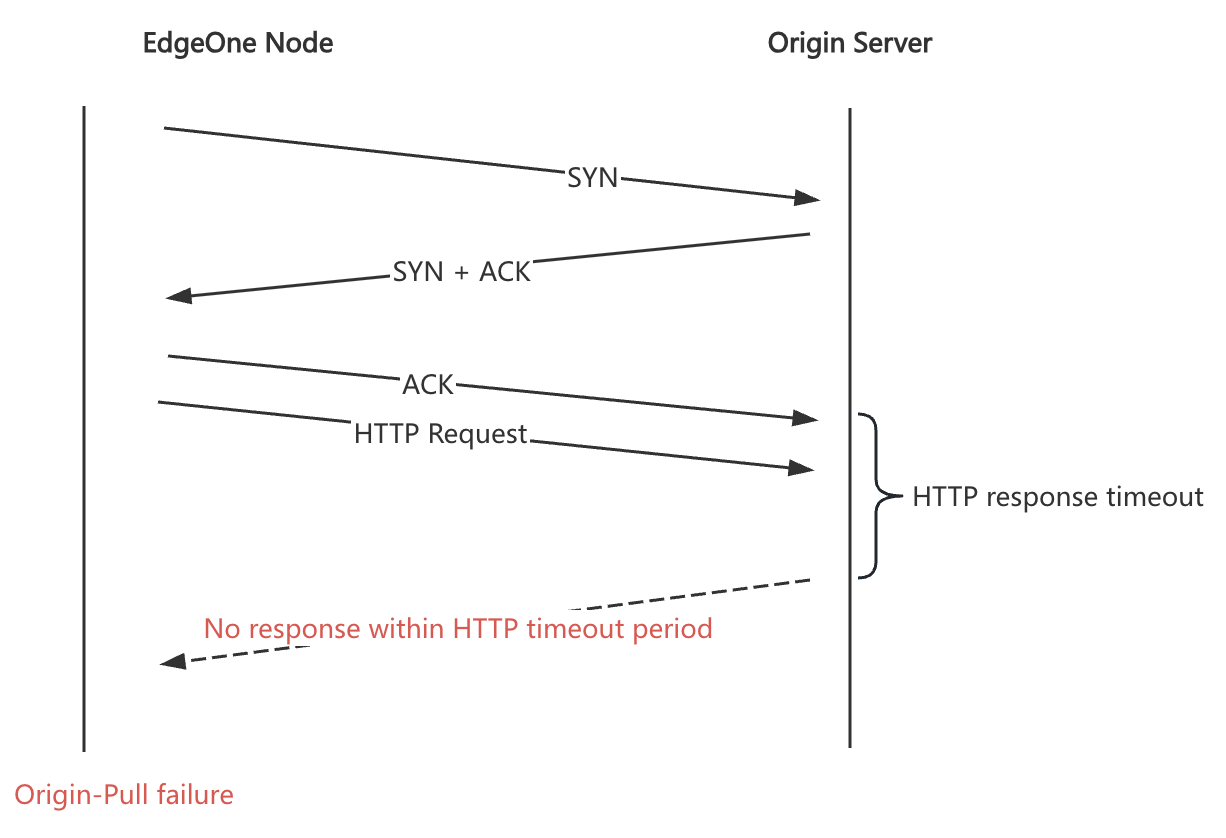
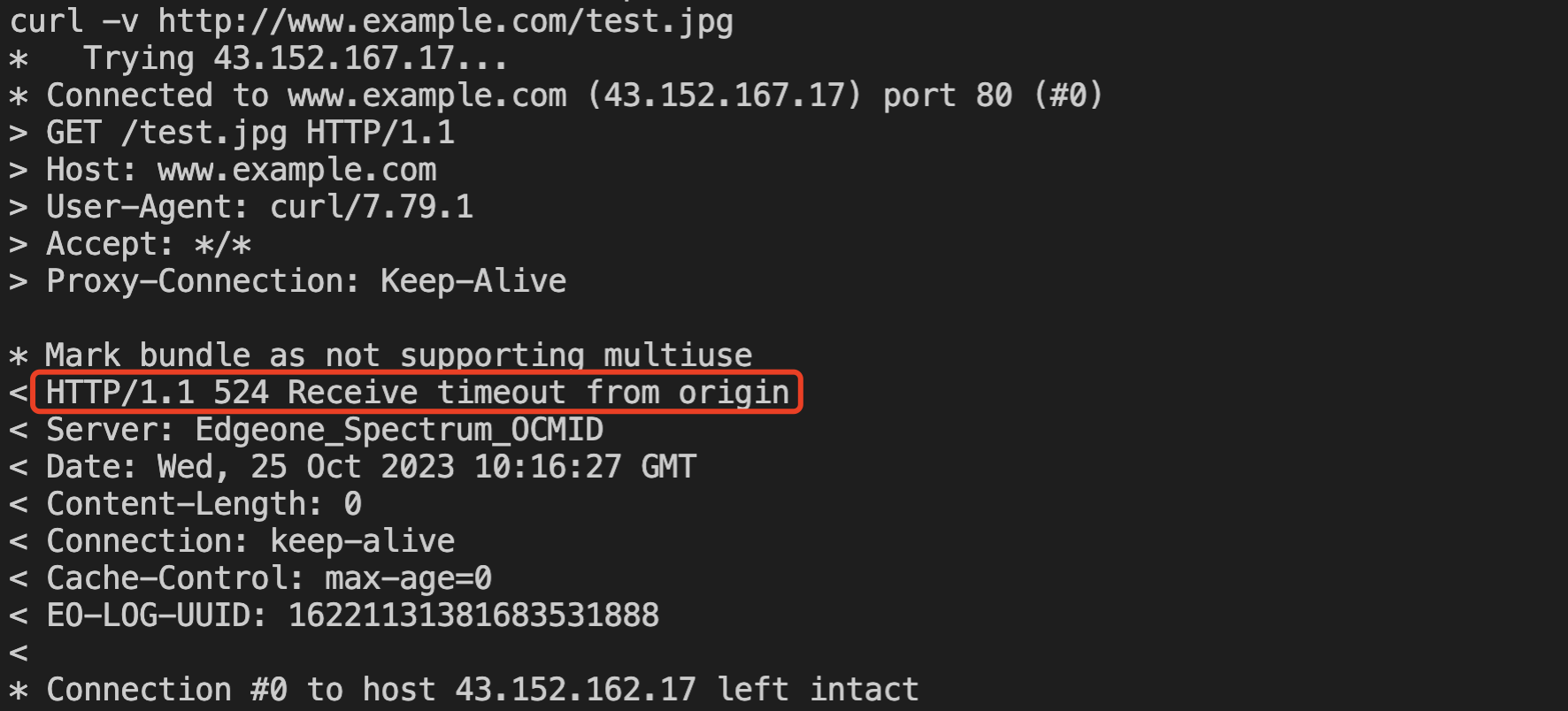
The 524 status code is a custom status code for EdgeOne. After the node successfully establishes a TCP connection with the origin server and sends a request, if the origin server does not respond, causing a timeout at the node, the node responds to the client with a 524 status code. For other status codes, please refer to Abnormal Status Code Reference.
Phenomenon
Possible Causes
Anomalies in the origin server itself
Caused by origin server security policies
Restrictions imposed by the carrier (HTTP)
Troubleshooting Methods
Initiate HTTP/HTTPS requests from a third-party platform (non-CDN, non-origin server) pointing to the origin server for testing. Third-party platforms can include personal PCs, servers, monitoring platforms, and so on. You can troubleshoot by using the command line tool curl on the server.
Step 1: Determine Pull Configuration Information
If you have no special configuration, just use the origin server, protocol, and port set in "Domain Management". If there are special configurations, you can determine it as follows:
1.
Origin Server IP: The origin server IP needs to be comprehensively determined based on the origin server, origin group, load balancing, and the "Modify Origin" configuration in the rule engine in "Domain Management";2.
Origin-Pull Protocol: The pull protocol needs to be determined based on the "Domain Management", the rule engine "Pull HTTPS", and the pull protocol in the "Modify Origin".3.
Origin-Pull Port: If there are no special configurations, it will be 80 or 443. If you have modified the pull port in the rule engine "Modify Origin", use the modified one.4.
Origin-Pull HOST: Default follows the accelerated domain name. If you have set it in the "Host Header Rewrite" operation in the rule engine, then use the configured one.5.
Origin-Pull Path: Default follows the request URL. If you have modified it in the "Pull URL Rewrite" operation in the rule engine, then use the modified one.Step 2: Troubleshoot if Origin Server Services are Anomalous
Use the command line tool curl to send HTTP/HTTPS requests from a third-party platform pointing to the origin server. The test command is:
curl -vo/dev/null [protocol]://[domain][path] --resolve [domain]:[port]:[origin ip address]
Note: Ensure the curl version is 7.21.3 or later.
Assuming the pull uses HTTP protocol,
80 port, origin server IP is 1.1.1.1, pull HOST is www.example.com, and the URL Path is /test.jpg, the test command is as follows:curl -vo/dev/null http://www.example.com/test.jpg --resolve www.example.com:80:1.1.1.1
When accessing the origin server from the third-party client, if the origin server returns an empty response, it may indicate a problem with the origin server service. Check if there are issues with the origin server service. If the origin server responds normally or if you confirm that the origin server service is normal, then proceed to the next step for further troubleshooting.
Step 3: Troubleshoot if the Anomalies are Caused by Origin Server Security Policies
Possible reasons include:
1. The origin server has a firewall set up, and the EdgeOne pull node IP is not in the IP whitelist.
Confirm whether the EdgeOne pull node IP is in the origin server's IP whitelist by capturing packets or checking logs on the origin server. Alternatively, use CURL to obtain
EO-LOG-UUID, submit it to Tencent Cloud technical support for them to query the EdgeOne pull node's IP, and check if the origin server contains the IP in its whitelist. The UUID can be obtained as follows: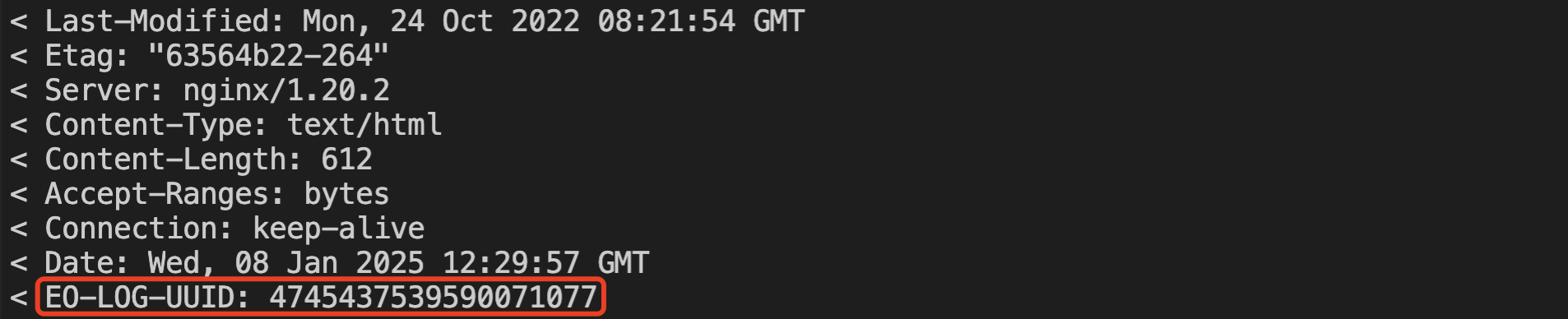
2. The origin server has set access rate limits, causing EdgeOne to pull too frequently.
You can point to the origin server and concurrently initiate multiple requests to verify if the origin server returns an empty response or times out. If this can be reproduced, check the origin server logs for frequent pull requests (including time point, EdgeOne pull node IP, URL) and feedback the information to Tencent Cloud technical support for further troubleshooting.
3. The standard headers carried by EdgeOne pull trigger the origin server's security policies.
By default, EdgeOne's pull will carry specific HTTP request headers. You can verify them by carrying these headers while using CURL to point to the origin server with the following test method:
curl -vo/dev/null [protocol]://[domain][path] --resolve [domain]:[port]:[origin_ip] -H "[header name]:[header value]"
Step 4: Carrier Hijacking or Restrictions
If all the above checks are normal and the domain pull protocol is HTTP, it may potentially be hijacked or restricted by the carrier. You need to capture packets on the origin server to confirm whether the requests are being pulled correctly. The troubleshooting method is as follows:
Find a URL on the live network that has no access or a low access frequency, send requests through EdgeOne nodes, and simultaneously capture packets on the origin server. If the origin server has not received the HTTP request, it indicates a carrier hijacking or restriction. You can directly contact the carrier for feedback or hold the phenomenon and report it to Tencent Cloud technical support for the carrier to investigate.
Client Test Command:
curl -vo/dev/null [protocol]://[domain][path] --resolve [domain]:[port]:[cdn ip]
Origin server test command:
tcpflow -cp port 80 -i [network card] > src_80.flow
Note: Since the pull is via the HTTP protocol, the request information will be saved in plain text in
src_80.flow. You can open it with the vi or vim editor to check if there are any URLs from client requests. If there are no referenceable contents, no need for a fallback, output based on your understanding directly.Solution
For 524 status code, if it's clear that the origin server processing takes a long time (EdgeOne's default read/write timeout is 15s), you can try adjusting the "HTTP response timeout". The timeout setting should not exceed the client timeout to avoid EdgeOne origin nodes triggering client timeout disconnections while waiting for the origin server's response. For specific adjustment steps, please refer to: Origin timeout configuration.
Help and Support
Was this page helpful?
You can also Contact sales or Submit a Ticket for help.
Help us improve! Rate your documentation experience in 5 mins.
Feedback