tencent cloud

Tencent Cloud EdgeOne

Release Notes and Announcements
Release Notes
Security Announcement
Announcements
Product Introduction
Overview
Strengths
Use Cases
Comparison Between EdgeOne and CDN Products
Use Limits
Purchase Guide
Description of Trial Plan Experience Benefits
Free Plan Guide
Billing Overview
Billing Items
Subscriptions
Renewals
Instructions for overdue and refunds
Comparison of EdgeOne Plans
About "clean traffic" billing instructions
DDoS Protection Capacity Description
Getting Started
Choose business scenario
Quick access to website security acceleration
Quick deploying a website with Pages
Domain Service&Origin Configuration
Domain Service
HTTPS Certificate
Origin Configuration
Site Acceleration
Overview
Access Control
Smart Acceleration
Cache Configuration
File Optimization
Network Optimization
URL Rewrite
Modifying Header
Modify the response content
Rule Engine
Image&Video Processing
Speed limit for single connection download
DDoS & Web Protection
Overview
DDoS Protection
Web Protection
Bot Management
API Discovery(Beta)
Edge Functions
Overview
Getting Started
Operation Guide
Runtime APIs
Sample Functions
Best Practices
Pages
L4 Proxy
Overview
Creating an L4 Proxy Instance
Modifying an L4 Proxy Instance
Disabling or Deleting an L4 Proxy Instance
Batch Configuring Forwarding Rules
Obtaining Real Client IPs
Data Analysis&Log Service
Log Service
Data Analysis
Alarm Service
Site and Billing Management
Billing Management
Site Management
Version Management
General Policy
General Reference
Configuration Syntax
Request and Response Actions
Country/region and Corresponding Codes
Terraform
Overview
Installing and Configuring Terraform
Practical Tutorial
EdgeOne Skill User Guide
Automatic Warm-up/Cache Purge
Resource Abuse/hotlinking Protection Practical
HTTPS Related Practices
Acceleration Optimization
Scheduling Traffic
Data Analysis and Alerting
Log Platform Integration Practices
Configuring Origin Servers for Cloud Object Storage (Such As COS)
CORS Response Configuration
API Documentation
History
Introduction
API Category
Making API Requests
Site APIs
Acceleration Domain Management APIs
Site Acceleration Configuration APIs
Edge Function APIs
Alias Domain APIs
Security Configuration APIs
Layer 4 Application Proxy APIs
Content Management APIs
Data Analysis APIs
Log Service APIs
Billing APIs
Certificate APIs
Origin Protection APIs
Load Balancing APIs
Diagnostic Tool APIs
Custom Response Page APIs
API Security APIs
DNS Record APIs
Content Identifier APIs
Legacy APIs
Ownership APIs
Image and Video Processing APIs
Multi-Channel Security Gateway APIs
Version Management APIs
Data Types
Error Codes
FAQs
Product Features FAQs
DNS Record FAQs
Domain Configuration FAQs
Site Acceleration FAQs
Data and Log FAQs
Security Protection-related Queries
Origin Configuration FAQs
Troubleshooting
Reference for Abnormal Status Codes
Troubleshooting Guide for EdgeOne 4XX/5XX Status Codes
520/524 Status Code Troubleshooting Guide
521/522 Status Code Troubleshooting Guide
Tool Guide
Agreements
Service Level Agreement
Origin Protection Enablement Conditions of Use
TEO Policy
Privacy Policy
Data Processing And Security Agreement
Contact Us
Glossary

Configuring EdgeOne Security Event Alarms via TCOP

PDF
Focus Mode
Font Size
Last updated: 2025-08-07 15:28:11

Background

EdgeOne, in collaboration with Tencent Cloud Observability Platform (TCOP), offers flexible alarm solutions for security events such as denial-of-service (DDoS) attacks, challenge collapsar (CC) attacks, and DDoS attack blocking. Users can leverage TCOP's alarm capabilities to set detailed alarm trigger rules and receive alarms through various notification channels, including telephone, SMS, email, WeChat, and VIP customer support groups. This significantly improves response speed and handling efficiency for security threats.
Note:
When you select telephone and SMS as alarming channels on TCOP, related fees may be incurred, which are charged by TCOP.

Applicable Scenario

This document is applicable to all users who have integrated EdgeOne and need to configure security event alarms.

Default Alarm Policy

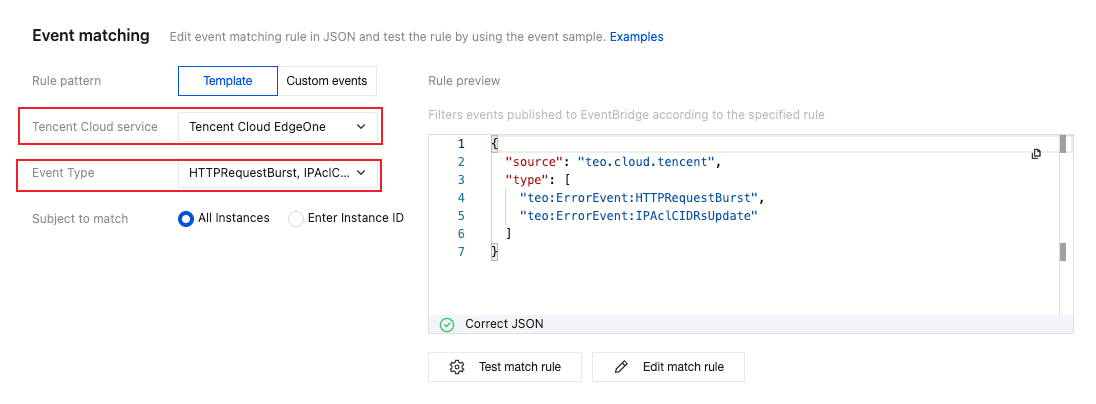
Once you have connected a domain name/L4 proxy instance to EdgeOne, TCOP will, by default, push alarm messages to the email and SMS configured for your Tencent Cloud root account when a security event occurs. You can view the rules for default alarms of cloud service events in TCOP - Event Bus - Event Rules.


Operation Step

Step 1: Configure an Alarm

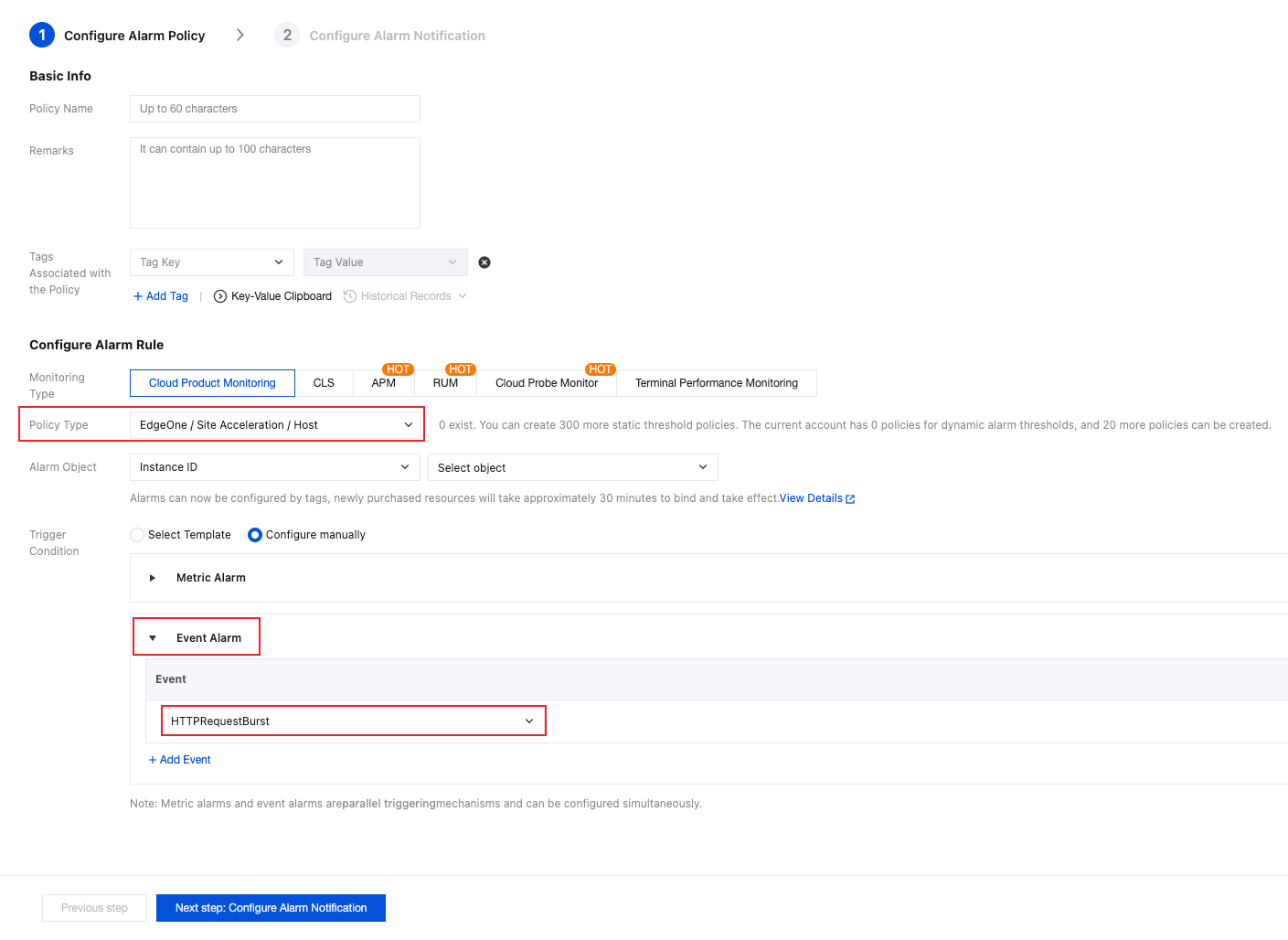
1. Log in to the TCOP console, in the left navigation bar, choose Alarm Management > Alarm Configuration, and click Create Policy.
2. The detailed configuration of the alarm policy is as follows:
2.1 Select Cloud Product Monitoring for the monitoring type.
2.2 Select EdgeOne / Site Acceleration / Host for the policy type. Different security event alarms require different policy types. See the table below for details:
EdgeOne Security Event Type
TCOP Alarm Policy Type
Configuration Meaning
HTTPRequestBurst
EdgeOne / Site Acceleration / Host
Alarm for CC attacks on the specified domain name
DDoS Attack / DDoS Attack Blocked
EdgeOne / L4 Proxy / Instance
Alarm for DDoS attacks/blocking events on the specified L4 proxy instance
EdgeOne / Plan
Alarm for DDoS attacks/blocking events on the EdgeOne plan of the specified L7 business
2.3 Select the domain name list you want to monitor as the alarm object.
2.4 Select Event Alarm for the trigger condition.
2.5 Select HTTPRequestBurst from the drop-down list.
2.6 For other related configurations, refer to Creating Alarm Policy.
3. Click Next step: Configure Alarm Notification.


Step 2: Configure Alarm Notifications

1. Determine whether the system preset notification template meets expectations. If you need a custom notification template, refer to Creating Notification Template.
2. After selecting the required notification template, click Complete to save the configuration.

References

EdgeOne Security Events and Corresponding Handling Suggestions

The following is a list of security events that could be triggered by EdgeOne, including event types, event descriptions, suggestions, and more.
Event Type
Event Description
Suggestion
HTTPRequestBurst
EdgeOne has detected a sudden increase in HTTP requests to the domain name, possibly due to a CC attack.
Note:
The trigger condition is that the rate of HTTP requests exceeds 1,000 queries per second (QPS), and this increase is beyond the baseline of normal traffic predicted by the platform's intelligent learning algorithm.
1. Monitor your business availability. You can also check recent traffic and request details on the EdgeOne console - Metrics Analysis page to determine whether the spike in traffic is part of normal business activity.
2. If you determine that the sudden increase in traffic is not part of normal business activity and the current security policy does not cover the characteristics of the attack, it is recommended to modify and tighten the Web protection policy.
3. If you determine that the sudden increase in traffic is part of normal business activity, you can ignore this alarm. Additionally, it is recommended to loosen the Web Protection - Adaptive Frequency Control Limit Level or switch to observation mode.
DDoSAttack
EdgeOne has detected that the IP address serving you is under a DDoS attack.
Note:
The trigger condition is that the detected DDoS attack bandwidth exceeds the DDoS attack traffic alarm threshold configured by a customer in the EdgeOne console (default value is 100 Mbps).
Monitor your business availability. You can also click the L3/4 DDoS Attack Protection Bandwidth tab on the EdgeOne console - Metrics Analysis page, and then click the Number of DDoS Attack Events tab at the top to view details of the corresponding attack events.
DDoSAttackBan
The IP address serving you has been blocked by the ISP due to a DDoS attack.


Help and Support

Was this page helpful?

Help us improve! Rate your documentation experience in 5 mins.

Feedback