About "clean traffic" billing instructions
Download
Focus Mode
Font Size
Note:
EdgeOne uses the "clean traffic" billing model, where requests intercepted by security protection features are not billed. Only traffic and request usage that has passed through security protection features are charged. This approach aims to provide users with a more transparent billing method, helping them better manage budgets and pay for truly valuable business usage.
Definition
In the integrated security acceleration service provided by EdgeOne, it includes a wealth of security features: network-layer and application-layer Anti-DDoS protection, rate limiting, vulnerability attack protection, and Bot management. These features help you identify and filter different types of malicious traffic. When requests or L4 proxy traffic pass through EdgeOne, security protection features will intercept or filter them according to your configuration. During this process, intercepted or filtered traffic will not be counted as usage and will not incur billing costs. The remaining requests are considered "clean traffic," which will be further processed by features like content delivery and edge functions according to the configuration, counted as "clean traffic" usage, and billed accordingly.
For example, the site
www.example.com has accessed EdgeOne and configured a rate-limiting rule, which distinguishes and counts requests to the /login path based on the client IP and intercepts clients with more than 10 requests per second. During an operational event, some clients initiated a large number of high-frequency visits to the business and triggered the rate-limiting rule. This rule intercepted a total of 200,000 requests. According to EdgeOne's "clean traffic" billing mode, these 200,000 requests intercepted by the security rule will not be counted in the site's request usage.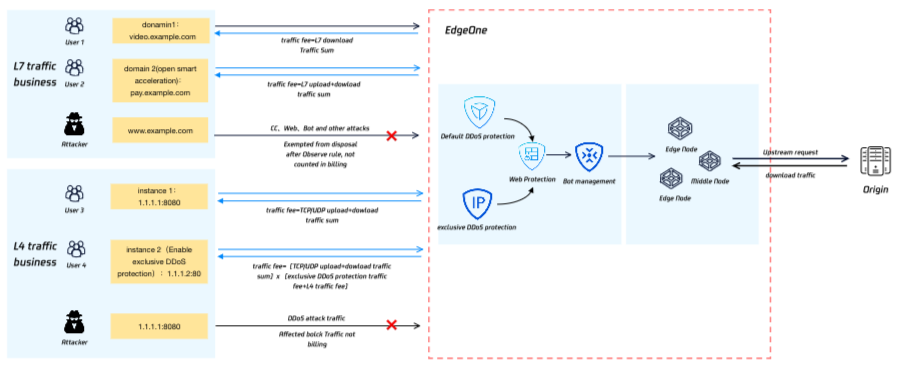
Does "clean traffic" billing mean that all attacks and malicious requests will not be billed?
EdgeOne only charges for "clean traffic," which refers to the fact that when traffic is filtered or intercepted and disposed of by security protection policies, that portion of traffic will not be billed. However, when traffic is not filtered or intercepted by security policies, that portion of traffic and requests will still be charged. Therefore, in the following scenarios (including but not limited to), traffic and request volume generated by attacks or malicious access will still be billed:
Scenario 1: Security policy configured in "observation" mode
To help you conveniently evaluate security policies, EdgeOne's Web Protection and Bot management features both provide an observation mode option. Please note that security modules and rules configured in observation mode only record logs for matched requests and do not intercept or dispose of them. Therefore, attack traffic that only hits the observation mode will still generate usage billing.
Usage suggestion: After completing the necessary evaluation, adjust the security policy to intercept or appropriate disposal actions as soon as possible to avoid attack traffic generating usage fees.
Scenario III: Pass-through caused by delayed protection effectiveness
EdgeOne provides protection exception rules to help you allow trusted clients. Requests that match the protection exception rules will skip one or more security modules and will not be scanned and processed. When attack traffic hits the protection exception rules, it may cause protection to pass through. This part of the pass-through attack traffic will generate usage billing.
Usage suggestion: When configuring protection exception rules, try to tighten and configure precise matching conditions (e.g., precise client IP list) to avoid overly loose protection exception rules causing attack traffic to pass through, resulting in business risks and usage fees.
Scenario 2: Overly loose protection exception rules
In the security features provided by EdgeOne, some features need to be statistically analyzed before they can be triggered and take effect, so there is a certain delay in effectiveness, including (but not limited to) DDoS protection, CC attack defense, rate limiting, Bot intelligent analysis, etc. Before these features are triggered and take effect, they cannot effectively protect against attacks, and this part of the traffic will generate usage billing.
Usage suggestion: For known attack sources, you can use custom rules and other instantly effective protection strategies to reduce the security risks and usage billing caused by policy effectiveness delays.
Scenario 4: Need for more advanced security features and protection policies
As the offense and defense confrontation escalates, some attack modes cannot be intercepted and protected by basic security features and require more advanced security features to effectively identify. Such attacks may pose business risks and generate usage billing.
Usage suggestion: If you believe your business is under attack by unknown methods or you need to use more advanced security features to further strengthen your current policy, consider upgrading your plan or contacting EdgeOne technical support. We will assist you in improving your business security policy.
Help and Support
Was this page helpful?
You can also Contact sales or Submit a Ticket for help.
Help us improve! Rate your documentation experience in 5 mins.
Feedback