tencent cloud

Tencent Cloud EdgeOne

Release Notes and Announcements
Release Notes
Security Announcement
Announcements
Product Introduction
Overview
Strengths
Use Cases
Comparison Between EdgeOne and CDN Products
Use Limits
Purchase Guide
Description of Trial Plan Experience Benefits
Free Plan Guide
Billing Overview
Billing Items
Subscriptions
Renewals
Instructions for overdue and refunds
Comparison of EdgeOne Plans
About "clean traffic" billing instructions
DDoS Protection Capacity Description
Getting Started
Choose business scenario
Quick access to website security acceleration
Quick deploying a website with Pages
Domain Service&Origin Configuration
Domain Service
HTTPS Certificate
Origin Configuration
Site Acceleration
Overview
Access Control
Smart Acceleration
Cache Configuration
File Optimization
Network Optimization
URL Rewrite
Modifying Header
Modify the response content
Rule Engine
Image&Video Processing
Speed limit for single connection download
DDoS & Web Protection
Overview
DDoS Protection
Web Protection
Bot Management
API Discovery(Beta)
Edge Functions
Overview
Getting Started
Operation Guide
Runtime APIs
Sample Functions
Best Practices
Pages
L4 Proxy
Overview
Creating an L4 Proxy Instance
Modifying an L4 Proxy Instance
Disabling or Deleting an L4 Proxy Instance
Batch Configuring Forwarding Rules
Obtaining Real Client IPs
Data Analysis&Log Service
Log Service
Data Analysis
Alarm Service
Site and Billing Management
Billing Management
Site Management
Version Management
General Policy
General Reference
Configuration Syntax
Request and Response Actions
Country/region and Corresponding Codes
Terraform
Overview
Installing and Configuring Terraform
Practical Tutorial
EdgeOne Skill User Guide
Automatic Warm-up/Cache Purge
Resource Abuse/hotlinking Protection Practical
HTTPS Related Practices
Acceleration Optimization
Scheduling Traffic
Data Analysis and Alerting
Log Platform Integration Practices
Configuring Origin Servers for Cloud Object Storage (Such As COS)
CORS Response Configuration
API Documentation
History
Introduction
API Category
Making API Requests
Site APIs
Acceleration Domain Management APIs
Site Acceleration Configuration APIs
Edge Function APIs
Alias Domain APIs
Security Configuration APIs
Layer 4 Application Proxy APIs
Content Management APIs
Data Analysis APIs
Log Service APIs
Billing APIs
Certificate APIs
Origin Protection APIs
Load Balancing APIs
Diagnostic Tool APIs
Custom Response Page APIs
API Security APIs
DNS Record APIs
Content Identifier APIs
Legacy APIs
Ownership APIs
Image and Video Processing APIs
Multi-Channel Security Gateway APIs
Version Management APIs
Data Types
Error Codes
FAQs
Product Features FAQs
DNS Record FAQs
Domain Configuration FAQs
Site Acceleration FAQs
Data and Log FAQs
Security Protection-related Queries
Origin Configuration FAQs
Troubleshooting
Reference for Abnormal Status Codes
Troubleshooting Guide for EdgeOne 4XX/5XX Status Codes
520/524 Status Code Troubleshooting Guide
521/522 Status Code Troubleshooting Guide
Tool Guide
Agreements
Service Level Agreement
Origin Protection Enablement Conditions of Use
TEO Policy
Privacy Policy
Data Processing And Security Agreement
Contact Us
Glossary

Overview

Focus Mode
Font Size
Last updated: 2024-01-25 11:20:13

Terraform Overview

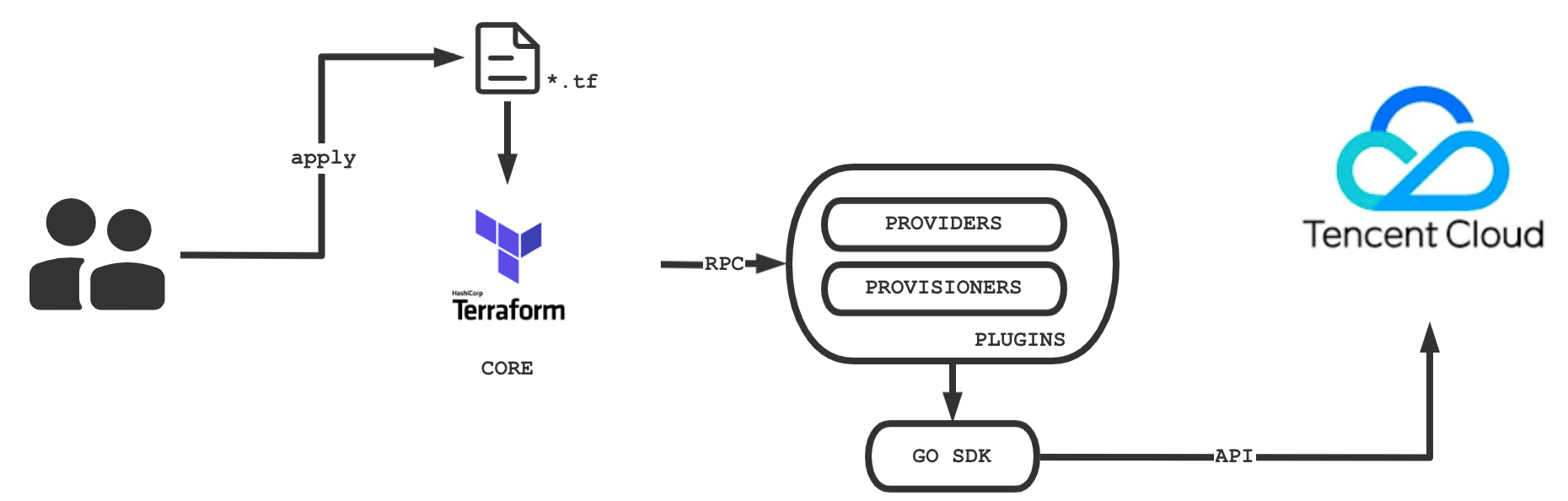
Terraform is an open-source resource orchestration tool written in Go and running on the client. It is highly scalable based on the HashiCorp Plugin architecture. Currently, Tencent Cloud implements the TencentCloud Provider based on Terraform plugin to manage Tencent Cloud resources through Terraform. The schematic diagram is as follows:

Based on tencentcloud-sdk-go, TencentCloud Provider offers more than 183 resources and 158 data sources across over 30 products, covering compute, storage, network, container service, load balancing, middleware, database, and cloud monitoring to meet your basic needs for cloudification.

Terraform Strengths

Multi-cloud orchestration

Terraform is suitable for multi-cloud solutions where you can deploy similar infrastructures in Tencent Cloud, other cloud providers, or local IDCs. You can manage resources from different cloud providers at the same time using the same tools and similar configuration files.

Infrastructure and code

You can use the high-level configuration syntax HCL to describe an infrastructure, so that it can be codified and versioned for sharing and reuse as shown in the following example:
# Create the `example.com` site with NS access
resource "tencentcloud_teo_zone" "zone" {
zone_name = "example.com"
# Query available plans by `zone_available_plans`
plan_type = "<your-plan-type>"
type = "full"
paused = false
cname_speed_up = "enabled"
}

# Create the DNS record of `example.com`
resource "tencentcloud_teo_dns_record" "dns_record" {
zone_id = tencentcloud_teo_zone.zone.id
type = "A"
name = "example.com"
# Enable the CDN acceleration service
mode = "proxied"
content = "<your-backend-ip>"
ttl = 60
}

Execution plan

Terraform has a "planning" step. It runs the terraform plan command to generate an execution plan, which shows the state of Terraform when apply is called. This allows you to avoid incidents when the infrastructure is manipulated on Terraform, as shown in the following example:
Terraform used the selected providers to generate the following execution plan. Resource actions are indicated with the following symbols:
+ create

Terraform will perform the following actions:

# tencentcloud_teo_dns_record.dns_record will be created
+ resource "tencentcloud_teo_dns_record" "dns_record" {
+ cname = (known after apply)
+ content = "<your-backend-ip>"
+ created_on = (known after apply)
+ domain_status = (known after apply)
+ id = (known after apply)
+ locked = (known after apply)
+ mode = "proxied"
+ modified_on = (known after apply)
+ name = "example.com"
+ priority = (known after apply)
+ type = "A"
+ status = (known after apply)
+ ttl = 60
+ zone_id = (known after apply)
}

# tencentcloud_teo_zone.zone will be created
+ resource "tencentcloud_teo_zone" "zone" {
+ area = (known after apply)
+ cname_speed_up = "enabled"
+ cname_status = (known after apply)
+ created_on = (known after apply)
+ id = (known after apply)
+ modified_on = (known after apply)
+ name = "example.com"
+ name_servers = (known after apply)
+ original_name_servers = (known after apply)
+ paused = false
+ plan_type = "sta"
+ status = (known after apply)
+ type = "full"
+ vanity_name_servers_ips = (known after apply)

+ vanity_name_servers {
+ servers = (known after apply)
+ switch = (known after apply)
}
}

Plan: 2 to add, 0 to change, 0 to destroy.

───────────────────────────────────────────────────────────────────────────────

Note: You didn't use the -out option to save this plan, so Terraform can't guarantee to take exactly these actions if you run "terraform apply" now.

Auto change

You can apply complex change sets to your infrastructure with minimal manual intervention. With the execution plan and resource topology mentioned above, you can get an accurate picture of Terraform dynamics and avoid possible human errors.

Remote State Management

Terraform introduces the concept of backend, a remote state storage mechanism. Currently, Tencent Cloud can manage your tfState files through COS to avoid storing files locally and causing file losses. In addition, remote storage makes it possible for multiple users to manage Terraform resources concurrently.
Help and Support

Was this page helpful?

Help us improve! Rate your documentation experience in 5 mins.

Feedback