tencent cloud

TDMQ for RocketMQ

Release Notes and Announcements
Release Notes
Announcements
Product Introduction
Introduction and Selection of the TDMQ Product Series
What Is TDMQ for RocketMQ
Strengths
Scenarios
Product Series
Comparison with Open-Source RocketMQ
High Availability
Quotas and Limits
Supported Regions
Basic Concepts
Billing
Billing Overview
Pricing
Billing Examples
Pay-as-you-go Switch to Monthly Subscription (5.x)
Renewal
Viewing Consumption Details
Refund
Overdue Payments
Getting Started
Getting Started Guide
Preparations
Step 1: Creating TDMQ for RocketMQ Resources
Step 2: Using the SDK to Send and Receive Messages (Recommended)
Step 2: Running the TDMQ for RocketMQ Client (Optional)
Step 3: Querying Messages
Step 4: Deleting Resources
User Guide
Usage Process Guide
Configuring Account Permissions
Creating the Cluster
Configuring the Namespace
Configuring the Topic
Configuring the Group
Connecting to the Cluster
Managing Messages
Managing the Cluster
Viewing Monitoring Data and Configuring Alarms
Cross-Cluster Message Replication
Use Cases
Naming Conventions for Common Concepts of TDMQ for RocketMQ
RocketMQ Client Use Cases
RocketMQ Performance Load Testing and Capacity Assessment
Access over HTTP
Client Risk Descriptions and Update Guide
Migration Guide for TencentCloud API Operations Related to RocketMQ 4.x Cluster Roles
Migration Guide
Disruptive Migration
Seamless Migration
Developer Guide
Message Types
Message Filtering
Message Retries
POP Consumption Mode (5.x)
Clustering Consumption and Broadcasting Consumption
Subscription Relationship Consistency
Traffic Throttling
​​API Reference(5.x)
History
API Category
Making API Requests
Topic APIs
Consumer Group APIs
Message APIs
Role Authentication APIs
Hitless Migration APIs
Cloud Migration APIs
Cluster APIs
Data Types
Error Codes
​​API Reference(4.x)
SDK Reference
SDK Overview
5.x SDK
4.x SDK
Security and Compliance
Permission Management
CloudAudit
Deletion Protection
FAQs
4.x Instance FAQs
Agreements
TDMQ for RocketMQ Service Level Agreement
Contact Us
DocumentationTDMQ for RocketMQUse CasesRocketMQ Performance Load Testing and Capacity Assessment

RocketMQ Performance Load Testing and Capacity Assessment

PDF
Focus Mode
Font Size
Last updated: 2026-01-23 17:36:45
Performance testing and capacity assessment are fundamental methods to ensure the overall stability of a system. However, conducting an effective load test is not straightforward. We recommend that you adopt the following load testing approach. Before starting, define the load testing objectives based on your business scenario. Then, determine the specific testing plan, including the testing object, scenario simulation, tool selection, and key metrics to monitor. Finally, analyze whether the test results meet your expectations and determine appropriate specifications for purchase.


Defining the Load Testing Objectives

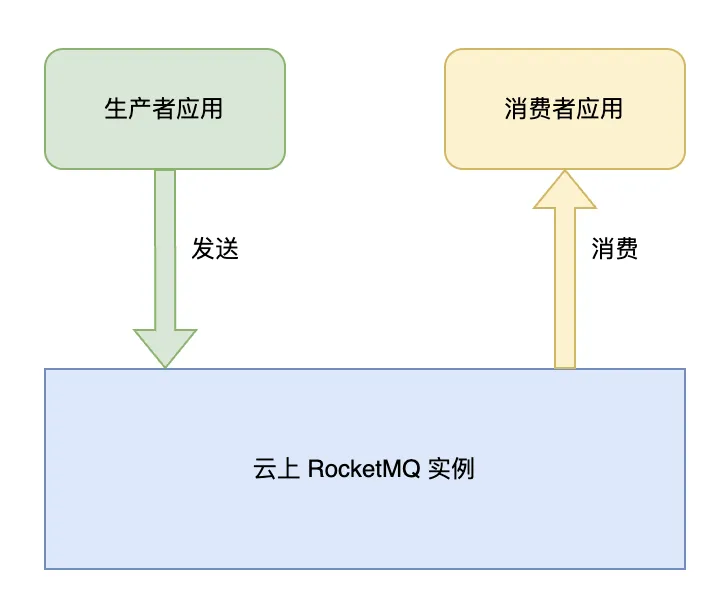
As shown in the figure above, for RocketMQ business scenarios, the load testing typically focuses on either message sending or message consumption.
If you perform load testing on message sending, the primary concerns are the sending rate, duration, success rate, and the application behavior when peak traffic throttling is triggered.
If you perform load testing on message consumption, the primary concerns are the consumption rate, duration, success rate, retry policy upon failure, and the business impact of message backlogs and delays.

Analyzing the Load Testing Object

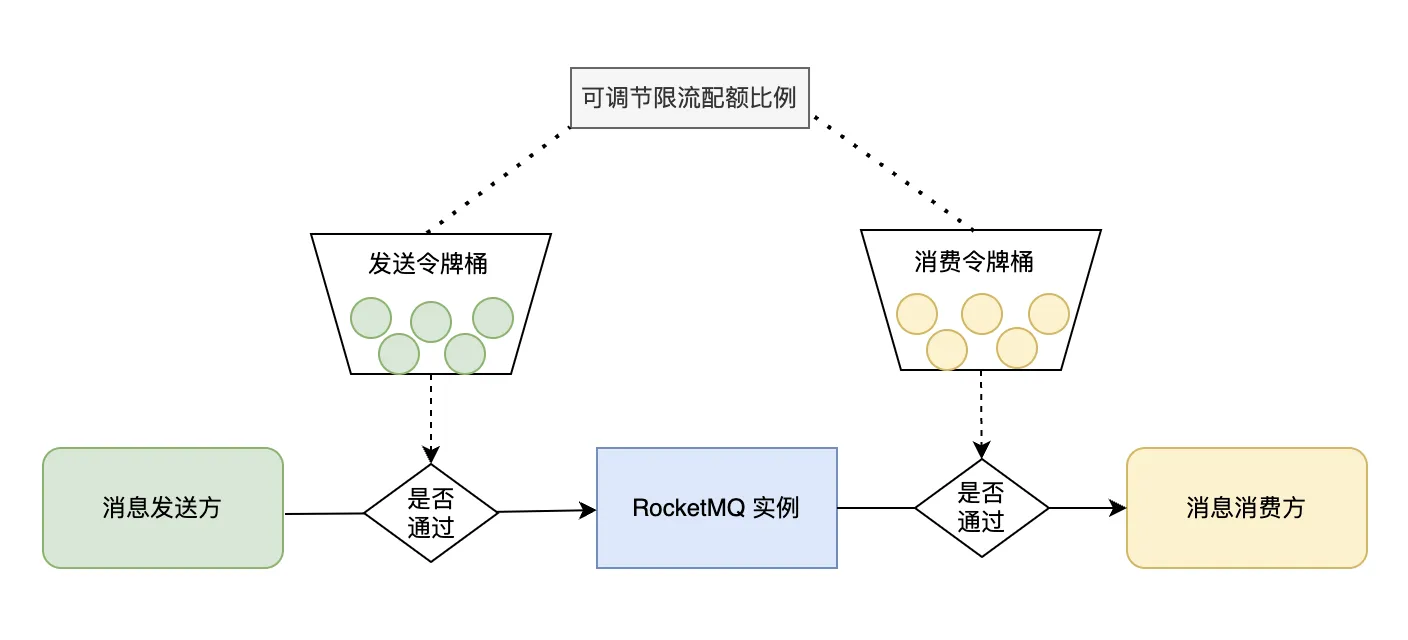
Testing message sending: The main testing object is the RocketMQ instance. Focus on the sending duration and success rate of the RocketMQ instance. Taking a RocketMQ 5.x instance as an example, distributed traffic throttling is enabled by default to prevent excessive traffic from overwhelming the cluster. Therefore, it is crucial to monitor the impact of traffic throttling on the business.
Testing message consumption: The main testing object is the downstream consumer application. Focus on the message consumption capability of the application. Key metrics include consumption processing duration, number of concurrent consumption threads, consumption timeouts, retries caused by exceptions, and whether a message backlog occurs.

Simulating the Load Testing Scenario

For message sending scenarios, there are typically two methods: The first method is to use the load testing script included with the open-source Apache RocketMQ code to generate test traffic. The second method is to simulate business traffic by using the producer application within business logic code for full-linkage load testing.
Generally, we recommend that you first use the built-in open-source script for a quick baseline test. This helps quickly obtain benchmark metrics for the RocketMQ instance, ensuring it meets basic performance standards. Then, based on the business model, simulate the business traffic for load testing with reasonable concurrency settings to ensure the final test results meet business requirements.
For message consumption scenarios, there are also typically two methods: The first method is to use the built-in load testing script of open-source Apache RocketMQ to subscribe to the test topic. Messages are acknowledged immediately upon receipt by default. This verifies that the consumption capacity provided by the RocketMQ instance is sufficient. The second method is to conduct full-linkage load testing, where the upstream message sender transmits messages in the format required by the consumer's business code. This ensures the consumer business logic is covered by the test, and can even propagate test traffic further downstream.

Analyzing Load Testing Metrics

Message sending metrics
Focus on the sending rate, sending duration, sending success rate, whether traffic throttling is triggered, and the business impact after throttling or the message retry policy.
Message consumption metrics
Focus on the consumption rate, business processing duration, consumption delay, consumption success rate, and the business impact of message backlogs and delays.

FAQs

1. How to Resolve the Issue of Low Sending Rate That Cannot Be Increased?

Two core factors determine the sending rate: sending duration and sending concurrency. For example, if the average sending duration is 5 milliseconds and the concurrency is 1, the sending rate is 200 transactions per second (TPS). Therefore, if the load testing target is not met, first verify the sending duration (for example, whether a public network is used, causing a long duration). If the duration is as expected, then investigate whether the concurrency is sufficient. Check whether the number of parallel execution threads on the sender side is adequate, whether the sender node's load is normal, or whether higher-level factors such as locks are affecting the performance.

2.How to Efficiently Simulate Load Testing Traffic Sent to Downstream Business Parties?

To achieve effective load testing, the test traffic should closely resemble real business traffic. Besides full-linkage load testing, traffic for downstream business can be efficiently generated by resetting the consumer offset to replay historical messages. This eliminates the need for the upstream business to repeatedly generate message sending traffic.

3.How to Analyze the Causes of Triggered Traffic Throttling?


Since RocketMQ 5.x instances have traffic throttling enabled by default, if traffic throttling is triggered by load testing, focus on analyzing the following causes:
1. Presence of micro-bursts: For example, if monitoring uses minute-level granularity, all traffic may concentrate within the first second. The token window of traffic throttling is updated every 10 seconds, potentially causing traffic throttling at the 10-second granularity even if minute-level metrics appear within limits.
2. Oversized message bodies: Traffic throttling is applied with a baseline of 4 KB per message. For example, a 100 KB message is calculated as 25 messages for traffic throttling. Therefore, the traffic throttling limit and the actual number of messages do not correspond directly.
3. Inappropriate adjustment of the throttling quota ratio: The ratio for sending and consumption throttling quotas is configurable. The default ratio is 5:5, and it can be adjusted to a maximum of 2:8 or 8:2. If traffic throttling is triggered, check whether the configured throttling quota ratio is reasonable.


Help and Support

Was this page helpful?

Help us improve! Rate your documentation experience in 5 mins.

Feedback